





davemoreton
Members
-
Joined
-
Last visited
Everything posted by davemoreton
-
Sometimes unraid just blows my mind away! all the apps are back with all the configurations. Thank you for all your help :)
-
Will they remember all the settings? I had some rather custom bits
-
Thanks JorgeB Here is the new diags, the rebuild hasn't finished yet. I think the docker image is dead though root@Jeeves:~# mkdir -p /mnt/docker-recovery root@Jeeves:~# btrfs restore -v /mnt/user/system/docker/docker.img /mnt/docker-recovery parent transid verify failed on 44892160 wanted 3065530 found 3065542 parent transid verify failed on 44892160 wanted 3065530 found 3065542 parent transid verify failed on 44892160 wanted 3065530 found 3065542 Ignoring transid failure ERROR: child eb corrupted: parent bytenr=30408704 item=0 parent level=1 child bytenr=44892160 child level=1 ERROR: search for next directory entry failed: -5 root@Jeeves:~# jeeves-diagnostics-20260627-1212.zip
-
Thanks for that, I have got a little further with this. I think the disk config file got a little messed up, I completely restored the USB boot drive to a few months ago. It's booted with all its drives, wanted to do a rebuild which its currently doing and all network shares are back online etc. The only problem I have at the moment is the docker service won't start :( I will wait for the rebuild to finish first, and then take a look. Thanks
-
Has anyone got any ideas? I tried a new config last night, which I know is dangerous with a failed drive. But I had a similar thing in the past, and that fixed it. Also the drive that failed is not very old, so I’m a little sceptical. After the new config, it now thinks drive 3 has failed and drive 1 is ok 🤷♂️ Still loads of drives in unassigned 😕
-
Sorry, please find attached the diags. I appreciated (disk1) drive defiantly looks to have failed, I just need some help on disk3 and 4 :) jeeves-diagnostics-20260626-1908.zip
-
Hi all, I'm hoping someone can point me in the right direction. I was upgrading the second NVMe slot in my server. I had a 256GB NVMe installed for a passthrough VM, which I removed and replaced with a 1TB drive. Since doing that, I've run into a strange issue. Unraid is now reporting one failed drive, and it's asking me to mount three drives. I believe these three drives are all connected to my PCIe SATA controller. My first thought was that the SATA controller had failed, so I replaced it with another one, but I'm seeing exactly the same behaviour. Has anyone come across anything like this before? Could changing the NVMe have altered the PCIe lane allocation or device ordering, causing the SATA controller drives to appear differently? Any ideas would be greatly appreciated. Thanks! jeeves-syslog-20260626-1758.zip
-
Hi, Hope everyone is doing well. Just changed my motherboard for a Gigabyte B760 DS3H DDR4, very similar to the previous board Gigabyte Z390 D. My PCIE PCE6SAT-A02 sata card is not even detected in the devices in the bios! I have no hard drives. I've kept all the bios settings the same, are my PCIE cards not compatable? Thanks Dave
-
Hi team, Is anyone else's virtual machine running slow suddenly? I use my VM for gaming and work, and for the last 2 weeks its all of a sudden tanked, not just for gaming but for things like just opening control panel and waiting for the icons to load! Thanks Dave
-
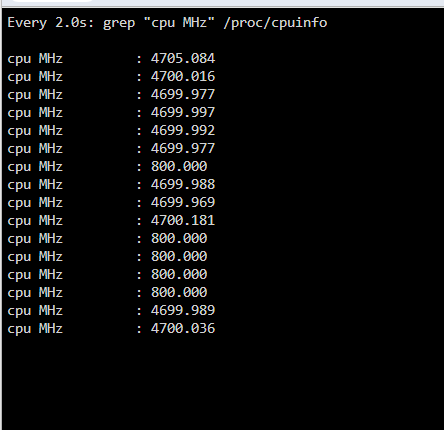
Hi, Might be a quick easy one? Is there a way to turn CPU performance mode on all the time? I have Tips and Tweaks installed and have it set to performance on normal scaling and power saving on CPU governor, I have no other options! And when I check my CPU, sometimes its power saving: Can it be forced not to? Thanks Dave
-
Hi, Strangely I just added pcie_aspm=off to the Syslinux and its been stable since. This seems fixed now. Thanks
-
I do seem to keep getting this now, I reboot and it still show up

-
Hi bmartino1, Here is the vfio-pci log: Loading config from /boot/config/vfio-pci.cfg BIND=0000:03:00.0|1002:7480 0000:03:00.1|1002:ab30 0000:05:00.0|1b21:2142 0000:0a:00.0|144d:a808--- Processing 0000:03:00.0 1002:7480 Vendor:Device 1002:7480 found at 0000:03:00.0 IOMMU group members (sans bridges): /sys/bus/pci/devices/0000:03:00.0/iommu_group/devices/0000:03:00.0 /sys/bus/pci/devices/0000:03:00.0/iommu_group/devices/0000:03:00.1 Binding... success... Device 1002:7480 at 0000:03:00.0 bound to vfio-pci --- Processing 0000:03:00.1 1002:ab30 Vendor:Device 1002:ab30 found at 0000:03:00.1 IOMMU group members (sans bridges): /sys/bus/pci/devices/0000:03:00.1/iommu_group/devices/0000:03:00.0 /sys/bus/pci/devices/0000:03:00.1/iommu_group/devices/0000:03:00.1 Binding... 0000:03:00.0 already bound to vfio-pci 0000:03:00.1 already bound to vfio-pci success... Device 1002:ab30 at 0000:03:00.1 bound to vfio-pci --- Processing 0000:05:00.0 1b21:2142 Vendor:Device 1b21:2142 found at 0000:05:00.0 IOMMU group members (sans bridges): /sys/bus/pci/devices/0000:05:00.0/iommu_group/devices/0000:05:00.0 Binding... Unbound 0000:05:00.0 from xhci_hcd success... Device 1b21:2142 at 0000:05:00.0 bound to vfio-pci --- Processing 0000:0a:00.0 144d:a808 Vendor:Device 144d:a808 found at 0000:0a:00.0 IOMMU group members (sans bridges): /sys/bus/pci/devices/0000:0a:00.0/iommu_group/devices/0000:0a:00.0 Binding... success... Device 144d:a808 at 0000:0a:00.0 bound to vfio-pci --- Devices listed in /sys/bus/pci/drivers/vfio-pci: lrwxrwxrwx 1 root root 0 Oct 23 05:12 0000:03:00.0 -> ../../../../devices/pci0000:00/0000:00:01.0/0000:01:00.0/0000:02:00.0/0000:03:00.0 lrwxrwxrwx 1 root root 0 Oct 23 05:12 0000:03:00.1 -> ../../../../devices/pci0000:00/0000:00:01.0/0000:01:00.0/0000:02:00.0/0000:03:00.1 lrwxrwxrwx 1 root root 0 Oct 23 05:12 0000:05:00.0 -> ../../../../devices/pci0000:00/0000:00:1b.3/0000:05:00.0 lrwxrwxrwx 1 root root 0 Oct 23 05:12 0000:0a:00.0 -> ../../../../devices/pci0000:00/0000:00:1d.0/0000:0a:00.0 vfio-pci binding complete Loading config from /boot/config/vfio-pci.cfg BIND=0000:03:00.0|1002:7480 0000:03:00.1|1002:ab30 0000:05:00.0|1b21:2142 0000:0a:00.0|144d:a808--- Processing 0000:03:00.0 1002:7480 Vendor:Device 1002:7480 found at 0000:03:00.0 IOMMU group members (sans bridges): /sys/bus/pci/devices/0000:03:00.0/iommu_group/devices/0000:03:00.0 /sys/bus/pci/devices/0000:03:00.0/iommu_group/devices/0000:03:00.1 Binding... success... Device 1002:7480 at 0000:03:00.0 bound to vfio-pci --- Processing 0000:03:00.1 1002:ab30 Vendor:Device 1002:ab30 found at 0000:03:00.1 IOMMU group members (sans bridges): /sys/bus/pci/devices/0000:03:00.1/iommu_group/devices/0000:03:00.0 /sys/bus/pci/devices/0000:03:00.1/iommu_group/devices/0000:03:00.1 Binding... 0000:03:00.0 already bound to vfio-pci 0000:03:00.1 already bound to vfio-pci success... Device 1002:ab30 at 0000:03:00.1 bound to vfio-pci --- Processing 0000:05:00.0 1b21:2142 Vendor:Device 1b21:2142 found at 0000:05:00.0 IOMMU group members (sans bridges): /sys/bus/pci/devices/0000:05:00.0/iommu_group/devices/0000:05:00.0 Binding... Unbound 0000:05:00.0 from xhci_hcd success... Device 1b21:2142 at 0000:05:00.0 bound to vfio-pci --- Processing 0000:0a:00.0 144d:a808 Vendor:Device 144d:a808 found at 0000:0a:00.0 IOMMU group members (sans bridges): /sys/bus/pci/devices/0000:0a:00.0/iommu_group/devices/0000:0a:00.0 Binding... success... Device 144d:a808 at 0000:0a:00.0 bound to vfio-pci --- Devices listed in /sys/bus/pci/drivers/vfio-pci: lrwxrwxrwx 1 root root 0 Oct 23 05:12 0000:03:00.0 -> ../../../../devices/pci0000:00/0000:00:01.0/0000:01:00.0/0000:02:00.0/0000:03:00.0 lrwxrwxrwx 1 root root 0 Oct 23 05:12 0000:03:00.1 -> ../../../../devices/pci0000:00/0000:00:01.0/0000:01:00.0/0000:02:00.0/0000:03:00.1 lrwxrwxrwx 1 root root 0 Oct 23 05:12 0000:05:00.0 -> ../../../../devices/pci0000:00/0000:00:1b.3/0000:05:00.0 lrwxrwxrwx 1 root root 0 Oct 23 05:12 0000:0a:00.0 -> ../../../../devices/pci0000:00/0000:00:1d.0/0000:0a:00.0 vfio-pci binding complete It's currently green and looks like this: Thanks Dave
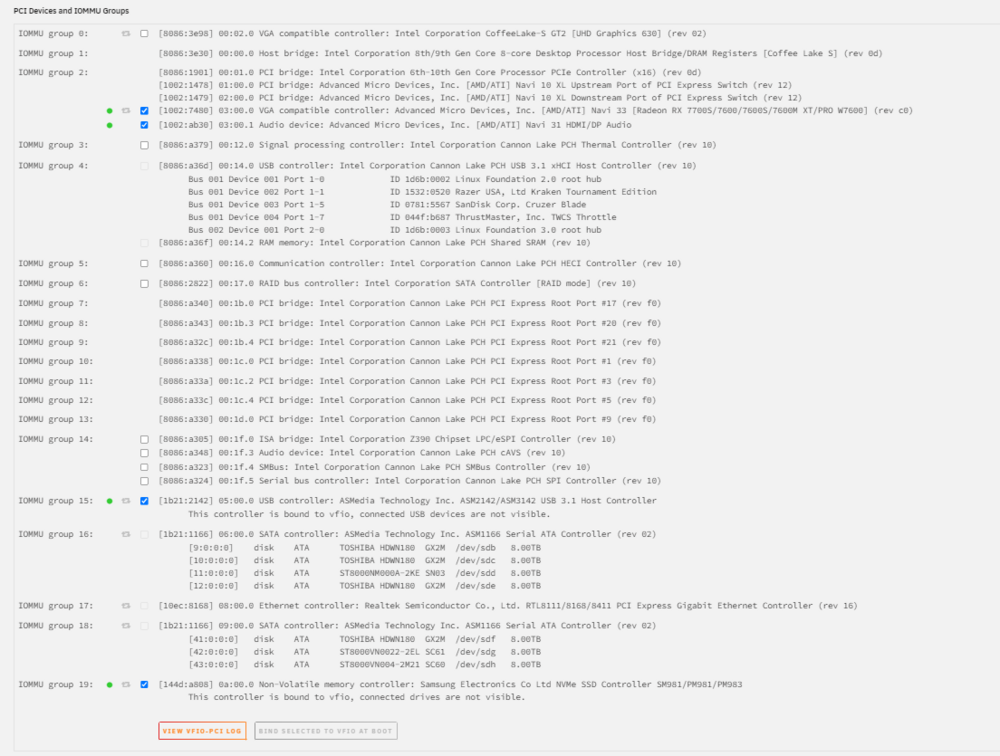
-
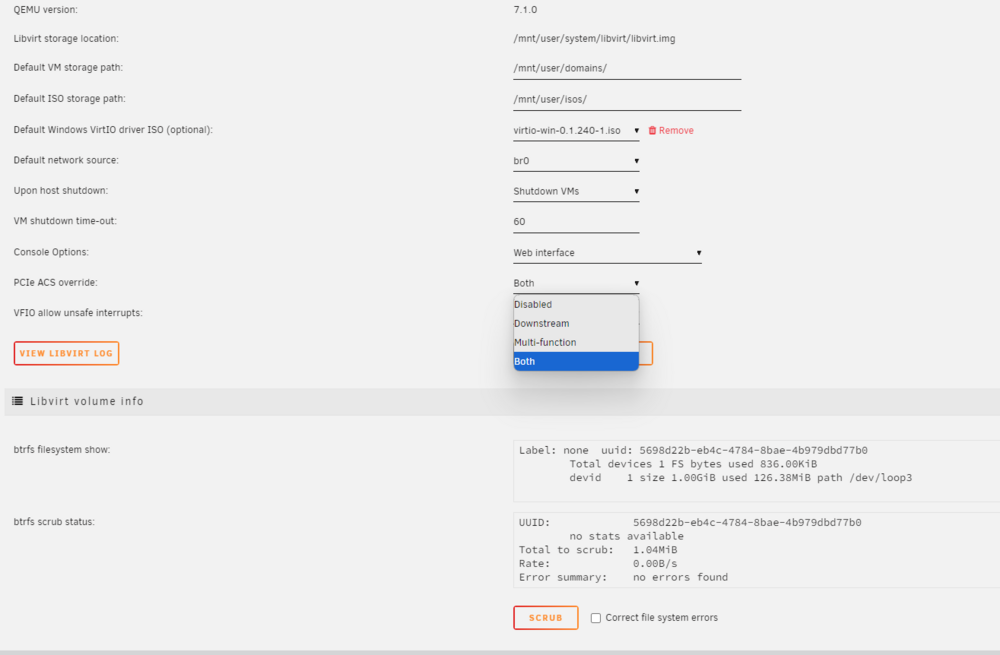
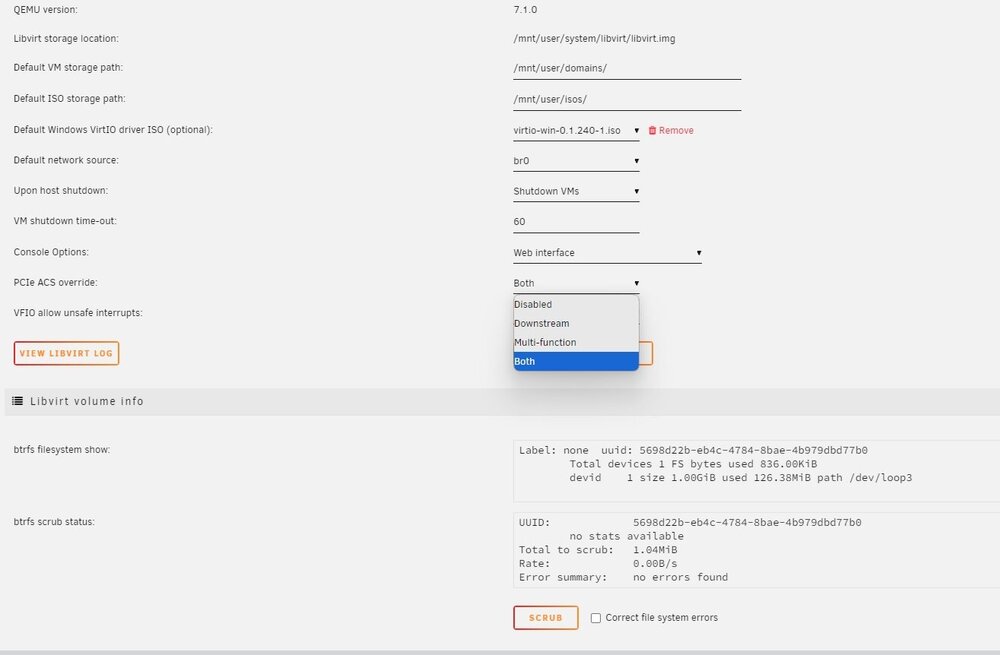
Hi bmartino1, Thanks for the info, much appreciated. So I checked everything and found all the settings was like your images and the NVME was right at the bottom of the list. Added the command to the syslinx and rebooted but nothing showed up in the VM settings. It looks loke this: default menu.c32 menu title Lime Technology, Inc. prompt 0 timeout 50 label Unraid OS menu default kernel /bzimage append pcie_acs_override=downstream,multifunction isolcpus=2-7,10-15 initrd=/bzroot label Unraid OS GUI Mode kernel /bzimage append pcie_acs_override=downstream,multifunction isolcpus=2-7,10-15 initrd=/bzroot,/bzroot-gui label Unraid OS Safe Mode (no plugins, no GUI) kernel /bzimage append initrd=/bzroot unraidsafemode label Unraid OS GUI Safe Mode (no plugins) kernel /bzimage append initrd=/bzroot,/bzroot-gui unraidsafemode label Memtest86+ kernel /memtest label Unraid OS (GPUs left alone) menu default kernel /bzimage append initrd=/bzroot earlymodules=vfio-pci video=efifb:off,vesafb:off isolcpus=2-7,10-15 gfxpayload=text nvme_core.default_ps_max_latency_us=5500 default_hugepagesz=1G hugepagesz=1G transparent_hugepage=always pci=noaer pcie_aspm=off pcie_acs_override=downstream,multifunction Thank You Dave
-
Hi, Really hoping someone can help. I have been running a stable server for a long time, and I was running a VM gaming machine on a NVME but not properly passed though. I decided tonight to pass it through and reinstall windows. It went ok, install went fine and installed all the drivers etc. Was just starting to download some games and then the wholes server crashed! Restarted it and done the same thing! so I've left the VM off for now. 20:15:22 Jeeves kernel: pcieport 0000:00:1b.3: AER: Corrected error received: 0000:05:00.0 Oct 22 20:15:22 Jeeves kernel: vfio-pci 0000:05:00.0: PCIe Bus Error: severity=Corrected, type=Physical Layer, (Receiver ID) Oct 22 20:15:22 Jeeves kernel: vfio-pci 0000:05:00.0: device [1b21:2142] error status/mask=00000001/00002000 Oct 22 20:15:22 Jeeves kernel: vfio-pci 0000:05:00.0: [ 0] RxErr Oct 22 20:15:22 Jeeves kernel: pcieport 0000:00:1b.3: AER: Corrected error received: 0000:05:00.0 I found this in the logs and I've attahced the diags, has anyone seen this? Many thanks Dave jeeves-diagnostics-20241022-2020.zip
-
Hi Guys, Not a massive issue but more annoying, I've created a VM and passed it though a GPU etc, all is working very well I have a HDMI KVM installed which my wife connects her laptop to for homeworking, problem is every time its switched, it disconnects the USB from the server and when its switched back it doesn't reconnect, I have to go into the VM settings, untick the keyboard and mouse and then tick them again to make it work. Is there away that it will just passthrough all connected USB devices instead of me just ticking them all the time 🤣 Thanks
-
Managed to resolve this, for anyone else having this issue I had to add this to the sys config: kernel /bzimage append initrd=/bzroot earlymodules=vfio-pci video=efifb:off,vesafb:off gfxpayload=text
-
Ok, small update on this, I’ve been going nuts with settings and created a windows 10 machine with the onboard intel UHD 630 in seabios and for a few times I managed to get the seabios screen come up!! It wouldn’t boot into windows but I did have a bios screen! I then restarted the unraid server and will it do it again, nope! 🤨 has anyone got any ideas?
-
Naa, still get no output on all screens
-
Really? crap no, it has a DVI port as well!
-
text error warn system array login 2023-10-14 16:36:32.378+0000: Starting external device: TPM Emulator /usr/bin/swtpm socket --ctrl 'type=unixio,path=/run/libvirt/qemu/swtpm/1-Dave PC-swtpm.sock,mode=0600' --tpmstate dir=/var/lib/libvirt/swtpm/b7c122d0-7512-11e8-4e15-06fd50f7f4df/tpm2,mode=0600 --log 'file=/var/log/swtpm/libvirt/qemu/Dave PC-swtpm.log' --terminate --tpm2 2023-10-14 16:36:32.402+0000: starting up libvirt version: 8.7.0, qemu version: 7.1.0, kernel: 6.1.49-Unraid, hostname: Jeeves LC_ALL=C \ PATH=/bin:/sbin:/usr/bin:/usr/sbin \ HOME='/var/lib/libvirt/qemu/domain-1-Dave PC' \ XDG_DATA_HOME='/var/lib/libvirt/qemu/domain-1-Dave PC/.local/share' \ XDG_CACHE_HOME='/var/lib/libvirt/qemu/domain-1-Dave PC/.cache' \ XDG_CONFIG_HOME='/var/lib/libvirt/qemu/domain-1-Dave PC/.config' \ /usr/local/sbin/qemu \ -name 'guest=Dave PC,debug-threads=on' \ -S \ -object '{"qom-type":"secret","id":"masterKey0","format":"raw","file":"/var/lib/libvirt/qemu/domain-1-Dave PC/master-key.aes"}' \ -blockdev '{"driver":"file","filename":"/usr/share/qemu/ovmf-x64/OVMF_CODE-pure-efi-tpm.fd","node-name":"libvirt-pflash0-storage","auto-read-only":true,"discard":"unmap"}' \ -blockdev '{"node-name":"libvirt-pflash0-format","read-only":true,"driver":"raw","file":"libvirt-pflash0-storage"}' \ -blockdev '{"driver":"file","filename":"/etc/libvirt/qemu/nvram/b7c122d0-7512-11e8-4e15-06fd50f7f4df_VARS-pure-efi-tpm.fd","node-name":"libvirt-pflash1-storage","auto-read-only":true,"discard":"unmap"}' \ -blockdev '{"node-name":"libvirt-pflash1-format","read-only":false,"driver":"raw","file":"libvirt-pflash1-storage"}' \ -machine pc-q35-7.1,usb=off,dump-guest-core=off,mem-merge=off,memory-backend=pc.ram,pflash0=libvirt-pflash0-format,pflash1=libvirt-pflash1-format \ -accel kvm \ -cpu host,migratable=on,hv-time=on,hv-relaxed=on,hv-vapic=on,hv-spinlocks=0x1fff,hv-vendor-id=none,host-cache-info=on,l3-cache=off \ -m 8192 \ -object '{"qom-type":"memory-backend-ram","id":"pc.ram","size":8589934592}' \ -overcommit mem-lock=off \ -smp 8,sockets=1,dies=1,cores=4,threads=2 \ -uuid b7c122d0-7512-11e8-4e15-06fd50f7f4df \ -display none \ -no-user-config \ -nodefaults \ -chardev socket,id=charmonitor,fd=36,server=on,wait=off \ -mon chardev=charmonitor,id=monitor,mode=control \ -rtc base=localtime \ -no-hpet \ -no-shutdown \ -boot strict=on \ -device '{"driver":"pcie-root-port","port":19,"chassis":4,"id":"pci.4","bus":"pcie.0","addr":"0x2.0x3"}' \ -device '{"driver":"pcie-root-port","port":11,"chassis":5,"id":"pci.5","bus":"pcie.0","addr":"0x1.0x3"}' \ -device '{"driver":"pcie-root-port","port":8,"chassis":1,"id":"pci.1","bus":"pcie.0","multifunction":true,"addr":"0x1"}' \ -device '{"driver":"pcie-root-port","port":9,"chassis":2,"id":"pci.2","bus":"pcie.0","addr":"0x1.0x1"}' \ -device '{"driver":"pcie-root-port","port":10,"chassis":3,"id":"pci.3","bus":"pcie.0","addr":"0x1.0x2"}' \ -device '{"driver":"ich9-usb-ehci1","id":"usb","bus":"pcie.0","addr":"0x7.0x7"}' \ -device '{"driver":"ich9-usb-uhci1","masterbus":"usb.0","firstport":0,"bus":"pcie.0","multifunction":true,"addr":"0x7"}' \ -device '{"driver":"ich9-usb-uhci2","masterbus":"usb.0","firstport":2,"bus":"pcie.0","addr":"0x7.0x1"}' \ -device '{"driver":"ich9-usb-uhci3","masterbus":"usb.0","firstport":4,"bus":"pcie.0","addr":"0x7.0x2"}' \ -device '{"driver":"virtio-serial-pci","id":"virtio-serial0","bus":"pci.2","addr":"0x0"}' \ -blockdev '{"driver":"file","filename":"/mnt/user/domains/Dave PC/vdisk1.img","node-name":"libvirt-3-storage","cache":{"direct":false,"no-flush":false},"auto-read-only":true,"discard":"unmap"}' \ -blockdev '{"node-name":"libvirt-3-format","read-only":false,"cache":{"direct":false,"no-flush":false},"driver":"raw","file":"libvirt-3-storage"}' \ -device '{"driver":"virtio-blk-pci","bus":"pci.3","addr":"0x0","drive":"libvirt-3-format","id":"virtio-disk2","bootindex":2,"write-cache":"on","serial":"vdisk1"}' \ -blockdev '{"driver":"file","filename":"/mnt/user/isos/Win11_22H2_EnglishInternational_x64v2.iso","node-name":"libvirt-2-storage","auto-read-only":true,"discard":"unmap"}' \ -blockdev '{"node-name":"libvirt-2-format","read-only":true,"driver":"raw","file":"libvirt-2-storage"}' \ -device '{"driver":"ide-cd","bus":"ide.0","drive":"libvirt-2-format","id":"sata0-0-0","bootindex":1}' \ -blockdev '{"driver":"file","filename":"/mnt/user/isos/virtio-win-0.1.240-1.iso","node-name":"libvirt-1-storage","auto-read-only":true,"discard":"unmap"}' \ -blockdev '{"node-name":"libvirt-1-format","read-only":true,"driver":"raw","file":"libvirt-1-storage"}' \ -device '{"driver":"ide-cd","bus":"ide.1","drive":"libvirt-1-format","id":"sata0-0-1"}' \ -netdev tap,fd=37,id=hostnet0 \ -device '{"driver":"virtio-net","netdev":"hostnet0","id":"net0","mac":"52:54:00:14:f7:db","bus":"pci.1","addr":"0x0"}' \ -chardev pty,id=charserial0 \ -device '{"driver":"isa-serial","chardev":"charserial0","id":"serial0","index":0}' \ -chardev socket,id=charchannel0,fd=35,server=on,wait=off \ -device '{"driver":"virtserialport","bus":"virtio-serial0.0","nr":1,"chardev":"charchannel0","id":"channel0","name":"org.qemu.guest_agent.0"}' \ -chardev 'socket,id=chrtpm,path=/run/libvirt/qemu/swtpm/1-Dave PC-swtpm.sock' \ -tpmdev emulator,id=tpm-tpm0,chardev=chrtpm \ -device '{"driver":"tpm-tis","tpmdev":"tpm-tpm0","id":"tpm0"}' \ -device '{"driver":"usb-tablet","id":"input0","bus":"usb.0","port":"1"}' \ -audiodev '{"id":"audio1","driver":"none"}' \ -device '{"driver":"vfio-pci","host":"0000:01:00.0","id":"hostdev0","bus":"pci.4","addr":"0x0"}' \ -device '{"driver":"vfio-pci","host":"0000:01:00.1","id":"hostdev1","bus":"pci.5","addr":"0x0"}' \ -device '{"driver":"usb-host","hostdevice":"/dev/bus/usb/001/004","id":"hostdev2","bus":"usb.0","port":"2"}' \ -device '{"driver":"usb-host","hostdevice":"/dev/bus/usb/001/003","id":"hostdev3","bus":"usb.0","port":"3"}' \ -sandbox on,obsolete=deny,elevateprivileges=deny,spawn=deny,resourcecontrol=deny \ -msg timestamp=on char device redirected to /dev/pts/0 (label charserial0) 2023-10-14T16:36:42.654479Z qemu-system-x86_64: libusb_release_interface: -4 [NO_DEVICE] 2023-10-14T16:36:42.654534Z qemu-system-x86_64: libusb_release_interface: -4 [NO_DEVICE]
-
Hi Guys, Can anyone help me, i'm struggling a little with trying to setup a VM that will passthrough to my main monitor. VM has been created, I have tried 2 video cards, one 6450 and a GTX 960. So far i've had absolutely nothing out the display! I've used the techpowerup sight for a bios, binded the IOMMU's, am I missing something? Thanks Dave
-
Thank you jeeves-diagnostics-20230919-1213.zip
-
Hi Guys, Wonder if anyone could help. I was getting loads of hard drive smart errors on one particular drive and a couple on another. So the one that had 17000 smart errors! I've replaced with a brand new drive and i'm now getting smart errors again. But there only maybe 2 a day. Do I have a faulty drive or could my storage card be faulty, the other drive has around 2 a day as well. Thanks
-
Hi guys, Am I being really stupid here! I'm trying to change the ddns name in the VPN manager, delete the tunnel and peers etc. Everytime I create the new one it reverts back to the old name! Do I need to factory reset it or something? Thanks Dave



