





citizengray
Members
-
Joined
-
Last visited
Everything posted by citizengray
-
Thx !
-
Ok never mind, somehow my array didn't stop properly. Nothing that I reboot didn't fix. Here is the new diagnosis.unraid-diagnostics-20250314-1328.zip
-
Sorry... I feel stupid, but I can't find a way to change the setting ? I tried disabling the array, but that setting is always grayed out
-
Here you go
-
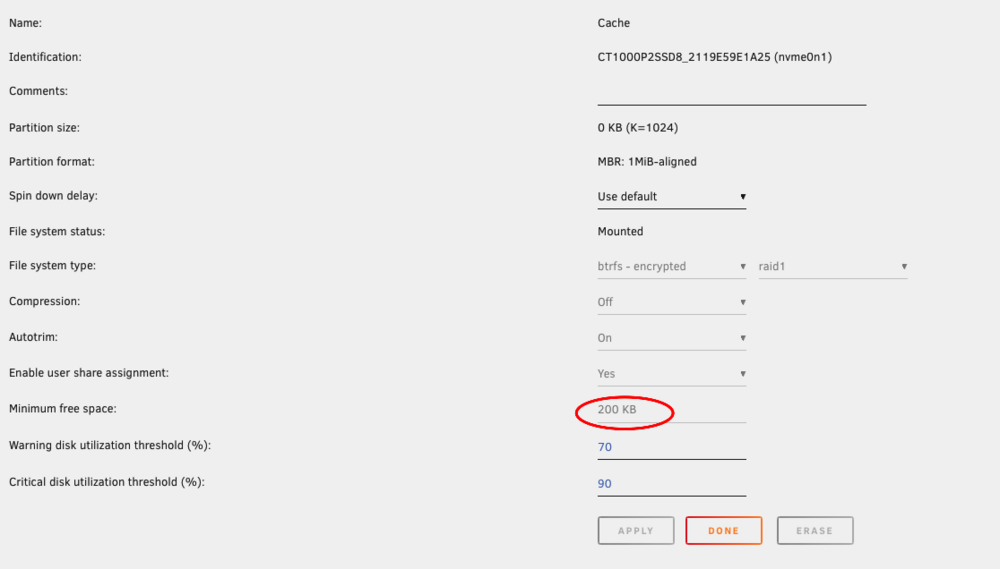
Ohh I found the setting - my bad. But it's set a 200KB not 200GB ? So it shouldn't be that ?
-
Thx ! That was fast ! However I don't see this setting by clicking on any drives ? What would that setting be so high !? Does it affect the entire disk pool, or just the cache pool ?
-
I have been looking at this for hours, and I can't find anything My appdata is on the cache drive. - Cache drive has 198GB free. - Appdata has Minimum free space set to 0 - Docker Image is 20GB and only 2.74GiB used I can't figure out what is happening Help. unraid-diagnostics-20250314-1116.zip
-
Well ! A very big thank you for giving me all the details about Jumbo frame... I guess I am that old that "back in my days" we would always aim to enable jumbo frames to get the max speed out of the ethernet transfers... but since I haven't dabbled in networking stuff for a long while - this is my first run with 10Gbps - it does feel kinda useless now ! I'll leave it off then Problem solved ! Thx
-
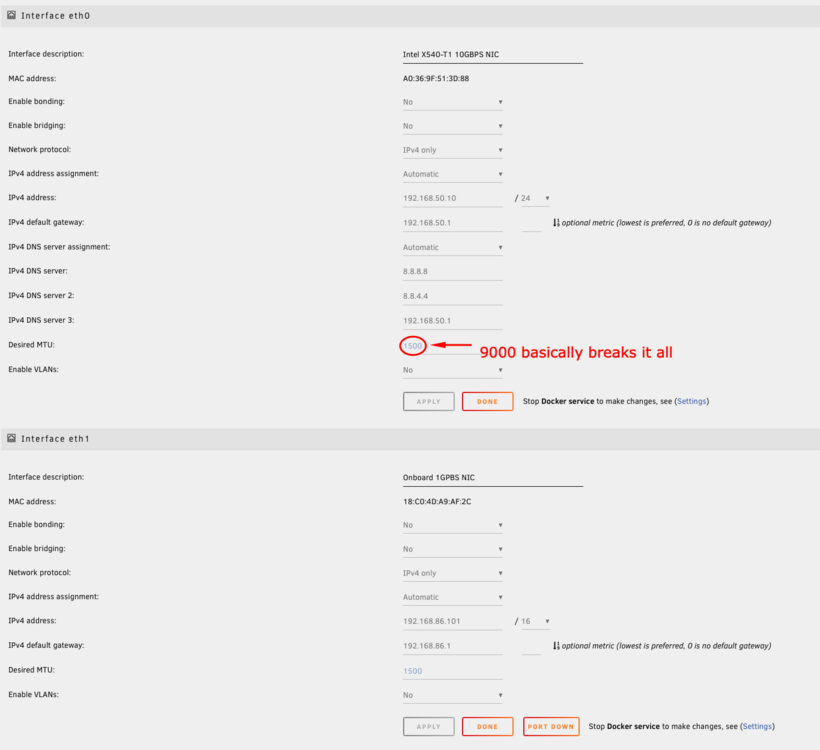
I have 2 NIC, the Intel mentioned in the title and some onboard 1 Gbps NIC. The onboard was configured with 1500 MTU and the Intel with 9000 MTU. They are both connected to different networks, and for the life of me I could never figure out why I could never access unraid's admin page (or ssh for that matter) through the Intel sub-network. Until I played enough with it that I realized that when I lowered the MTU to the defaults 1500 it suddenly started working !?! So I removed all my Jumbo frames configuration on my network - I do get slightly less performance (~8k Gbps vs ~9.5 Gbps) but now I can access unraid from the right network (the other sub-network on the 1 Gbps onboard NIC was meant to be a temporary transition). I find this so weird and could not find any online content about it... anyone else noticed this ?
-
it should be eth0 I assume ?
-
SubnetL 192.168.86.0/16 Gateway: 192.168.86.1 DHCP pool: not set
-
What seems to me the most interesting lead so far (from reddit): This is the last 100 lines of the log (indeed it looks fishy, `subnet 172.17.0.1` !?!) root@unraid:~# tail -n 100 -f /var/log/syslog Dec 27 10:46:53 unraid nmbd[19858]: [2021/12/27 10:46:53.500183, 0] ../../lib/util/become_daemon.c:135(daemon_ready) Dec 27 10:46:53 unraid nmbd[19858]: daemon_ready: daemon 'nmbd' finished starting up and ready to serve connections Dec 27 10:46:53 unraid root: /usr/sbin/winbindd -D Dec 27 10:46:53 unraid winbindd[19868]: [2021/12/27 10:46:53.531777, 0] ../../source3/winbindd/winbindd_cache.c:3203(initialize_winbindd_cache) Dec 27 10:46:53 unraid winbindd[19868]: initialize_winbindd_cache: clearing cache and re-creating with version number 2 Dec 27 10:46:53 unraid winbindd[19868]: [2021/12/27 10:46:53.532694, 0] ../../lib/util/become_daemon.c:135(daemon_ready) Dec 27 10:46:53 unraid winbindd[19868]: daemon_ready: daemon 'winbindd' finished starting up and ready to serve connections Dec 27 10:46:53 unraid emhttpd: shcmd (317): /usr/local/sbin/mount_image '/mnt/cache/system/docker/docker.img' /var/lib/docker 20 Dec 27 10:46:54 unraid kernel: BTRFS: device fsid 84ac4ceb-da34-4f58-9fbd-0384a4bcc3e1 devid 1 transid 870852 /dev/loop2 scanned by udevd (19910) Dec 27 10:46:54 unraid kernel: BTRFS info (device loop2): using free space tree Dec 27 10:46:54 unraid kernel: BTRFS info (device loop2): has skinny extents Dec 27 10:46:54 unraid kernel: BTRFS info (device loop2): enabling ssd optimizations Dec 27 10:46:54 unraid root: Resize '/var/lib/docker' of 'max' Dec 27 10:46:54 unraid emhttpd: shcmd (319): /etc/rc.d/rc.docker start Dec 27 10:46:54 unraid root: starting dockerd ... Dec 27 10:46:54 unraid kernel: Bridge firewalling registered Dec 27 10:46:54 unraid avahi-daemon[10826]: Joining mDNS multicast group on interface docker0.IPv4 with address 172.17.0.1. Dec 27 10:46:54 unraid avahi-daemon[10826]: New relevant interface docker0.IPv4 for mDNS. Dec 27 10:46:54 unraid avahi-daemon[10826]: Registering new address record for 172.17.0.1 on docker0.IPv4. Dec 27 10:46:55 unraid rc.docker: b5c6b4129a563eb7bf3332aa3e18941c085aa843ab017ec3824ed89718f83201 Dec 27 10:46:55 unraid kernel: docker0: port 1(vethcd43b4d) entered blocking state Dec 27 10:46:55 unraid kernel: docker0: port 1(vethcd43b4d) entered disabled state Dec 27 10:46:55 unraid kernel: device vethcd43b4d entered promiscuous mode Dec 27 10:46:55 unraid kernel: docker0: port 1(vethcd43b4d) entered blocking state Dec 27 10:46:55 unraid kernel: docker0: port 1(vethcd43b4d) entered forwarding state Dec 27 10:46:55 unraid kernel: docker0: port 1(vethcd43b4d) entered disabled state Dec 27 10:46:55 unraid kernel: cgroup: cgroup: disabling cgroup2 socket matching due to net_prio or net_cls activation Dec 27 10:46:55 unraid kernel: eth0: renamed from veth0a9be5a Dec 27 10:46:55 unraid kernel: IPv6: ADDRCONF(NETDEV_CHANGE): vethcd43b4d: link becomes ready Dec 27 10:46:55 unraid kernel: docker0: port 1(vethcd43b4d) entered blocking state Dec 27 10:46:55 unraid kernel: docker0: port 1(vethcd43b4d) entered forwarding state Dec 27 10:46:55 unraid kernel: IPv6: ADDRCONF(NETDEV_CHANGE): docker0: link becomes ready Dec 27 10:46:55 unraid rc.docker: NoIp: started succesfully! Dec 27 10:46:56 unraid rc.docker: Plex-Media-Server: started succesfully! Dec 27 10:46:56 unraid kernel: docker0: port 2(vethce8951e) entered blocking state Dec 27 10:46:56 unraid kernel: docker0: port 2(vethce8951e) entered disabled state Dec 27 10:46:56 unraid kernel: device vethce8951e entered promiscuous mode Dec 27 10:46:56 unraid kernel: docker0: port 2(vethce8951e) entered blocking state Dec 27 10:46:56 unraid kernel: docker0: port 2(vethce8951e) entered forwarding state Dec 27 10:46:56 unraid kernel: docker0: port 2(vethce8951e) entered disabled state Dec 27 10:46:56 unraid kernel: eth0: renamed from veth8bed2e9 Dec 27 10:46:56 unraid kernel: IPv6: ADDRCONF(NETDEV_CHANGE): vethce8951e: link becomes ready Dec 27 10:46:56 unraid kernel: docker0: port 2(vethce8951e) entered blocking state Dec 27 10:46:56 unraid kernel: docker0: port 2(vethce8951e) entered forwarding state Dec 27 10:46:56 unraid rc.docker: radarr: started succesfully! Dec 27 10:46:56 unraid kernel: docker0: port 3(veth081108c) entered blocking state Dec 27 10:46:56 unraid kernel: docker0: port 3(veth081108c) entered disabled state Dec 27 10:46:56 unraid kernel: device veth081108c entered promiscuous mode Dec 27 10:46:56 unraid kernel: docker0: port 3(veth081108c) entered blocking state Dec 27 10:46:56 unraid kernel: docker0: port 3(veth081108c) entered forwarding state Dec 27 10:46:57 unraid kernel: eth0: renamed from veth02a7ef7 Dec 27 10:46:57 unraid kernel: IPv6: ADDRCONF(NETDEV_CHANGE): veth081108c: link becomes ready Dec 27 10:46:57 unraid rc.docker: sabnzbd: started succesfully! Dec 27 10:46:57 unraid avahi-daemon[10826]: Joining mDNS multicast group on interface docker0.IPv6 with address fe80::42:6dff:fe87:800. Dec 27 10:46:57 unraid avahi-daemon[10826]: New relevant interface docker0.IPv6 for mDNS. Dec 27 10:46:57 unraid avahi-daemon[10826]: Registering new address record for fe80::42:6dff:fe87:800 on docker0.*. Dec 27 10:46:57 unraid kernel: docker0: port 4(veth1d5370d) entered blocking state Dec 27 10:46:57 unraid kernel: docker0: port 4(veth1d5370d) entered disabled state Dec 27 10:46:57 unraid kernel: device veth1d5370d entered promiscuous mode Dec 27 10:46:57 unraid kernel: docker0: port 4(veth1d5370d) entered blocking state Dec 27 10:46:57 unraid kernel: docker0: port 4(veth1d5370d) entered forwarding state Dec 27 10:46:57 unraid kernel: eth0: renamed from vethc371dd8 Dec 27 10:46:57 unraid kernel: IPv6: ADDRCONF(NETDEV_CHANGE): veth1d5370d: link becomes ready Dec 27 10:46:57 unraid avahi-daemon[10826]: Joining mDNS multicast group on interface vethcd43b4d.IPv6 with address fe80::34d8:e2ff:fe21:f642. Dec 27 10:46:57 unraid avahi-daemon[10826]: New relevant interface vethcd43b4d.IPv6 for mDNS. Dec 27 10:46:57 unraid avahi-daemon[10826]: Registering new address record for fe80::34d8:e2ff:fe21:f642 on vethcd43b4d.*. Dec 27 10:46:57 unraid rc.docker: sonarr: started succesfully! Dec 27 10:46:58 unraid avahi-daemon[10826]: Joining mDNS multicast group on interface veth081108c.IPv6 with address fe80::4825:35ff:fef0:968. Dec 27 10:46:58 unraid avahi-daemon[10826]: New relevant interface veth081108c.IPv6 for mDNS. Dec 27 10:46:58 unraid avahi-daemon[10826]: Registering new address record for fe80::4825:35ff:fef0:968 on veth081108c.*. Dec 27 10:46:58 unraid avahi-daemon[10826]: Joining mDNS multicast group on interface veth1d5370d.IPv6 with address fe80::cc68:61ff:fef9:d3cd. Dec 27 10:46:58 unraid avahi-daemon[10826]: New relevant interface veth1d5370d.IPv6 for mDNS. Dec 27 10:46:58 unraid avahi-daemon[10826]: Registering new address record for fe80::cc68:61ff:fef9:d3cd on veth1d5370d.*. Dec 27 10:46:58 unraid avahi-daemon[10826]: Joining mDNS multicast group on interface vethce8951e.IPv6 with address fe80::e050:5fff:fee0:8df8. Dec 27 10:46:58 unraid avahi-daemon[10826]: New relevant interface vethce8951e.IPv6 for mDNS. Dec 27 10:46:58 unraid avahi-daemon[10826]: Registering new address record for fe80::e050:5fff:fee0:8df8 on vethce8951e.*. Dec 27 10:46:59 unraid kernel: process '7b37335f9343e2628ef6b509290440ad894ddac97530c6a23ecbac032c5f7bc0/usr/bin/par2' started with executable stack Dec 27 10:47:16 unraid nmbd[19858]: [2021/12/27 10:47:16.523353, 0] ../../source3/nmbd/nmbd_become_lmb.c:397(become_local_master_stage2) Dec 27 10:47:16 unraid nmbd[19858]: ***** Dec 27 10:47:16 unraid nmbd[19858]: Dec 27 10:47:16 unraid nmbd[19858]: Samba name server UNRAID is now a local master browser for workgroup WORKGROUP on subnet 192.168.86.100 Dec 27 10:47:16 unraid nmbd[19858]: Dec 27 10:47:16 unraid nmbd[19858]: ***** Dec 27 10:47:54 unraid ntpd[1918]: kernel reports TIME_ERROR: 0x41: Clock Unsynchronized Dec 27 10:47:56 unraid ntpd[1918]: frequency error 7077 PPM exceeds tolerance 500 PPM Dec 27 10:50:20 unraid avahi-dnsconfd[10836]: DNS Server 169.254.172.251 removed (interface: 8.IPv4) Dec 27 10:50:20 unraid avahi-dnsconfd[10836]: Script returned with non-zero exit code 1 Dec 27 10:50:34 unraid avahi-dnsconfd[10836]: New DNS Server 192.168.86.249 (interface: 8.IPv4) Dec 27 10:50:34 unraid avahi-dnsconfd[10836]: Script returned with non-zero exit code 1 Dec 27 10:52:35 unraid nmbd[19858]: [2021/12/27 10:52:35.751351, 0] ../../source3/nmbd/nmbd_become_lmb.c:397(become_local_master_stage2) Dec 27 10:52:35 unraid nmbd[19858]: ***** Dec 27 10:52:35 unraid nmbd[19858]: Dec 27 10:52:35 unraid nmbd[19858]: Samba name server UNRAID is now a local master browser for workgroup WORKGROUP on subnet 172.17.0.1 Dec 27 10:52:35 unraid nmbd[19858]: Dec 27 10:52:35 unraid nmbd[19858]: ***** Dec 27 10:56:04 unraid root: Fix Common Problems Version 2021.08.05 Dec 27 10:56:04 unraid root: Fix Common Problems: Error: Unable to communicate with GitHub.com Dec 27 10:56:05 unraid root: Fix Common Problems: Other Warning: Could not check for blacklisted plugins Dec 27 10:56:13 unraid root: Fix Common Problems: Other Warning: Could not perform docker application port tests Dec 27 10:57:21 unraid root: Fix Common Problems Version 2021.08.05
-
Opened up a thread on reddit: My router setup is completely vanilla (Google Wifi - very straight up conf). Finding so far in the reddit thread, is that it is a DNS resolution issue. Upon reboot my /etc/resolv.conf file is empty... and I have to assume that somehow it fills itself up with the proper DNS nameserver after ~24h which is why it start working again. But as I have just identified this, I cannot confirm yet. But manually entering a nameserver in there just fixes the issue right away. Feels more like a bug rather than a outside network issue to me...
-
Just for the test, I restarted the docker for Plex, and it took lost access to the internet...
-
While we are talking about SAB, I have another issue. The working folder __ADMIN__ has a different set of permission than the other files in the incomplete folder (700 vs 744) and it seems that SAB cannot delete that folder and therefore leaves a a whole bunch of folder being after failed jobs... any ideas ?
-
Another piece to the puzzle... I needed to restart the Docker for SABnzbd (privilege thingy, anyways). Doing that made SABnzbd loose access to the internet... while the the rest of unraid still has access....
-
Ah... the port did it... weird... went from 443 to 5543 why !? I know get ~75MB/S peak. Thx for the tip.
-
I have fairly recently setup a new unraid machine. I have installed SABnzbd with CA following the commonly available tutorials. I am very concerned with the performance of SABNzb downloading speed. I get about ~25MB in peak performance, but most of the time I get ~6-7MB. Of course you might think it's my broadband that is limiting... but I have 1gbs. And I run tests from my macbook using Binreader, form the same Newsgroups servers and I get consistently ~60-80MB/s there. The specs of my unraid machine should be largely enough: - AMD Ryzen 5 5600G - Raid 1 Cache drive (where all the docker images run and download to) nvme 1tb x 2 - 10GBs NIC card - Cat7 cabled (sustained local transfers speed are ~120MB/s) I have also looked into configuring SABnzbd optimally, like lowering the SSL Cypher etc. But nothing seems to work. How do I go about debugging this ?
-
any ideas ?
-
It's now been exactly 23h24m since the last reboot (to disable the onboard NIC) and unraid "magically" found internet again: root@unraid:~# ping www.google.com PING www.google.com (142.250.72.4) 56(84) bytes of data. 64 bytes from den08s06-in-f4.1e100.net (142.250.72.4): icmp_seq=1 ttl=115 time=9.13 ms 64 bytes from den08s06-in-f4.1e100.net (142.250.72.4): icmp_seq=2 ttl=115 time=9.38 ms 64 bytes from den08s06-in-f4.1e100.net (142.250.72.4): icmp_seq=3 ttl=115 time=9.14 ms 64 bytes from den08s06-in-f4.1e100.net (142.250.72.4): icmp_seq=4 ttl=115 time=9.02 ms Another dump of network config: docker0: flags=4163<UP,BROADCAST,RUNNING,MULTICAST> mtu 1500 inet 172.17.0.1 netmask 255.255.0.0 broadcast 172.17.255.255 inet6 fe80::42:2eff:fe88:9cc2 prefixlen 64 scopeid 0x20<link> ether xx:xx:xx:xx:xx:xx txqueuelen 0 (Ethernet) RX packets 230419 bytes 1107350686 (1.0 GiB) RX errors 0 dropped 0 overruns 0 frame 0 TX packets 512744 bytes 68734504 (65.5 MiB) TX errors 0 dropped 0 overruns 0 carrier 0 collisions 0 eth0: flags=4163<UP,BROADCAST,RUNNING,MULTICAST> mtu 1500 inet 192.168.86.100 netmask 255.255.0.0 broadcast 192.168.255.255 ether xx:xx:xx:xx:xx:xx txqueuelen 1000 (Ethernet) RX packets 2270477 bytes 358472337 (341.8 MiB) RX errors 0 dropped 0 overruns 0 frame 0 TX packets 8487047 bytes 11988842958 (11.1 GiB) TX errors 0 dropped 0 overruns 0 carrier 0 collisions 0 lo: flags=73<UP,LOOPBACK,RUNNING> mtu 65536 inet 127.0.0.1 netmask 255.0.0.0 inet6 ::1 prefixlen 128 scopeid 0x10<host> loop txqueuelen 1000 (Local Loopback) RX packets 448959 bytes 62560084 (59.6 MiB) RX errors 0 dropped 0 overruns 0 frame 0 TX packets 448959 bytes 62560084 (59.6 MiB) TX errors 0 dropped 0 overruns 0 carrier 0 collisions 0 vethb193387: flags=4163<UP,BROADCAST,RUNNING,MULTICAST> mtu 1500 inet6 fe80::28be:e6ff:fe53:e90 prefixlen 64 scopeid 0x20<link> ether xx:xx:xx:xx:xx:xx txqueuelen 0 (Ethernet) RX packets 112906 bytes 1087653489 (1.0 GiB) RX errors 0 dropped 0 overruns 0 frame 0 TX packets 414674 bytes 39595502 (37.7 MiB) TX errors 0 dropped 0 overruns 0 carrier 0 collisions 0 vethb519ed7: flags=4163<UP,BROADCAST,RUNNING,MULTICAST> mtu 1500 inet6 fe80::6c41:a8ff:fed2:689f prefixlen 64 scopeid 0x20<link> ether xx:xx:xx:xx:xx:xx txqueuelen 0 (Ethernet) RX packets 141 bytes 9400 (9.1 KiB) RX errors 0 dropped 0 overruns 0 frame 0 TX packets 6129 bytes 2033645 (1.9 MiB) TX errors 0 dropped 0 overruns 0 carrier 0 collisions 0 vethc516d50: flags=4163<UP,BROADCAST,RUNNING,MULTICAST> mtu 1500 inet6 fe80::40fa:7cff:fe3b:e6d4 prefixlen 64 scopeid 0x20<link> ether xx:xx:xx:xx:xx:xx txqueuelen 0 (Ethernet) RX packets 32220 bytes 6887566 (6.5 MiB) RX errors 0 dropped 0 overruns 0 frame 0 TX packets 38587 bytes 7564720 (7.2 MiB) TX errors 0 dropped 0 overruns 0 carrier 0 collisions 0 vethcf94af7: flags=4163<UP,BROADCAST,RUNNING,MULTICAST> mtu 1500 inet6 fe80::b0d0:56ff:fe19:8cd8 prefixlen 64 scopeid 0x20<link> ether xx:xx:xx:xx:xx:xx txqueuelen 0 (Ethernet) RX packets 85152 bytes 16026097 (15.2 MiB) RX errors 0 dropped 0 overruns 0 frame 0 TX packets 71659 bytes 25641976 (24.4 MiB) TX errors 0 dropped 0 overruns 0 carrier 0 collisions 0 virbr0: flags=4099<UP,BROADCAST,MULTICAST> mtu 1500 inet 192.168.122.1 netmask 255.255.255.0 broadcast 192.168.122.255 ether xx:xx:xx:xx:xx:xx txqueuelen 1000 (Ethernet) RX packets 0 bytes 0 (0.0 B) RX errors 0 dropped 0 overruns 0 frame 0 TX packets 0 bytes 0 (0.0 B) TX errors 0 dropped 0 overruns 0 carrier 0 collisions 0 I don't see anything different... this is so puzzling...
-
My apologies. Here you go. unraid-diagnostics-20211218-1747.zip
-
Ok, I have followed your recommendation and disabled the onboard NIC from the motherboard via Bios. As I anticipated this has changed nothing. Same situation, after a reboot I still get no connection to the web from unraid... root@unraid:~# ping www.google.com ping: www.google.com: Name or service not known I really don't know what to do at this point Current state of the network configuration after reboot (masked mac addresses): root@unraid:~# ifconfig docker0: flags=4163<UP,BROADCAST,RUNNING,MULTICAST> mtu 1500 inet 172.17.0.1 netmask 255.255.0.0 broadcast 172.17.255.255 inet6 fe80::42:2eff:fe88:9cc2 prefixlen 64 scopeid 0x20<link> ether xx:xx:xx:xx:xx:xx txqueuelen 0 (Ethernet) RX packets 1532 bytes 4223307 (4.0 MiB) RX errors 0 dropped 0 overruns 0 frame 0 TX packets 3036 bytes 819710 (800.4 KiB) TX errors 0 dropped 0 overruns 0 carrier 0 collisions 0 eth0: flags=4163<UP,BROADCAST,RUNNING,MULTICAST> mtu 1500 inet 192.168.86.100 netmask 255.255.0.0 broadcast 192.168.255.255 ether xx:xx:xx:xx:xx:xx txqueuelen 1000 (Ethernet) RX packets 13078 bytes 3135811 (2.9 MiB) RX errors 0 dropped 0 overruns 0 frame 0 TX packets 10831 bytes 8901430 (8.4 MiB) TX errors 0 dropped 0 overruns 0 carrier 0 collisions 0 lo: flags=73<UP,LOOPBACK,RUNNING> mtu 65536 inet 127.0.0.1 netmask 255.0.0.0 inet6 ::1 prefixlen 128 scopeid 0x10<host> loop txqueuelen 1000 (Local Loopback) RX packets 2856 bytes 527779 (515.4 KiB) RX errors 0 dropped 0 overruns 0 frame 0 TX packets 2856 bytes 527779 (515.4 KiB) TX errors 0 dropped 0 overruns 0 carrier 0 collisions 0 vethb193387: flags=4163<UP,BROADCAST,RUNNING,MULTICAST> mtu 1500 inet6 fe80::28be:e6ff:fe53:e90 prefixlen 64 scopeid 0x20<link> ether 2a:be:e6:53:0e:90 txqueuelen 0 (Ethernet) RX packets 405 bytes 3473151 (3.3 MiB) RX errors 0 dropped 0 overruns 0 frame 0 TX packets 1452 bytes 161032 (157.2 KiB) TX errors 0 dropped 0 overruns 0 carrier 0 collisions 0 vethb519ed7: flags=4163<UP,BROADCAST,RUNNING,MULTICAST> mtu 1500 inet6 fe80::6c41:a8ff:fed2:689f prefixlen 64 scopeid 0x20<link> ether xx:xx:xx:xx:xx:xx txqueuelen 0 (Ethernet) RX packets 3 bytes 200 (200.0 B) RX errors 0 dropped 0 overruns 0 frame 0 TX packets 118 bytes 21279 (20.7 KiB) TX errors 0 dropped 0 overruns 0 carrier 0 collisions 0 vethc516d50: flags=4163<UP,BROADCAST,RUNNING,MULTICAST> mtu 1500 inet6 fe80::40fa:7cff:fe3b:e6d4 prefixlen 64 scopeid 0x20<link> ether xx:xx:xx:xx:xx:xx txqueuelen 0 (Ethernet) RX packets 284 bytes 280253 (273.6 KiB) RX errors 0 dropped 0 overruns 0 frame 0 TX packets 476 bytes 96522 (94.2 KiB) TX errors 0 dropped 0 overruns 0 carrier 0 collisions 0 vethcf94af7: flags=4163<UP,BROADCAST,RUNNING,MULTICAST> mtu 1500 inet6 fe80::b0d0:56ff:fe19:8cd8 prefixlen 64 scopeid 0x20<link> ether xx:xx:xx:xx:xx:xx txqueuelen 0 (Ethernet) RX packets 840 bytes 491151 (479.6 KiB) RX errors 0 dropped 0 overruns 0 frame 0 TX packets 1348 bytes 606518 (592.3 KiB) TX errors 0 dropped 0 overruns 0 carrier 0 collisions 0 virbr0: flags=4099<UP,BROADCAST,MULTICAST> mtu 1500 inet 192.168.122.1 netmask 255.255.255.0 broadcast 192.168.122.255 ether xx:xx:xx:xx:xx:xx txqueuelen 1000 (Ethernet) RX packets 0 bytes 0 (0.0 B) RX errors 0 dropped 0 overruns 0 frame 0 TX packets 0 bytes 0 (0.0 B) TX errors 0 dropped 0 overruns 0 carrier 0 collisions 0
-
I discovered something unexpected during the first 24h after a reboot. Even tough unraid can't connect out, I was actually able to down stuff with SABNzbd... but Sonarr/Radarr are not able to pull anything from the web either... This is getting weirder...
-
I will try, but I doubt this is it. Because in my many tests I had remove the 10GBS Nic and use the onboard one and I had the exact same issue. I also reinstalled unraid a few times, still the same. But I have never disabled the onboard RealTek. I'll report back.
-
I know this seems really weird, but I have been experiencing this for the last couple of month after setting up a brand new unraid install. I tinkered with everything I could try, but nothing... when unraid boots after about 24h of it being up I have no access to internet from the unraid server itself: - Unable to communicate with GitHub.com - Could not check for blacklisted plugins - etc. However I have no problem access local network devices. root@unraid:~# ping 192.168.86.1 PING 192.168.86.1 (192.168.86.1) 56(84) bytes of data. 64 bytes from 192.168.86.1: icmp_seq=1 ttl=64 time=0.419 ms 64 bytes from 192.168.86.1: icmp_seq=2 ttl=64 time=0.431 ms ^C --- 192.168.86.1 ping statistics --- 2 packets transmitted, 2 received, 0% packet loss, time 1063ms rtt min/avg/max/mdev = 0.419/0.425/0.431/0.006 ms root@unraid:~# ping www.google.com ping: www.google.com: Name or service not known Also, I need to not that my home network configuration is very straight forward... one router, no subnet, nothing special. I have no other device that exhibits a similar behavior, I can't imagine that it is coming from my network. It has to come from the unraid server somehow. Everything is cabled, no wifi... I am at a loss here... and this getting very annoying. What process could be running on unraid only after ~24h that could somehow unblock the situation ? I really need help. Thx. unraid-diagnostics-20211216-1807.zip

