





chuckthetekkie
Members
-
Joined
-
Last visited
Everything posted by chuckthetekkie
-
I have no idea how to do that.
-
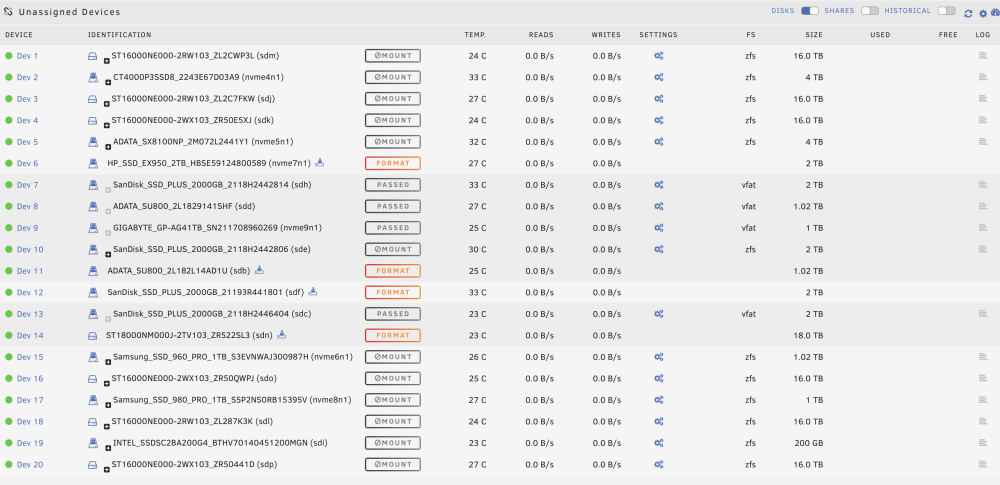
There could be an option in UD's config that could list all hidden disks. Or maybe a better option would be to show hidden disks in the Historical section since you can already hide that section. I already have disabled mounting of ZFS disks but the disk list is so scrambled with non ZFS disk spread all over as well. As you can see in the screenshot disks are all over the place and the order changes with every reboot.
-
Would it be possible to add a feature so one can hide certain disks from being shown in the UD list? The majority of the disks listed in my UD are in ZFS pools and I'd like to hide those disks so the UD list isn't so cluttered. It's hard to find particular disks as the list is so jumbled and Linux has a bad habit of rearranging the list every boot.
-
Great News. To fix a different issue with the onboard SATA ports not working I was asked to add "pci=realloc=off" behind "initrd=/bzroot" which has the unexpected excellent side effect of showing all the booting text when plugged into the onboard ASPEED VGA port. I now consider this issue solved. Thank you everyone for trying to help me figure this out. I really appreciate it.
-
What section do I add it too or is General okay? EDIT: I changed "append initrd=/bzroot" in the menu default section to "append pci=realloc=off initrd=/bzroot" which not only fixed the SATA Blu-Ray drive from not showing up in Unraid but it has had the unexpected excellent side effect of fixing the Unraid booting process from not showing anything after "Loading /bzroot... OK" when the server was connected to the motherboard's onboard ASPEED VGA port. Two birds, one stone. Thank you everyone for the help. I really appreciate it.
-
Where in that file do I add it?
-
For some reason Unraid is not detecting any devices on the motherboard's internal SATA ports. Booting into Windows (using one of those SATA ports) detects everything properly but not Unraid and I don't know why. Attached are my current diagnosis. karamediagroup-diagnostics-20230212-0632.zip
-
I keep getting this error and don't know what it means. Any ideas. karamediagroup-syslog-20230211-1217.zip karamediagroup-diagnostics-20230211-0718.zip
-
filename: /lib/modules/5.19.17-Unraid/kernel/drivers/gpu/drm/ast/ast.ko.xz license: GPL and additional rights description: AST author: Dave Airlie firmware: ast_dp501_fw.bin alias: pci:v00001A03d00002010sv*sd*bc03sc*i* alias: pci:v00001A03d00002000sv*sd*bc03sc*i* depends: drm_kms_helper,drm,drm_vram_helper,i2c-algo-bit,i2c-core,drm_ttm_helper retpoline: Y intree: Y name: ast vermagic: 5.19.17-Unraid SMP preempt mod_unload parm: modeset:Disable/Enable modesetting (int) I had no issue with this part on the original ASUS Pro WS WRX80 SAGE WIFI SE using the VGA chip so not sure why it won't work with the replacement ASUS sent me.
-
Where's "modinfo"?
-
Apparently Unraid does not like this motherboard's onboard VGA chip as when I used a discrete GPU Unraid booted with all the screen activity I was expecting to see. Is there anyway of fixing that issue? It's not a big deal as long as Unraid boots but it is rather annoying. I don't remember this being an issue in the past with this model motherboard.
-
I have no issues booting a Windows SSD so it must be something else. Also an old install of TureNAS also boots.
-
Anytime I tried to run memtest in the past with the old board, the PC just rebooted but I'll try now.
-
It's a built-in VGA chip. I don't have a discrete GPU installed. I am getting a picture.
-
Yes I can access the Web GUI despite the display attached to the server stopping at "Loading /bzroot... OK".
-
The only thing I did was unplug one of the SPF+ 10G Fiber cables and now it at least booted but still won't display anything beyond "Loading /bzroot... OK".
-
I am also having it where the stops at "Loading /bzimage..." or "Loading /bzroot..." with no "OK" after either one. Is it possible a BIOS setting is causing all these issues? Even clearing CMOS doesn't fix the screen stopping at "Loading /bzroot... OK". EDIT: I didn't change anything and I got the Web UI to load.
-
On the fresh install there is no "config/disks.cfg". On the old install there is a file called "disk.cfg". What setting do I change?
-
On my original setup, it's a 0 byte file. On a fresh Unraid install no.
-
Now Unraid no longer fully boots. I don't know what else to do. I tried different USB ports and different USB Flash Drives.
-
I can't access the GUI. Even loading GUI mode and Safe-Mode GUI doesn't bring up the GUI on the local machine. The screen just sits there at "loading /bzroot-gui... OK" I could access the GUI via web browser earlier today like I posted above. What changed? The Unraid shares still show up so I know the OS fully loaded.
-
Things just keep getting weirder. I used one of the onboard USB3 ports and my shares show up on the network but I can't access the GUI via a web browser. If I try to use the IP address assigned to the Unraid server, the browser puts "www." in front of the address. Tried Safari and FireFox. Main screen still doesn't go past "loading /bzroot... OK".
-
Yes, via an onboard connector since all USB ports on the I/O backplate are all USB3.
-
When it was working, I used normal non-GUI mode and was able to log into Unraid via a web browser on another computer.
-
I take that back. After being able to log into Unraid via a web browser after several reboots it stopped fully booting. I am really frustrated.

