




Skip to content
View in the app

A better way to browse. Learn more.

Unraid

A full-screen app on your home screen with push notifications, badges and more.

To install this app on iOS and iPadOS
  1. Tap the Share icon in Safari
  2. Scroll the menu and tap Add to Home Screen.
  3. Tap Add in the top-right corner.
To install this app on Android
  1. Tap the 3-dot menu (⋮) in the top-right corner of the browser.
  2. Tap Add to Home screen or Install app.
  3. Confirm by tapping Install.

Urukrode

Members
  • Joined

  • Last visited

Everything posted by Urukrode

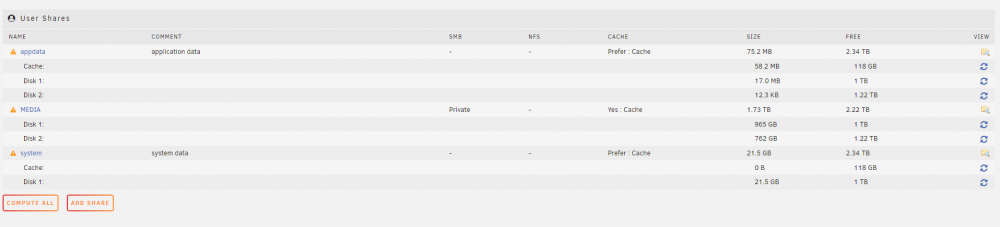
  1. yes I deleted the duplicate folder after sending the diagnostic ... For the parity disk, it is dead. I have to order another one but I don't think that the problem comes from there. I join the screenshot. I don't say why MEDIA is in private but that does not solve the problem
  2. I have check many logs and I have a "read only file" but I don't know where...
  3. I use plex by linuxServer And now the diagnotics : tower-diagnostics-20211029-1353.zip
  4. Hello, Plex does not want to start and shows me this error: Starting Plex Media Server. PMS: failure detected. Read/write access is required for path: /config/Library/Application Support/Plex Media Server Do you have an idea of what I can do to solve the problem ?

Account

Navigation

Search

Search

Configure browser push notifications

Chrome (Android)
  1. Tap the lock icon next to the address bar.
  2. Tap Permissions → Notifications.
  3. Adjust your preference.
Chrome (Desktop)
  1. Click the padlock icon in the address bar.
  2. Select Site settings.
  3. Find Notifications and adjust your preference.