nizidramaniiyt
Members
-
Joined
-
Last visited
-
I disabled VMs and docker, set the 3 shares as requested and invoked the mover. It doesn't do anything. It appears to be working (the stop and move buttons are greyed out), but no reads on cache drive or writes on data disks; the 31.9GB that are used on the cache drive remain unchanged. I looked on the cache drive and those three shares have "nobody" as owner. Is this ok or not? PS. It apparently finished, but nothing appears to have changed - the Appdata and System shares still have a "some or all files unprotected" warning. Also the Domains share disappeared from shares tab. tower-diagnostics-20260419-1841.zip
-
Here they are tower-diagnostics-20260416-1657.zip
-
Ok, its fixed now. Thanks! Can you elaborate on this please?
-
Oh, sorry, didn't know it required special software. i can read them in windows and mac with default software and i thought that everyone could. My bad. Reuploaded as plain .txt. WD40EFRX-68N32N0_WD-WCC7K4XDECAP_2001b4d205156b13e (sdh).txt WD40EFRX-68N32N0_WD-WCC7K5XX8D15_2001b4d20eb985865 (sdi).txt
-
Hello, I put the array in maintenance mode and checked the filesystem. I copied the output in 2 separate files and attached it below. Thanks WD40EFRX-68N32N0_WD-WCC7K4XDECAP_2001b4d205156b13e (sdh).rtf WD40EFRX-68N32N0_WD-WCC7K5XX8D15_2001b4d20eb985865 (sdi).rtf
-
Hello again, I replaced 6 sata cables with new ones, and switched the 2 cables on the sas-to-sata cable. I double checked that all cables are fully seated (including power cables) and made sure that the cables from the motherboard sata ports match the HDDs as they did initially. I powered on the system and it took a while on "Starting array", then it tells me "Unmountable disks present" and lists the 2 WDs (connected to the SAS cable) and asked if i want to format them. I took a diag reading and powered off the system. Am thinking of putting those 2 disks back on their original connections, but i am waiting for your opinion. Thanks, Stefan tower-diagnostics-20260405-2014.zip
-
Hey, I ordered 6 new sata cables for the Ironwolves. The 2 WD's are connected through a SAS to 4 SATA cable and im thinking to switch the 2 in use atm with the 2 unused ones. I still have a new 4to1 cable as a backup. I took the old parity drive and put it in my PC, booted up DLC Boot and ran a HD Tune Pro long test on it. After 7 hours it didn't show any red dots, which i find strange as the Health Tab showed 400 retired sectors before starting the test. I had CrystalDiskInfo running in the background on the same drive and i noticed the Reallocated Sector Count changing: it started as 1B0, then 1D0, to 228 when HD Tune finished (so from 432 to 552 bad sectors). I tried to copy some files over LAN to my PC and the folders were empty. While in Krusader the files were there, but windows doesnt see them. Maybe because of the emulated disks? Will post again after i replace the cables and get new diag data. Thanks!
-
Out of the blue? As i remember, those 2 disks are in adapters in the 5.25" drives, while the faulty one was in the bottom 3.5" bay, so the cables are quite a distance apart and facing different directions. They might share, as my PSU didn't have enough ports for all disks. I will have to check tomorrow and will get new diag data. Is it safe to power down the system without data loss? Apparently some files are missing (as is empty folders). Cheers!
-
Thanks for the answers. I managed to find out where to extract diagnosis zip from and i have attached it. I used new cables when i set up the array, but you may be right. I will check all other connections, just to be safe, but atm i am away from home. I would also avoid doing anything to the array until i know it can be fixed. tower-diagnostics-20260331-1542.zip
-
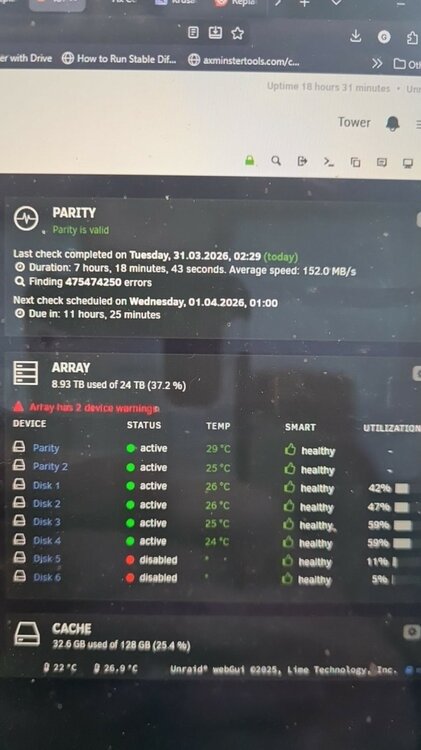
Hello, I have a problem with my unraid and i don't know what to do, so i turned to the forums. I have an array made from 2 parity disks and 6 data disks. (2 old WD reds and 6 Seagate Ironwolfs, all of them 4TB). For the last 6 months one of the parity drives was unhealthy (CRC errors) but as the array wasn't getting much use, i figured i could leave it as is. Yesterday evening it was marked with a red X in MAIN, so I decided to replace the drive with a new one (i bought it when the parity drive showed as unhealthy). As i didn't know which drive was which, i had to turn off the array, remove a sata cable from one drive, reboot and see which drive disappeared from the list. I got the faulty drive on my second attempt and replaced it with the new drive. After boot I selected the new drive in "Parity 1" position and started the array. It went into "parity check" which i took to be rebuilding the missing data. Today i decided to see what happened overnight and here lies the problem. It says parity is valid, that it took 7 hours 18mins to finish and it found 475.474.250 errors !?!?!. It also disabled 2 of my data disks (disks 5 and 6 are the oldest in the array, the WDs and they were working fine and healthy when rebuild started). I have attached a photo of the MAIN webpage. I also see that "log filesystem" is maxed out. If i click on one of the disabled disks, i can't see attributes/ capabilities or run SMART tests. What do i do now? i have data on those disks and, shamefully, no backup. Is there a risk of data loss or can this be recovered? I'm sorry if this is not the right place for this post, it's my first time on the forums. I have tried downloading the largest log file (syslog.1 @131mb) but it only downloads the last part of it, worth 6.8kb, even scrolling up wont add new data. Am i doing something wrong? Thanks, Stefan syslog.1 apcupsd.events