Michaelclaw
Members
-
Joined
-
Last visited
Everything posted by Michaelclaw
-
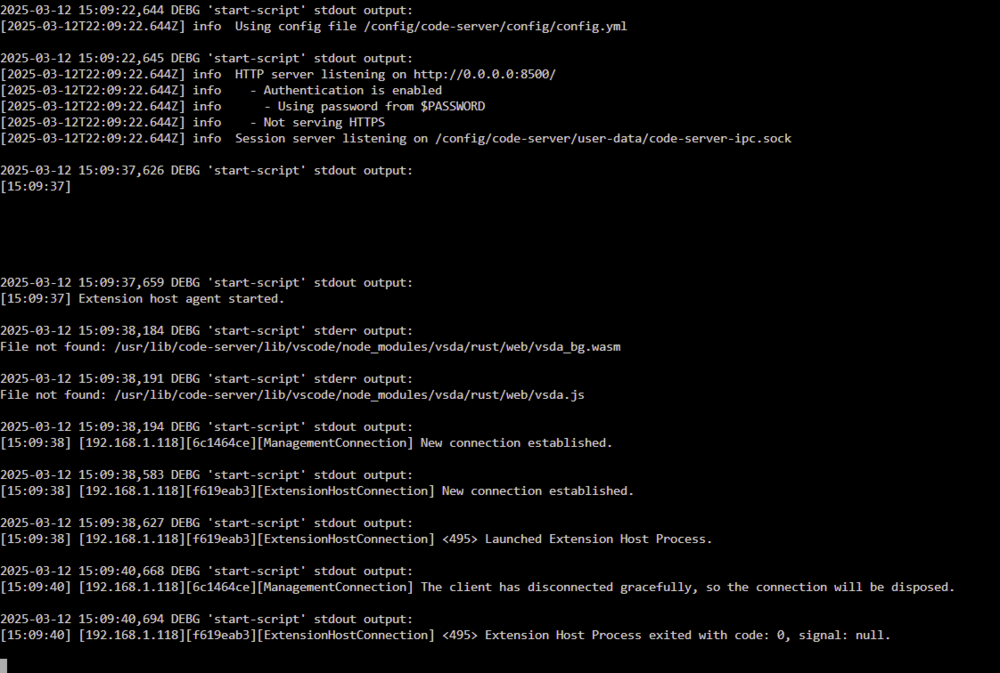
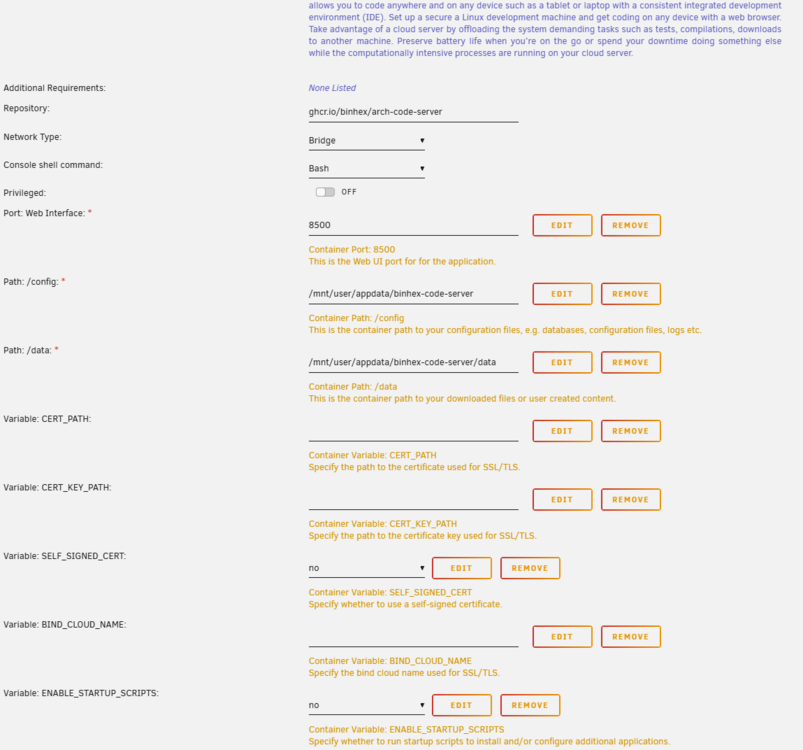
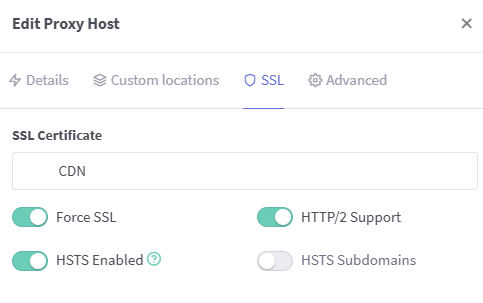
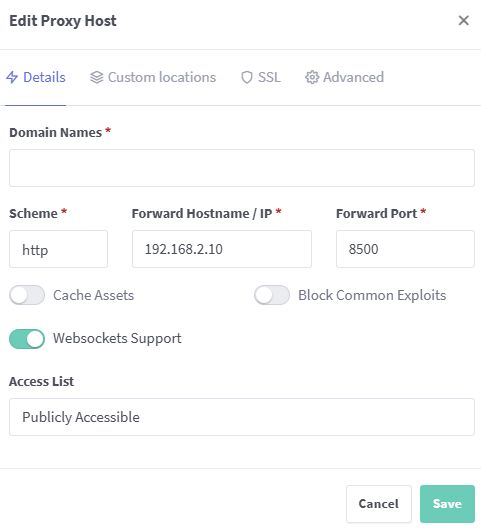
@binhex I'm trying to setup the code-server with nginx-proxy-manager but I'm having issues. I have set the crt and key values in docker to be blank and set self-signed to no and can access code-server locally. Once I forward in npm it states SSL Handshake Failed Error 525. I'm using the CloudFlare certificates on all my other services that are running through NPM. I'm only having issues on code-server
-
Okay i so follow your instructions and tried to re-dump my vgabios and had the same problem where the dumps are only like 60kb instead of the techpower's 160kb ones. Waiting for a few seconds ..... Stopping the temp vm Domain dumpvbios destroyed Removing the temp vm Domain dumpvbios has been undefined Okay dumping vbios file named GeForce GTX 1070 to the location /mnt/user/isos/vbios/ /mnt/user/isos/vbios/GeForce GTX 1070 is less than 70kb This seems too small. Probably the GPU is Primary and needs disconnecting and reconnecting to get proper vbios Running again Disconnecting the graphics card 1 Entered suspended (sleep) state ...... PRESS POWER BUTTON ON SERVER TO CONTINUE I don't know if its a problem but when it gets to this part in the script, when I press the power button it doesn't continue the script for like a minute. I feel like it's not detecting me pressing the power button. It still dumps the bios though but I think it's not complete. So after doing the checkmark on the Nvidia card & audio iommu group, updating the xml file, and using the 60kb bios dump from my card I still get a black screen. In regard to this, I'm accessing unraid through port 75 on my main desktop and still had I believe an incomplete dump Please let me know if you have any other ideas
-
I’m sorry I don’t know what you’re asking for in the first question? If you’re asking for the Iommu group for 72, I have it pasted in the first post. If not, could you please clarify? I’m new to unraid and mostly just use it for docker. i will replace that text when I get off work today. Unfortunately I can’t pull my own vbios, the script that SpaceInvader created doesn’t work for me (Unraid doesn’t register when I press the power button to wake up from sleep mode) Will I be able to run with vbios from techpowerup or do I have to have a dump from my card? I checked the model number sticker on my card and it’s the MSI gtx 1070 gaming z, so I did pull the correct one. thank you for the help so far
-
Oh sorry here is the diagnostic file. I’ve never pulled one before so hopefully it’s everything sandcastle-diagnostics-20211026-0958.zip sandcastle-diagnostics-20211026-0958.zip
-
Hello, I've been lurking the forums lately viewing each thread relating to gpu passthrough and couldn't find a solution that works. I've followed this tutorial by SpaceInvader and still having problems. My windows 11 vm runs great through VNC but once I add my Nvidia card, I get a black screen (I've attached a picture of it) What I've already tried: Having two separate groups for the video card and audio controller Enabled PCIe ACS override & VFIO allow unsafe interrupts Reinstalled Windows 11 and installed all the drivers then trying to add the video card I've tried two different VGA bios' and both displayed a black screen. (I've also tried pulling my own vga bios through spaceinvaders newer tutorial but it's not working for me) I attached a picture of the black screen I don't know what other information is needed for support but please let me know if ya'll need any other information. I'm sorry if the post is too long but I tried to attach as much relevant information. <?xml version='1.0' encoding='UTF-8'?> <domain type='kvm' id='6'> <name>Windows 10</name> <uuid>0e802c21-c1d6-01f8-476a-6e5b0ade0158</uuid> <metadata> <vmtemplate xmlns="unraid" name="Windows 10" icon="windows.png" os="windows10"/> </metadata> <memory unit='KiB'>16777216</memory> <currentMemory unit='KiB'>16777216</currentMemory> <memoryBacking> <nosharepages/> </memoryBacking> <vcpu placement='static'>4</vcpu> <cputune> <vcpupin vcpu='0' cpuset='0'/> <vcpupin vcpu='1' cpuset='2'/> <vcpupin vcpu='2' cpuset='4'/> <vcpupin vcpu='3' cpuset='6'/> </cputune> <resource> <partition>/machine</partition> </resource> <os> <type arch='x86_64' machine='pc-q35-5.1'>hvm</type> <loader readonly='yes' type='pflash'>/usr/share/qemu/ovmf-x64/OVMF_CODE-pure-efi.fd</loader> <nvram>/etc/libvirt/qemu/nvram/0e802c21-c1d6-01f8-476a-6e5b0ade0158_VARS-pure-efi.fd</nvram> </os> <features> <acpi/> <apic/> <hyperv> <relaxed state='on'/> <vapic state='on'/> <spinlocks state='on' retries='8191'/> <vendor_id state='on' value='none'/> </hyperv> </features> <cpu mode='host-passthrough' check='none' migratable='on'> <topology sockets='1' dies='1' cores='2' threads='2'/> <cache mode='passthrough'/> </cpu> <clock offset='localtime'> <timer name='hypervclock' present='yes'/> <timer name='hpet' present='no'/> </clock> <on_poweroff>destroy</on_poweroff> <on_reboot>restart</on_reboot> <on_crash>restart</on_crash> <devices> <emulator>/usr/local/sbin/qemu</emulator> <disk type='file' device='disk'> <driver name='qemu' type='qcow2' cache='writeback'/> <source file='/mnt/user/domains/Windows 10/vdisk1.img' index='3'/> <backingStore/> <target dev='hdc' bus='virtio'/> <boot order='1'/> <alias name='virtio-disk2'/> <address type='pci' domain='0x0000' bus='0x03' slot='0x00' function='0x0'/> </disk> <disk type='file' device='cdrom'> <driver name='qemu' type='raw'/> <source file='/mnt/user/isos/Windows/Window11_Insiders.iso' index='2'/> <backingStore/> <target dev='hda' bus='sata'/> <readonly/> <boot order='2'/> <alias name='sata0-0-0'/> <address type='drive' controller='0' bus='0' target='0' unit='0'/> </disk> <disk type='file' device='cdrom'> <driver name='qemu' type='raw'/> <source file='/mnt/user/isos/virtio-win-0.1.190-1.iso' index='1'/> <backingStore/> <target dev='hdb' bus='sata'/> <readonly/> <alias name='sata0-0-1'/> <address type='drive' controller='0' bus='0' target='0' unit='1'/> </disk> <controller type='pci' index='0' model='pcie-root'> <alias name='pcie.0'/> </controller> <controller type='pci' index='1' model='pcie-root-port'> <model name='pcie-root-port'/> <target chassis='1' port='0x8'/> <alias name='pci.1'/> <address type='pci' domain='0x0000' bus='0x00' slot='0x01' function='0x0' multifunction='on'/> </controller> <controller type='pci' index='2' model='pcie-root-port'> <model name='pcie-root-port'/> <target chassis='2' port='0x9'/> <alias name='pci.2'/> <address type='pci' domain='0x0000' bus='0x00' slot='0x01' function='0x1'/> </controller> <controller type='pci' index='3' model='pcie-root-port'> <model name='pcie-root-port'/> <target chassis='3' port='0xa'/> <alias name='pci.3'/> <address type='pci' domain='0x0000' bus='0x00' slot='0x01' function='0x2'/> </controller> <controller type='pci' index='4' model='pcie-root-port'> <model name='pcie-root-port'/> <target chassis='4' port='0x13'/> <alias name='pci.4'/> <address type='pci' domain='0x0000' bus='0x00' slot='0x02' function='0x3'/> </controller> <controller type='pci' index='5' model='pcie-root-port'> <model name='pcie-root-port'/> <target chassis='5' port='0x14'/> <alias name='pci.5'/> <address type='pci' domain='0x0000' bus='0x00' slot='0x02' function='0x4'/> </controller> <controller type='virtio-serial' index='0'> <alias name='virtio-serial0'/> <address type='pci' domain='0x0000' bus='0x02' slot='0x00' function='0x0'/> </controller> <controller type='sata' index='0'> <alias name='ide'/> <address type='pci' domain='0x0000' bus='0x00' slot='0x1f' function='0x2'/> </controller> <controller type='usb' index='0' model='ich9-ehci1'> <alias name='usb'/> <address type='pci' domain='0x0000' bus='0x00' slot='0x07' function='0x7'/> </controller> <controller type='usb' index='0' model='ich9-uhci1'> <alias name='usb'/> <master startport='0'/> <address type='pci' domain='0x0000' bus='0x00' slot='0x07' function='0x0' multifunction='on'/> </controller> <controller type='usb' index='0' model='ich9-uhci2'> <alias name='usb'/> <master startport='2'/> <address type='pci' domain='0x0000' bus='0x00' slot='0x07' function='0x1'/> </controller> <controller type='usb' index='0' model='ich9-uhci3'> <alias name='usb'/> <master startport='4'/> <address type='pci' domain='0x0000' bus='0x00' slot='0x07' function='0x2'/> </controller> <interface type='bridge'> <mac address='52:54:00:cb:61:9e'/> <source bridge='br0'/> <target dev='vnet0'/> <model type='virtio-net'/> <alias name='net0'/> <address type='pci' domain='0x0000' bus='0x01' slot='0x00' function='0x0'/> </interface> <serial type='pty'> <source path='/dev/pts/0'/> <target type='isa-serial' port='0'> <model name='isa-serial'/> </target> <alias name='serial0'/> </serial> <console type='pty' tty='/dev/pts/0'> <source path='/dev/pts/0'/> <target type='serial' port='0'/> <alias name='serial0'/> </console> <channel type='unix'> <source mode='bind' path='/var/lib/libvirt/qemu/channel/target/domain-6-Windows 10/org.qemu.guest_agent.0'/> <target type='virtio' name='org.qemu.guest_agent.0' state='connected'/> <alias name='channel0'/> <address type='virtio-serial' controller='0' bus='0' port='1'/> </channel> <input type='tablet' bus='usb'> <alias name='input0'/> <address type='usb' bus='0' port='1'/> </input> <input type='mouse' bus='ps2'> <alias name='input1'/> </input> <input type='keyboard' bus='ps2'> <alias name='input2'/> </input> <hostdev mode='subsystem' type='pci' managed='yes'> <driver name='vfio'/> <source> <address domain='0x0000' bus='0x81' slot='0x00' function='0x0'/> </source> <alias name='hostdev0'/> <rom file='/mnt/user/isos/vbios/gtx1070.rom'/> <address type='pci' domain='0x0000' bus='0x04' slot='0x00' function='0x0'/> </hostdev> <hostdev mode='subsystem' type='pci' managed='yes'> <driver name='vfio'/> <source> <address domain='0x0000' bus='0x81' slot='0x00' function='0x1'/> </source> <alias name='hostdev1'/> <address type='pci' domain='0x0000' bus='0x05' slot='0x00' function='0x0'/> </hostdev> <memballoon model='none'/> </devices> <seclabel type='dynamic' model='dac' relabel='yes'> <label>+0:+100</label> <imagelabel>+0:+100</imagelabel> </seclabel> </domain> Attached above is my VM XML. Below is my IOMMU grouping for the nvidia as well, as you can see they are in the same group. IOMMU group 72: [10de:1b81] 81:00.0 VGA compatible controller: NVIDIA Corporation GP104 [GeForce GTX 1070] (rev a1) [10de:10f0] 81:00.1 Audio device: NVIDIA Corporation GP104 High Definition Audio Controller (rev a1) -nodefaults \ -chardev socket,id=charmonitor,fd=31,server,nowait \ -mon chardev=charmonitor,id=monitor,mode=control \ -rtc base=localtime \ -no-hpet \ -no-shutdown \ -boot strict=on \ -device pcie-root-port,port=0x8,chassis=1,id=pci.1,bus=pcie.0,multifunction=on,addr=0x1 \ -device pcie-root-port,port=0x9,chassis=2,id=pci.2,bus=pcie.0,addr=0x1.0x1 \ -device pcie-root-port,port=0xa,chassis=3,id=pci.3,bus=pcie.0,addr=0x1.0x2 \ -device pcie-root-port,port=0x13,chassis=4,id=pci.4,bus=pcie.0,addr=0x2.0x3 \ -device pcie-root-port,port=0x14,chassis=5,id=pci.5,bus=pcie.0,addr=0x2.0x4 \ -device ich9-usb-ehci1,id=usb,bus=pcie.0,addr=0x7.0x7 \ -device ich9-usb-uhci1,masterbus=usb.0,firstport=0,bus=pcie.0,multifunction=on,addr=0x7 \ -device ich9-usb-uhci2,masterbus=usb.0,firstport=2,bus=pcie.0,addr=0x7.0x1 \ -device ich9-usb-uhci3,masterbus=usb.0,firstport=4,bus=pcie.0,addr=0x7.0x2 \ -device virtio-serial-pci,id=virtio-serial0,bus=pci.2,addr=0x0 \ -blockdev '{"driver":"file","filename":"/mnt/user/domains/Windows 10/vdisk1.img","node-name":"libvirt-3-storage","cache":{"direct":false,"no-flush":false},"auto-read-only":true,"discard":"unmap"}' \ -blockdev '{"node-name":"libvirt-3-format","read-only":false,"cache":{"direct":false,"no-flush":false},"driver":"qcow2","file":"libvirt-3-storage","backing":null}' \ -device virtio-blk-pci,bus=pci.3,addr=0x0,drive=libvirt-3-format,id=virtio-disk2,bootindex=1,write-cache=on \ -blockdev '{"driver":"file","filename":"/mnt/user/isos/Windows/Window11_Insiders.iso","node-name":"libvirt-2-storage","auto-read-only":true,"discard":"unmap"}' \ -blockdev '{"node-name":"libvirt-2-format","read-only":true,"driver":"raw","file":"libvirt-2-storage"}' \ -device ide-cd,bus=ide.0,drive=libvirt-2-format,id=sata0-0-0,bootindex=2 \ -blockdev '{"driver":"file","filename":"/mnt/user/isos/virtio-win-0.1.190-1.iso","node-name":"libvirt-1-storage","auto-read-only":true,"discard":"unmap"}' \ -blockdev '{"node-name":"libvirt-1-format","read-only":true,"driver":"raw","file":"libvirt-1-storage"}' \ -device ide-cd,bus=ide.1,drive=libvirt-1-format,id=sata0-0-1 \ -netdev tap,fd=33,id=hostnet0 \ -device virtio-net,netdev=hostnet0,id=net0,mac=52:54:00:cb:61:9e,bus=pci.1,addr=0x0 \ -chardev pty,id=charserial0 \ -device isa-serial,chardev=charserial0,id=serial0 \ -chardev socket,id=charchannel0,fd=35,server,nowait \ -device virtserialport,bus=virtio-serial0.0,nr=1,chardev=charchannel0,id=channel0,name=org.qemu.guest_agent.0 \ -device usb-tablet,id=input0,bus=usb.0,port=1 \ -device vfio-pci,host=0000:81:00.0,id=hostdev0,bus=pci.4,addr=0x0,romfile=/mnt/user/isos/vbios/gtx1070.rom \ -device vfio-pci,host=0000:81:00.1,id=hostdev1,bus=pci.5,addr=0x0 \ -sandbox on,obsolete=deny,elevateprivileges=deny,spawn=deny,resourcecontrol=deny \ -msg timestamp=on 2021-10-25 21:02:28.517+0000: Domain id=6 is tainted: high-privileges 2021-10-25 21:02:28.517+0000: Domain id=6 is tainted: host-cpu char device redirected to /dev/pts/0 (label charserial0)