





Odin_KG
Members
-
Joined
-
Last visited
-
Hello, I have 3 computers: Windows 11, Windows 10 and Windows 8.1. Only the computer with Windows 8.1 does not see the shared folders, but it sees the Unraid server. If I try to open server, I get the message about problem with access. I use guest access without password. I installed SMB 1 on Windows 8.1. But I can't solve this problem.
-
Thanks for your help!
-
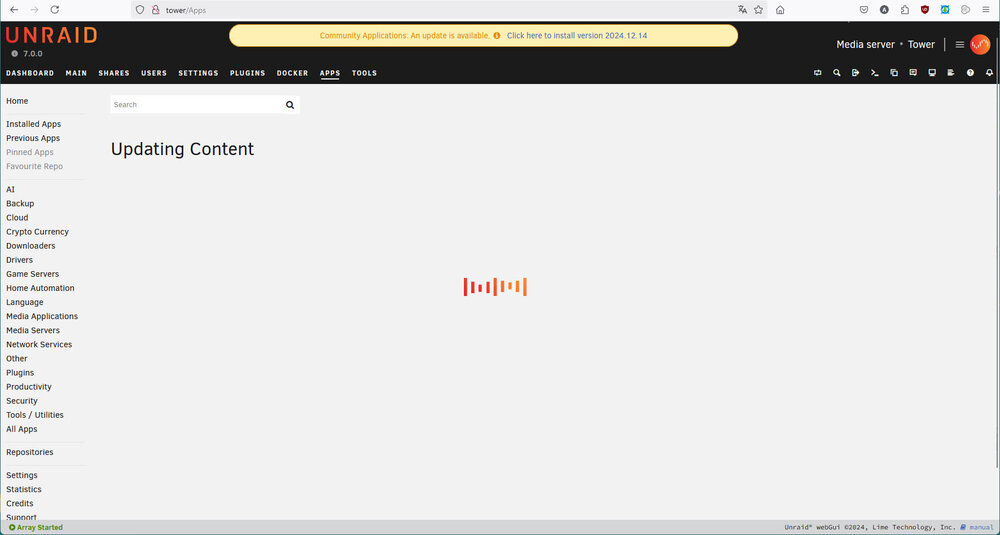
Hello I have just updated unraid (ver 7.0.0). But section "APPS" does not work now. I attached the screenshot. I can't click by mouse, because this page is blocked in browser.
-
JonathanM, itimpi Thanks a lot! I could connect new disk
-
Hello, I want to change one disk. But I can't do it. I deleted old disk from computer and set new disk. But Unraid remembered old disk. I try to change old disk to new disk, but button "Start" is disabled. After reboot I have no any my changes. My new disk is not formated.
-
Squid It seems, you are right. Thanks!
-
Odin_KG joined the community
-
Hello, My unraid starts successful, but in 5-7 minutes all disks will be not accessible. The Web GUI does not work too. But Plex continues to work. I got this problem yesterday. And I see the problem with "missing key file". It is working unraid: http://astralax.com/temp/unraid1.jpg It is not working unraid: http://astralax.com/temp/unraid2.jpg Please, help me :-)
