snipes1259
Members
-
Joined
-
Last visited
-
See attached mover_log.txt
-
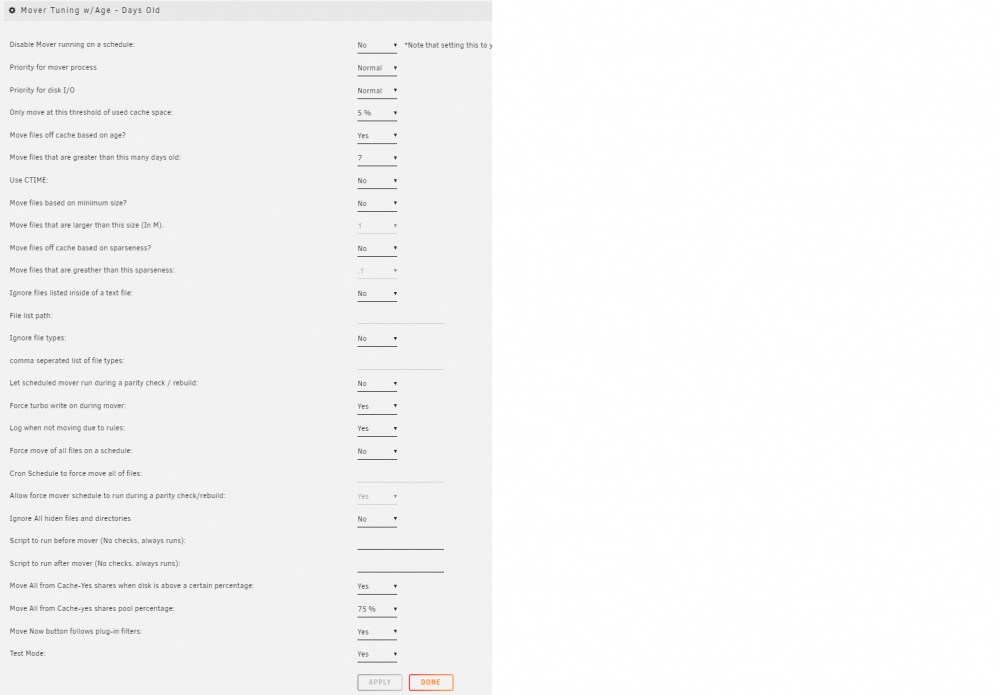
Hello, Running into an issue with the mover tuner at the moment. The intent is to have the mover run every hour, and only move files that are >7 days old, however if the cache is >75% full, run the standard mover/move everything on a Cache:YES share to the array. I have my settings set to what I think are correct, i.e. only move files that are greater than 7 days and 'move all from cache:yes shares' to yes and 75%. When testing the settings with the Move Now button follows plug-in filters and Test Mode set to yes, I can see mover picking up on files that are less than 7 days old in the log. However, once I set test mode to off and manually invoke the Mover, it runs without actually moving any files and doesn't detect any files that need to be moved. Any idea what's gong on?