



Skip to content
View in the app

A better way to browse. Learn more.

Unraid

A full-screen app on your home screen with push notifications, badges and more.

To install this app on iOS and iPadOS
  1. Tap the Share icon in Safari
  2. Scroll the menu and tap Add to Home Screen.
  3. Tap Add in the top-right corner.
To install this app on Android
  1. Tap the 3-dot menu (⋮) in the top-right corner of the browser.
  2. Tap Add to Home screen or Install app.
  3. Confirm by tapping Install.

ssouza

Members
  • Joined

  • Last visited

Everything posted by ssouza

  1. I checked my time and confirmed it was correct. Good call with that didn't even think about that. Question, The only place I can change my DNS is on my eth0. I changed it to 208.67.222.222 / 208.67.220.220 and tried to pull down a app. Had the same outcome.
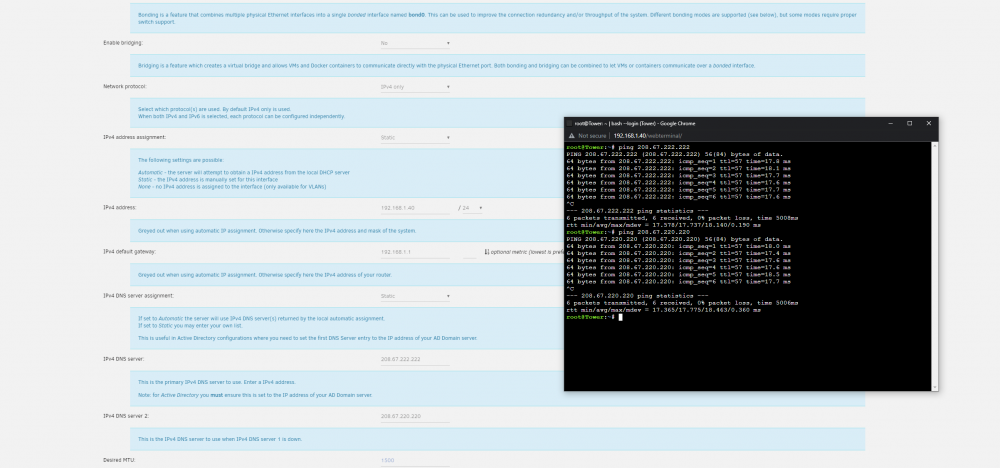
  2. I played with Docker in the past and did not have this problem. I have not changed anything on my home network. My server is up to date. I've tried to load many different apps and get the same command failure. Ive tried bonding and bridging the NIC's, I get the same problem. I can run Auto Update Applications App, It reports that everything is up to date Unraid Docker.txtUnraid log .txtUnraid network.txt Looking forward to any help.

Account

Navigation

Search

Search

Configure browser push notifications

Chrome (Android)
  1. Tap the lock icon next to the address bar.
  2. Tap Permissions → Notifications.
  3. Adjust your preference.
Chrome (Desktop)
  1. Click the padlock icon in the address bar.
  2. Select Site settings.
  3. Find Notifications and adjust your preference.