itsprobablyme
Members
-
Joined
-
Last visited
Everything posted by itsprobablyme
-
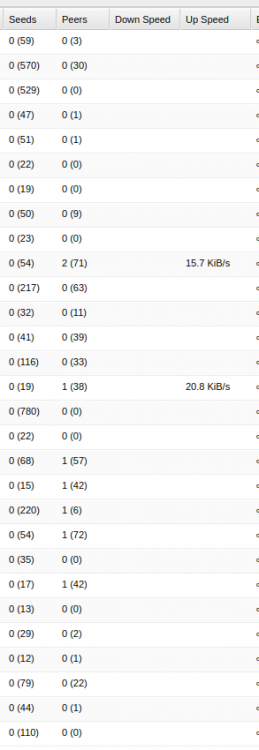
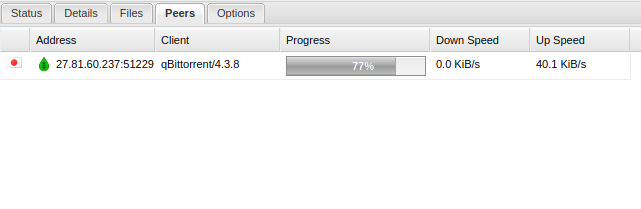
Hey Guys, I am wondering if I can help. I am suffering servere slow upload on torrents using Deluge w/AirVPN (20KiBs-60KiBs). I am using an unlimited traffic server with Hetzner as the provider, I get 900Mbs up/down using ookla speed test cli, only 300Mbs up/down inside the container with AirVPN (I can live with this). I have set up a remote port on AirVPN using UDP and have set that port as the incoming port on deluge. I have installed the ltConfig plugin and set it to high performance. I have 30 seeding torrents and yet right now there is only 3 active with 20KiBs-60KiBs upload. Any idea what I might be missing? As you can see the ratio on some of those torrents like 15 seeders to 42 peers, surely I should be seeding? It even shows a bunch of active peers e.g. 1 (38) but I provide no upload. If I click a torrent with no upload and an active peer and look at peers sometimes it will show one with downloading 0%. Should the port on the peers address match my incoming port? Right now it doesn't, I don't know if that is an issue. Here is my docker-compose file (using nginx, can provide the nginx conf if needed). version: '3.4' services: deluge: image: binhex/arch-delugevpn container_name: deluge restart: unless-stopped cap_add: - NET_ADMIN environment: - VPN_ENABLED=yes - VPN_PROV=airvpn - VPN_CLIENT=openvpn - ENABLE_PRIVOXY=yes - LAN_NETWORK=192.168.1.0/24 - NAME_SERVERS=209.222.18.222,84.200.69.80,37.235.1.174,1.1.1.1,209.222.18.218,37.235.1.177,84.200.70.40,1.0.0.1 - DELUGE_DAEMON_LOG_LEVEL=info - DELUGE_WEB_LOG_LEVEL=info - DEBUG=false - VPN_INPUT_PORTS=1234 - VPN_OUTPUT_PORTS=5678 - UMASK=000 - PUID=1000 - PGID=1000 volumes: - /etc/localtime:/etc/localtime:ro - ./deluge-config:/config - /media/gdrive:/data - /home/x/seeding:/seeding ports: - 8112:8112 - 8118:8118 - 58846:58846 - 58946:58946 networks: - app-network webserver: image: nginx:mainline-alpine container_name: webserver restart: unless-stopped ports: - "80:80" - "443:443" volumes: - web-root:/var/www/html - ./nginx-conf:/etc/nginx/conf.d - certbot-etc:/etc/letsencrypt - certbot-var:/var/lib/letsencrypt - dhparam:/etc/ssl/certs depends_on: - stash - deluge networks: - app-network certbot: image: certbot/certbot container_name: certbot volumes: - certbot-etc:/etc/letsencrypt - certbot-var:/var/lib/letsencrypt - web-root:/var/www/html depends_on: - webserver command: certonly --webroot --webroot-path=/var/www/html --email x --agree-tos --no-eff-email --force-renewal -d x volumes: certbot-etc: certbot-var: web-root: driver: local driver_opts: type: none device: /home/x/stash-config/views/ o: bind dhparam: driver: local driver_opts: type: none device: /home/x/stash-config/dhparam/ o: bind networks: app-network: driver: bridge I am at my wits end, does anyone have any clue?