





SHALcL
Members
-
Joined
-
Last visited
Everything posted by SHALcL
-
I already have it but i forgot, tere you have the latest two log files syslog-127.0.0.1.log syslog-127.0.0.1.log.1
-
Hello, within the last week i noticed that Unraid dissappeared from the network, the rj45 port shows activity and reconnecting it makes it behabe like one expects, but nothing reaches the network, and checking the switch i see that the port has no actual activity. I did not have the opportunity to connect the server to a display to see if its fully hung up, but restarting the server does fix the issue. I checked the logs but i did not find anything obvious. can someone please give me a hand? server1a-diagnostics-20250326-2044_latest2.zip
-
I will do it tonight. Many thanks.-
-
Changing this setting right away. Fingers crossed. Thanks for looking in to it! If it does not crash in a couple of weeks I will mark this as the solution.
-
Sorry, I assumed the diagnostics would already take them. syslog-127.0.0.1.log syslog-127.0.0.1_1.log syslog-127.0.0.1_2.log syslog-127.0.0.1_3.log syslog-127.0.0.1_4.log
-
-
Hello, And happened once again... I dont have any MTU above the default 1500 and i updated everything. This freezing randomly thing is starting to get old... server1a-diagnostics-20231102-1150_latest1.zip
-
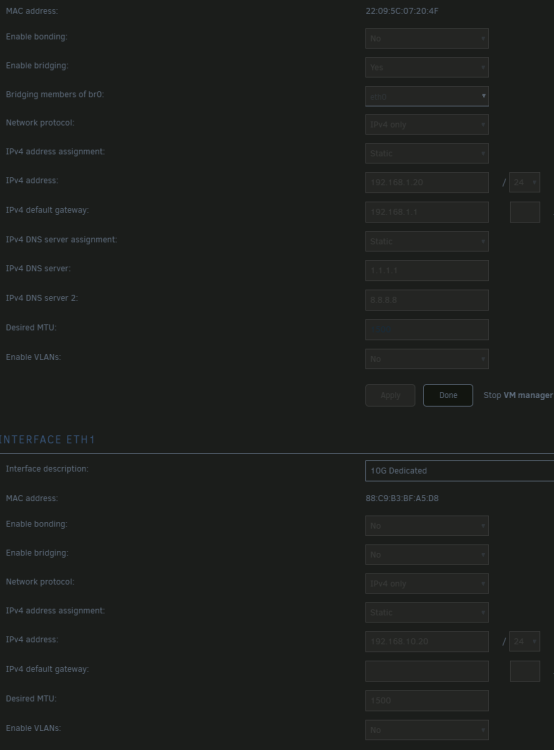
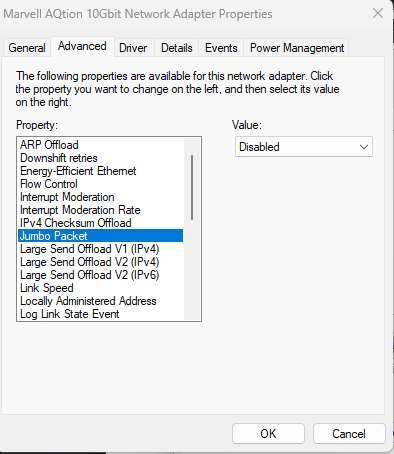
Both interfaces are using the default MTU of 1500. At the other end, on my windows computer i also have jumbo packets disabled (10G NIC is a direct connection between the server and the workstation).
-
It happened again, this time without apparent reason. server1a-diagnostics-20231102-1150_latest.zip
-
I see Thanks!
-
QQ: Why where the contents not emulated in that scenario? I had a drive fail before and it was emulated, allowing all the programs to work with some performance degradation.
-
Goddammit, why do i trust autocomplete? That fixed it, thank you very much!
-
Oh, you mean the check fylesystem thing. AFAIK is he same as "xfs_repair".
-
I got this: Sorry, could not find valid secondary superblock Exiting now.
-
I dont see any repair option on the array or the disk sections.
-
Yeah, its the right drive. But I used the wrong path. With the right path get this: Phase 1 - find and verify superblock... - block cache size set to 3061320 entries Phase 2 - using internal log - zero log... zero_log: head block 706506 tail block 704147 ERROR: The filesystem has valuable metadata changes in a log which needs to be replayed. Mount the filesystem to replay the log, and unmount it before re-running xfs_repair. If you are unable to mount the filesystem, then use the -L option to destroy the log and attempt a repair. Note that destroying the log may cause corruption -- please attempt a mount of the filesystem before doing this.

-
Hello, basically what the title says, after an unexpected reboot, one disk appears with the message "Unmountable: Unsuported or no file system", but the drive is not have the "contents emulated" warning. I tried "xfs_repair -v /dev/nvme1n1" but after a while it does not detect secondary superblock. At the same time, all my dockers dissapeared. Is there a way to recover it or should i go format it and go to the backup? My backup is a full dump of the array as-is, so I will have to manually check what files where in that drive specifically, i would like to avoid it if possible. Thanks! server1a-diagnostics-20231025-0115.zip
-
It happened again and this time without jumbo packets enabled. EDIT: I think its OOM this time... server1a-diagnostics-20231019-0012.zip
-
Thanks for the reply! I have the 2.5G connected to the lan, and the 10G with jumbo packets connected directly to a PC. I will try to disable jumbo packets between te server and the pc and see if it stops crashing.
-
Happened again. server1a-diagnostics-20231017-0032.zip
-
Yeah, but i did not enable it becasue i can't casue (or i dont know how yet) the crash, and i have to leave it running for weeks to months for it to happen again, and I don't want to burn my flashdrive
-
Damn, i dont have the syslogs. If you check my previous post history you will see that i have some weird network behaviour on my unraid, and this made it to not capture the logs since the last reboot... Now i'm capturing logs again, lets wait for another crash... Sorry.
-
It just happened again, this time I was not sleeping, i was not doing anything special with unraid when it happened. Attached the diagnostics file, this time with syslog server enabled. server1a-diagnostics-20231009-1050_latest.zip
-
Ohh, okay, makes sense why the logs i had were useless. I will activate the syslog server and see. Last time it hung up was like a month ago, so it will be a long time before i get those useful logs... Thanks!
-
Hello, This morning when i woke up unraid was unresponsive until reboot, so i was not able to collect logs before rebooting. This is the second time this happened. I checked the system logs but i cant find any clues of what could be causing this. Both times i was sleeping so i did not see exactly when it did happen. Can someone point me to the right direction to troubleshoot this? Thanks!! server1a-diagnostics-20231004-0946.zip


