





mganoe
Members
-
Joined
-
Last visited
-
After much messing around and finally some searching I have determined that my board is not capable of booting UEFI. I did find a setting in the BIOS that will keep the logs from filling up with keyboard errors. Somehow my system clock also got way out of sync. Could that be causing any of the issues I have been having? At this point, should I just fire it back up, or is it worth trying to install a OS on the usb stick that I can then attempt to include the memtest86 into the GRUB loader?
-
I tried checking the System Event Log in the BIOS, but it seemed to be loaded up with messages about my wireless keyboard being disconnected or something from when I had it powered off. I reset the logs and will check it each time I need to reboot. I just now noticed you said to run the memory test from a different stick. When I first read your post I recall seeing the app when UNRAID first boots. Should I not run that version and instead download the latest?
-
I have been having a lot of issues with my server becoming unresponsive and the only way to get out of it is to force a shutdown. I have attached a log that I think was from before one of the shutdowns. At this point I can't really remember there have been so many. I've tried removing some plugins and docker files since at first I thought it was that, but now I'm not so sure as it will lockup with no docker files running at all. Any help would be most appreciated gtower-diagnostics-20220330-2049.zip
-
I think I'll wait for the other drive and then the preclear to complete. Thanks for all the help. You both talked me off the ledge.
-
I now see what everyone has been talking about as far as the counts go. I just finished going through and pulling all the drives to verify what was where. It appears the only drive UNRAID is not picking up is the 4TB drive with serial number WD-WCC4E3CECN91, which I suspect should be in Disk 4. I have another drive on the way in the event the drive just died. Should I wait to receive the drive before spinning up the array and restarting the rebuild process on my other failed drive? Also can I simply change the slot count on the main page without any negative side effects? I have no idea how it got like that.
-
My issues is that 18, 19, 20, 21, 22 as well as 4 all show as unassiged with no option to select the drives that are actually connected to them. I did not load a new config what you see is how it just came back online are the reboot. Prior to that reboot all the drives were assigned a drive and nothing showed as unassigned. That said, I did have 3 drives I believe that were not part of the array. Now I"m just trying to determine how I get the missing drives back so I can restart the array.
-
No, that is how it came up after the very first reboot after the alarm. When I log into the BIOS of the RAID card I can see all the same disks are still attached, but for some reason they are just not visible to UNRAID.
-
I mapped these out shortly before everything went south, so it should be correct as how things are supposed to look.
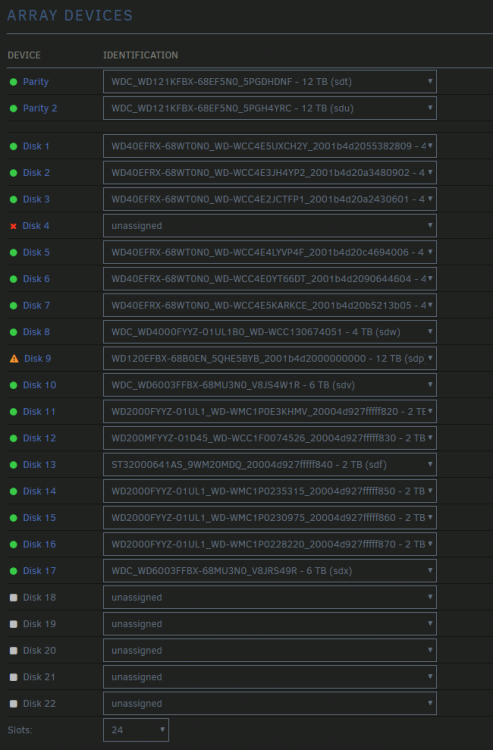
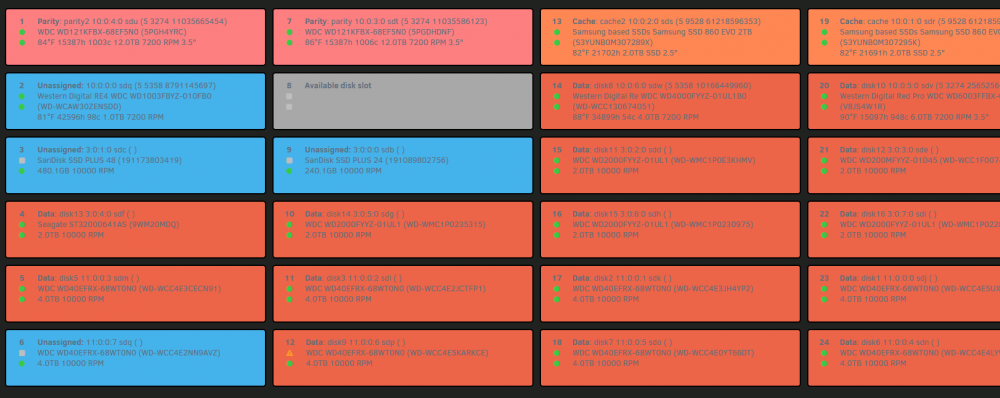
-
The array has all 24 filled with drives, which is what concerns me. The BIOS is set to use ACHI and the RAID cards are only being used to connect all the drives not as an actual RAID configuration. I moved to UNRAD when I began to get concerned with the age of the cards a few years back. What is odd is the part of the bank that has fallen off are disks 18, 19, 20, 21, 22, which now that I look are all from one RAID card, but 17 is registered just fine and it's also on that same RAID card. The disks you see as unassigned have always been unassigned, but were used in VMs once things spin up normal.
-
Sorry, show have included those in the first. gtower-diagnostics-20211121-1902.zip
-
As the title describes I was in the middle of a drive rebuild on a precleared disk when my motherboard there was a high temp alarm on 2 CPUs. I paused the rebuild and shut the system down thinking perhaps I had dust buildup in the case. After blowing it out I fired it back up to find another drive failing and 5 disks just missing from the system. I double checked the cables and everything seems to be fine. My attached cards all seem to see the drives, but they do not show at all in UNRAD (6.9.2) from the array devices. I have not tried to restart the array, because I am afraid it might do irreversible damage. Any thoughts would be most welcome at this point.

