





Dustin Turner
Members
-
Joined
-
Last visited
Everything posted by Dustin Turner
-
Node[N1]:Worker[ripe-racer]:[Step W03] [C11] [AV1 PlexGuide] Running Community plugin: 1.0.0: ffmpegCommandExecute: Execute R_sVKR-eTs-log.txt
-
2025-10-08T08:47:54.195Z 42ns5lOaSHE:Node[B580]:Worker[right-rhea]:[Step W07] [C1] Worker [-error-] 2 2025-10-08T08:47:54.196Z 42ns5lOaSHE:Node[B580]:Worker[right-rhea]:[-error-] 3 2025-10-08T08:47:54.197Z 42ns5lOaSHE:Node[B580]:Worker[right-rhea]:Error encountered when processing /mnt/media/_Shows/Test/Original/Shows/Da Vinci's Demons/Season 02/Da Vinci's Demons - S02E08 - The Fall from Heaven.mkv 4 2025-10-08T08:47:54.198Z 42ns5lOaSHE:Node[B580]:Worker[right-rhea]:Tdarr ALERT: NO OUTPUT FILE PRODUCED: 5 2025-10-08T08:47:54.198Z /temp/tdarr-workDir2-42ns5lOaSHE/Da Vinci's Demons - S02E08 - The Fall from Heaven-TdarrCacheFile-3qT9B_7gI.mkv 6 2025-10-08T08:47:54.201Z 42ns5lOaSHE:Node[B580]:Worker[right-rhea]:Checking new cache file 7 2025-10-08T08:47:54.202Z 42ns5lOaSHE:Node[B580]:Worker[right-rhea]:Updating transcode stats 8 2025-10-08T08:47:54.203Z 42ns5lOaSHE:Node[B580]:Worker[right-rhea]:Transcoding error encountered. Check sections above
-
Log attached OuIik0BZrh-log.txt
-
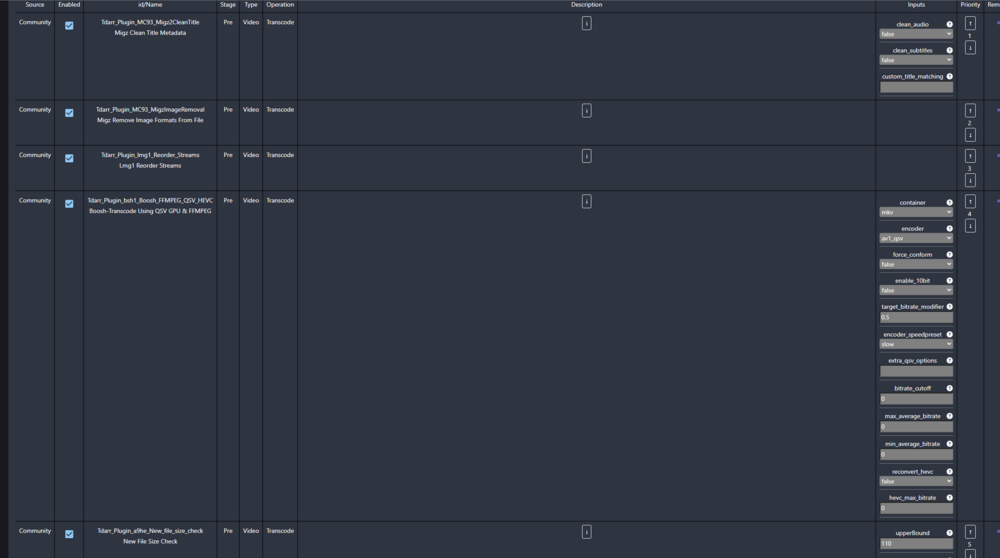
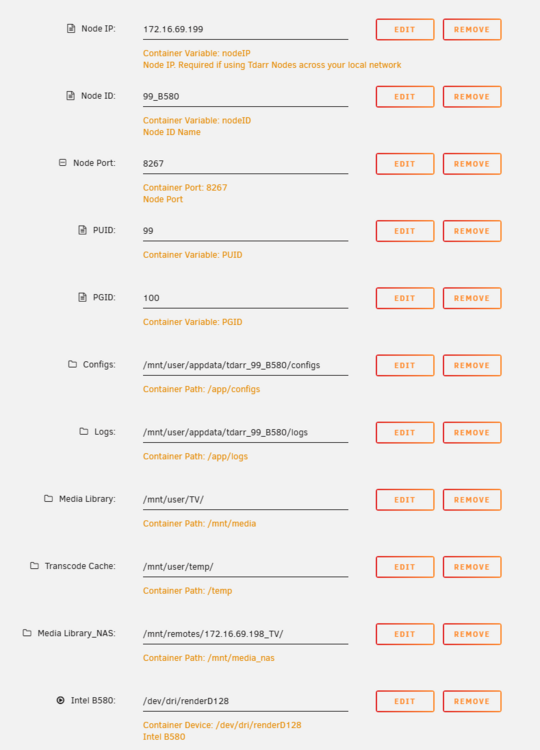
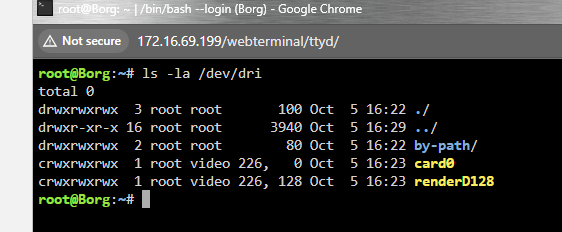
Uninstalled an old dying 1660 TI(encoding to x265) and installed a Intel Arc B580(encoding to AV1). Followed instructions from : https://github.com/plexguide/Unraid_Intel-ARC_Deployment?tab=readme-ov-file#adding-the-intel-arc-gpu-to-the-plex-docker-template Unable to get that flow to work and switch to "TDarr_plugin_d5d3_iiDrakeii_FFMPEG_NVENC_Tierd_MKV" and still unable to encode to AV1. Unraid 7.1.4 AMD Ryzen 7 3700X 8-Core Memory: 64 GiB DDR4 Battlemage G21 [Arc B580]
-
Plex was doing a full scan nightly of all libraries, causing it to log the scans to the NAS. TY for all your help trurl and JorgeB.
-
220G this morning. borg-diagnostics-20250312-0605.zip
-
All dockers that map remote NAS attached. Docker Run.txt
-
Application is full again. Was not Jellyfin causing the issue as I expected. Maybe Plex... I can't unmount the NAS (172.16.69.198) as it has a library of Movies and TV that are used by Plex. Anything else I can do, besides increase the log size? borg-diagnostics-20250311-0802.zip
-
I disabled a docker I think that may be causing the issues. We'll find out tomorrow morning. Thanks for all your help trurl.
-
Docker disabled and restarted. borg-diagnostics-20250309-2116.zip
-
//172.16.69.198/TV is my Synology NAS that has my Archived TV collection. I can restart it, but disconnecting will be an issue. It may sound like Sonarr is scanning the whole collection at night. I just need to know how to stop the logging on it.
-
I'm not using CIFS, so how do I disable this from logging?
-
0 /var/log/pwfail 0 /var/log/swtpm/libvirt/qemu 0 /var/log/swtpm/libvirt 0 /var/log/swtpm 0 /var/log/samba/cores/rpcd_lsad 0 /var/log/samba/cores/samba-dcerpcd 0 /var/log/samba/cores/winbindd 0 /var/log/samba/cores/nmbd 0 /var/log/samba/cores/smbd 0 /var/log/samba/cores 8.0K /var/log/samba 0 /var/log/plugins 0 /var/log/pkgtools/removed_scripts 0 /var/log/pkgtools/removed_packages 0 /var/log/pkgtools 4.0K /var/log/nginx 0 /var/log/nfsd 0 /var/log/libvirt/qemu 0 /var/log/libvirt/ch 4.0K /var/log/libvirt 128M /var/log root@Borg:~#
-
Log is full again. borg-diagnostics-20250308-1227.zip
-
I restarted. We'll see tomorrow.
-
Log less than 5% this morning. Such weird behavior. borg-diagnostics-20250307-0813.zip
-
NFS turned off.
-
0 /var/log/pwfail 0 /var/log/swtpm/libvirt/qemu 0 /var/log/swtpm/libvirt 0 /var/log/swtpm 0 /var/log/samba/cores/rpcd_winreg 0 /var/log/samba/cores/rpcd_classic 0 /var/log/samba/cores/rpcd_lsad 0 /var/log/samba/cores/samba-dcerpcd 0 /var/log/samba/cores/winbindd 0 /var/log/samba/cores/nmbd 0 /var/log/samba/cores/smbd 0 /var/log/samba/cores 8.0K /var/log/samba 0 /var/log/plugins 0 /var/log/pkgtools/removed_scripts 0 /var/log/pkgtools/removed_packages 0 /var/log/pkgtools 4.0K /var/log/nginx 0 /var/log/nfsd 0 /var/log/libvirt/qemu 0 /var/log/libvirt/ch 4.0K /var/log/libvirt 176K /var/log
-
I'll have to check tomorrow. I already cleared the log out of habit.
-
Logs full again. Seems to happen overnight. borg-diagnostics-20250306-0811.zip
-
Ok. I'll remove that and clear the logs. Updates to follow. TY JorgeB
-
The log is full this morning. TY Dustin borg-diagnostics-20250305-0838.zip
-
I'll look again tomorrow morning. TY
-
Diag after a restart and about 5 minutes. borg-diagnostics-20250304-1444.zip
-
Log only at 5% full ATM. borg-diagnostics-20250304-1433.zip


