杨克强
Members
-
Joined
-
Last visited
-
自己回答吧,新建虚拟机时 Hyper-V 改为否即可
-
Virt-Manager 了解下,虚拟机磁盘记得选 qow2 类型
-
CPU i5-12600K,尝试过 6.9.2 6.10.0 RC2,RC3,都会卡死 char device redirected to /dev/pts/3 (label charserial0) qxl_send_events: spice-server bug: guest stopped, ignoring KVM internal error. Suberror: 3 extra data[0]: 0x000000008000002f extra data[1]: 0x0000000000000020 extra data[2]: 0x0000000000000daa extra data[3]: 0x0000000000000009 RAX=0000000000000000 RBX=0000000000000000 RCX=0000000040000070 RDX=0000000000000000 RSI=0000000000000000 RDI=ffffab0396b88010 RBP=ffff870085eb8740 RSP=ffff870085eb86a0 R8 =00000000ffffffff R9 =0000000000000000 R10=00000000ffffffff R11=0000000000000000 R12=00000000a8500156 R13=0000000000000046 R14=0000000000000000 R15=0000000000000000 RIP=fffff80204bd8d7c RFL=00000046 [---Z-P-] CPL=0 II=0 A20=1 SMM=0 HLT=0 ES =002b 0000000000000000 ffffffff 00c0f300 DPL=3 DS [-WA] CS =0010 0000000000000000 00000000 00209b00 DPL=0 CS64 [-RA] SS =0018 0000000000000000 ffffffff 00c09300 DPL=0 DS [-WA] DS =002b 0000000000000000 ffffffff 00c0f300 DPL=3 DS [-WA] FS =0053 000000006bcd0000 00007c00 0040f300 DPL=3 DS [-WA] GS =002b ffff870085e8e000 ffffffff 00c0f300 DPL=3 DS [-WA] LDT=0000 0000000000000000 ffffffff 00c00000 TR =0040 ffff870085e94b40 00000067 00008b00 DPL=0 TSS64-busy GDT= ffff870085e9bc00 0000006f IDT= ffff870085e9bc70 00000fff CR0=80050031 CR2=000002b03e548000 CR3=00000000001aa000 CR4=001506f8 DR0=0000000000000000 DR1=0000000000000000 DR2=0000000000000000 DR3=0000000000000000 DR6=00000000ffff0ff0 DR7=0000000000000400 EFER=0000000000000d01 Code=25 88 61 00 00 b9 70 00 00 40 0f ba 32 00 72 06 33 c0 8b d0 <0f> 30 5a 58 59 c3 cc cc cc cc cc cc 0f 1f 84 00 00 00 00 00 48 81 ec 38 01 00 00 48 8d 84
-
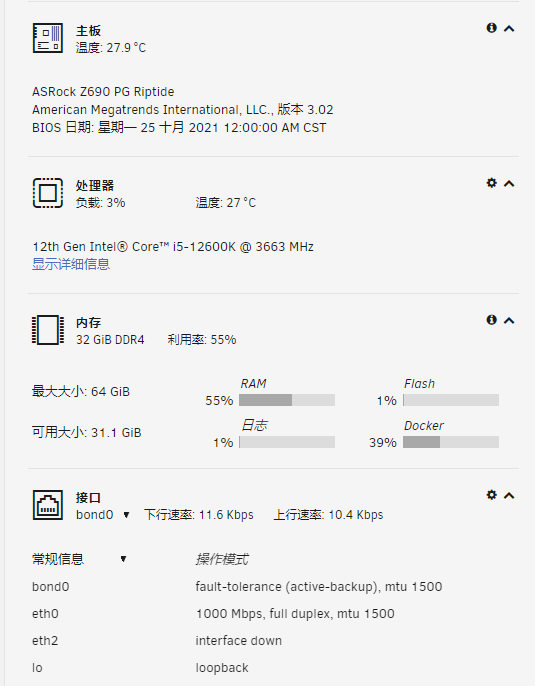
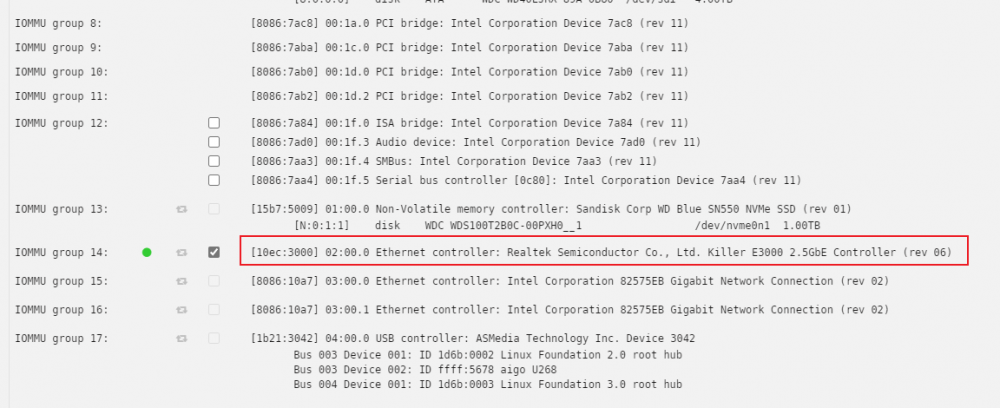
i build with ASRock Z690 PG Riptide,just RMB 1499,about 208.5€,provide 8 SATA3 + 3 M.2 + 1 PCIe 5.0 + 1 PCIe 4.0 + 3 PCIe 3.0 + 2.5G NIC
-
NIC are working,i don't the measuring idle power draw,i set 8 4T HHD,1 Nvme,power draw maby a little high 。
-
还是不行
-
I use the 12600K + ASRock Z690 PG Riptide as solution. ASRock Z690 PG Riptide has 8 SATA3 + 3 M.2 + 1 PCIe 5.0 + 1 PCIe 4.0 + 3 PCIe 3.0 + 2.5G Eth , just RMB 1499 ,about $236.5, so cool !!!
-
感谢大佬回复,我这就升级系统测试
-
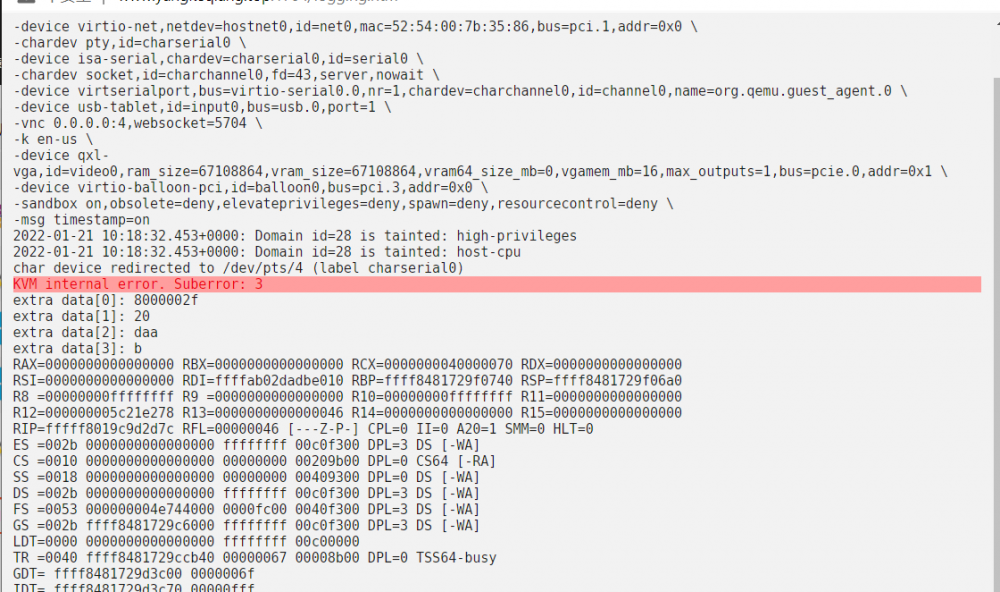
系统版本:6.9.2 ISO: 尝试过 Windows Server 2008 Windows Server 2016 BIOS: SeaBIOS 机器:尝试过 Q35-5.1 i440fx-5.1 问题表现: 下列问题为不定期出现,但每台虚拟机均有。 1、安装界面输入密码的地方卡死; 2、添加 AD 域功能卡死; 3、AD 域添加新林 卡死; 表现形式: VNC 直接卡住,过一会,机器显示“已暂停”,只能强制关机。 日志信息: 请大佬答疑解惑下,谢谢
-
我的应用场景是在公司远程家里的电脑,所以SMB 失效的,从文件同步服务走也可以,但是相比 RDP 协议的剪贴板,还是不太方便
-
RT,一直用的 RDP ,切到 Unrid 后,不知道怎么才能实现复制粘贴和文件共享了
-
现有 Unraid 是 I5-8500 32G 的,CPU 总是爆满,想把手里的台式机换成Unraid ,配置如上,AMD 的套装是否靠谱?咨询各位大佬,目前跑的服务如下图所示: