Reacher
Members
-
Joined
-
Last visited
-
@trurl That's it. Thanks!
-
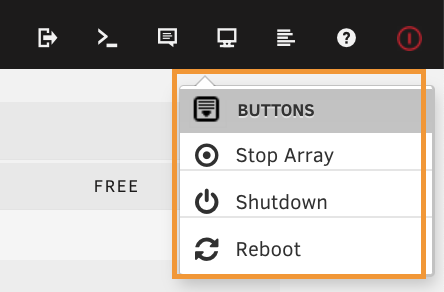
I feel silly asking this because I've figured it out before. However, I just started a new project server and can't remember where / how to add the UI option to Shutdown / Restart etc that I have highlighted in my attached screengrab. Thanks in advance! Chris

-
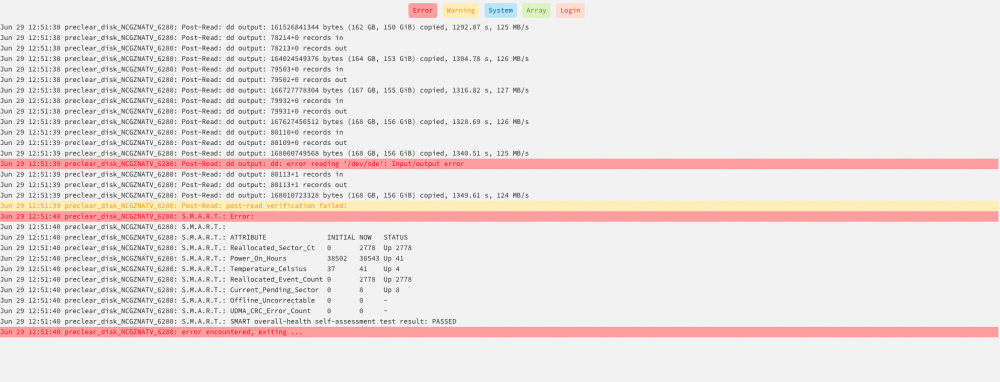
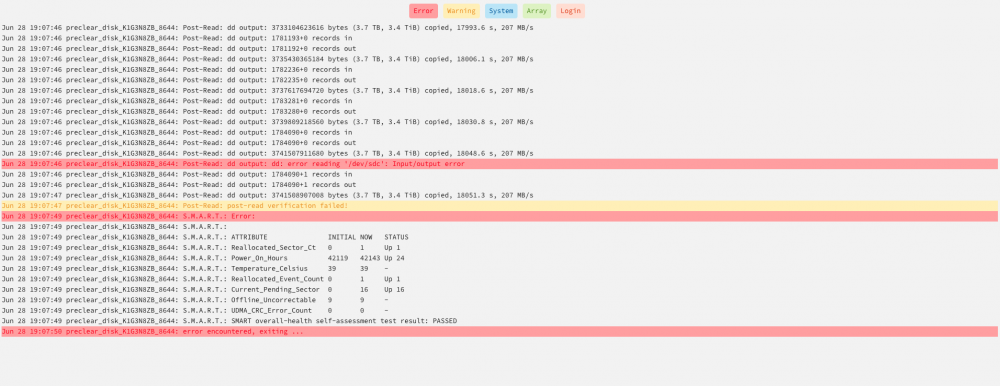
Hi! I precleared 4 WD Yellow 6 TB drives via this plugin. 2 Failed and 2 passed. Both of the failed drives pass SMART and failed on Post Read Verification. I've read around that it could be bad RAM, but since 2 of the 4 drives did not fail on that error I'm curious if it's something else. I also read that doing the preclear on one drive at a time can help. Any suggestions would be greatly appreciated! Screenshots of Output attached. Thanks! Chris
-
@dlandon You are a Gentleman (or Woman) 😀and a Scholar. Thanks so much! Chris
-
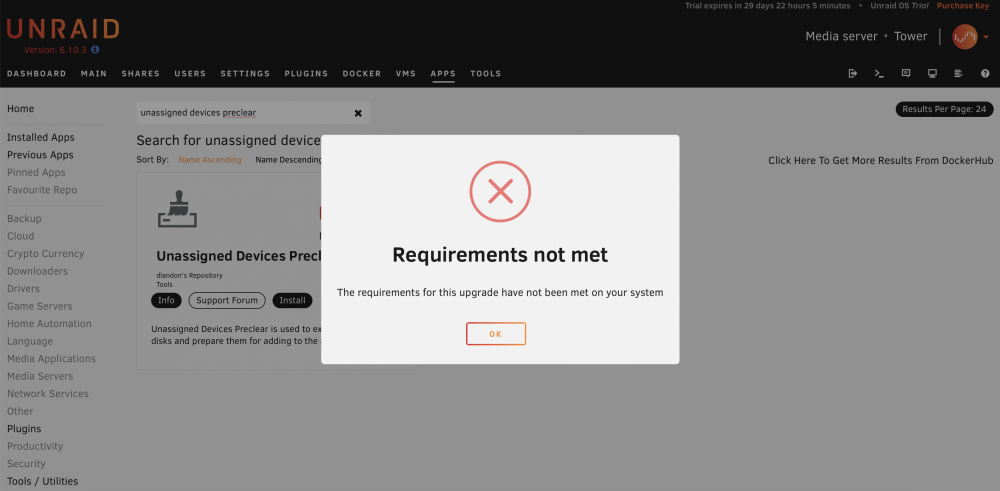
Hi! I have an existing Unraid server and am working on setting up a back up. I'm using used WD Yellow Enterprise drives and want to pre-clear them. However, when I go to install the UD Preclear Plugin I get the attached error calling out that Requirements Not Met. I originally thought that I needed to upgrade to the latest version of Unraid. I did this on my "backup" server and am still getting this error. Also getting it on my original machine running 6.9.2. Any help would be greatly appreciated. Thanks so much! Chris
-
Awesome idea. Unfortunately I can’t get the machine to boot past the iDrac initiation.
-
Hi All! Sorry for long post. tldr I reset my bios via iDrac and now computer won’t post past memory check. I’m running a Dell T130 with 32 GB of Ram and 4 6 TB HDD (2 parity) along with 1 - 1 GB Cache SSD. I ran an upgrade on my home assistant VM today and almost immediately got a kernel panic. No matter what I did (restart etc) I could not get beyond Kernel panic. The error that I was getting lead me to believe that my USB was going bad, so I formatted it and re-downloaded Unraid. I could not get my server to see the OS on the USB despite it being there. I tried manually selecting and rearranging the boot order. I ended up resetting the bios via iDrac and now it will not boot beyond “Memory Check Done” I tried taking all but 1 ram dimm out and restarting and still got same out put. I also tried moving NVRAM pin on mother board as well as removing the battery. Any other thoughts? I’m afraid I broke the mother board. Thanks Chris
-
My server locked up last night with a Kernel Panic. I restarted it and ran the entire Memtest program and it showed no errors. Can anyone glean anything from the logs for that timeframe? Feb 5 21:06:34 Quint kernel: BUG: Bad page map in process php-fpm pte:ffff88813a7d8da8 pmd:2a388c067 Feb 5 21:06:34 Quint kernel: addr:000014649f704000 vm_flags:00000071 anon_vma:0000000000000000 mapping:ffff8881079d97a0 index:24c Feb 5 21:06:34 Quint kernel: file:LC_COLLATE fault:shmem_fault mmap:shmem_mmap readpage:0x0 Feb 5 21:06:34 Quint kernel: CPU: 0 PID: 21910 Comm: php-fpm Tainted: G W 5.10.28-Unraid #1 Feb 5 21:06:34 Quint kernel: Hardware name: Dell Inc. PowerEdge T130/06FW8M, BIOS 2.12.0 05/24/2021 Feb 5 21:06:34 Quint kernel: Call Trace: Feb 5 21:06:34 Quint kernel: dump_stack+0x6b/0x83 Feb 5 21:06:34 Quint kernel: print_bad_pte+0x1b7/0x1d1 Feb 5 21:06:34 Quint kernel: vm_normal_page+0x71/0x8b Feb 5 21:06:34 Quint kernel: unmap_page_range+0x2e3/0x648 Feb 5 21:06:34 Quint kernel: unmap_vmas+0x6c/0x9a Feb 5 21:06:34 Quint kernel: ? lru_add_drain_cpu+0x23/0xf8 Feb 5 21:06:34 Quint kernel: exit_mmap+0xb5/0x155 Feb 5 21:06:34 Quint kernel: __mmput+0x3b/0xcf Feb 5 21:06:34 Quint kernel: do_exit+0x3b4/0x8eb Feb 5 21:06:34 Quint kernel: do_group_exit+0x8e/0x8e Feb 5 21:06:34 Quint kernel: __x64_sys_exit_group+0xf/0xf Feb 5 21:06:34 Quint kernel: do_syscall_64+0x5d/0x6a Feb 5 21:06:34 Quint kernel: entry_SYSCALL_64_after_hwframe+0x44/0xa9 Feb 5 21:06:34 Quint kernel: RIP: 0033:0x1464a3db9ac6 Feb 5 21:06:34 Quint kernel: Code: Unable to access opcode bytes at RIP 0x1464a3db9a9c. Feb 5 21:06:34 Quint kernel: RSP: 002b:00007fff6fd7c638 EFLAGS: 00000246 ORIG_RAX: 00000000000000e7 Feb 5 21:06:34 Quint kernel: RAX: ffffffffffffffda RBX: 00001464a3eb8820 RCX: 00001464a3db9ac6 Feb 5 21:06:34 Quint kernel: RDX: 0000000000000000 RSI: 000000000000003c RDI: 0000000000000000 Feb 5 21:06:34 Quint kernel: RBP: 0000000000000000 R08: 00000000000000e7 R09: ffffffffffffff78 Feb 5 21:06:34 Quint kernel: R10: fffffffffffff50b R11: 0000000000000246 R12: 00001464a3eb8820 Feb 5 21:06:34 Quint kernel: R13: 000000000000000b R14: 00001464a3ec1328 R15: 0000000000000000 Feb 5 21:06:34 Quint kernel: Disabling lock debugging due to kernel taint Thanks in advance! CH
-
I actually solved this one on my own. After resetting my Keychain and SMB Cache, I realized I hadn't restarted my Unraid server since I made the change. Restarted it and everything is well in the world. Sometimes the explanation is incredibly simple. 🤦🏻♂️
-
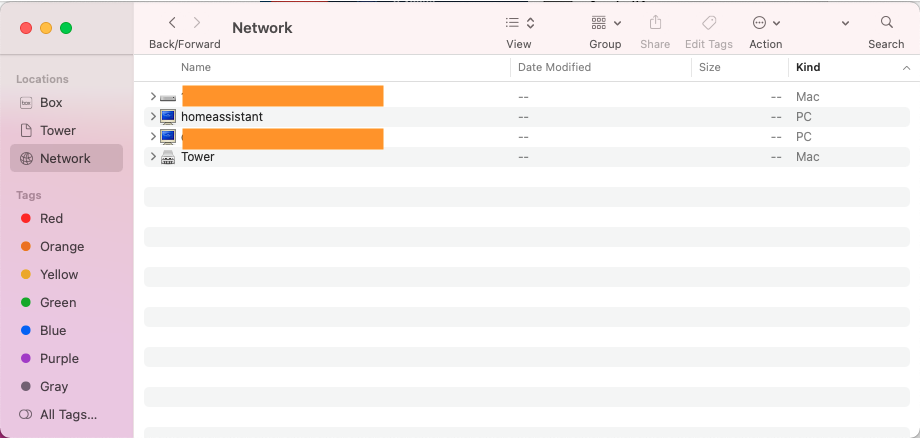
Hi! First time question here that I'm really banging my head against the wall over. I set up my server with default names, but changed the server name later on. My Macs are showing the original "Tower" with a server icon in network along with the new name with just a blue PC icon. Additionally, "Tower" is showing on the left rail and I can't get OSX to update it. I reset my keychain and it's still showing both. Has anyone had this problem and know how to fix it in OSX? Running 11.6 Attached screenshot for reference. Top entry is another Mac client and third entry down is the newly named server. These are both coming up without being mapped (as far as I can tell). Thanks in advance! Chris