Styx
Members
-
Joined
-
Last visited
-
Thanks JorgeB! Should I start the array with the failed disk mounted or the new disk mounted?
-
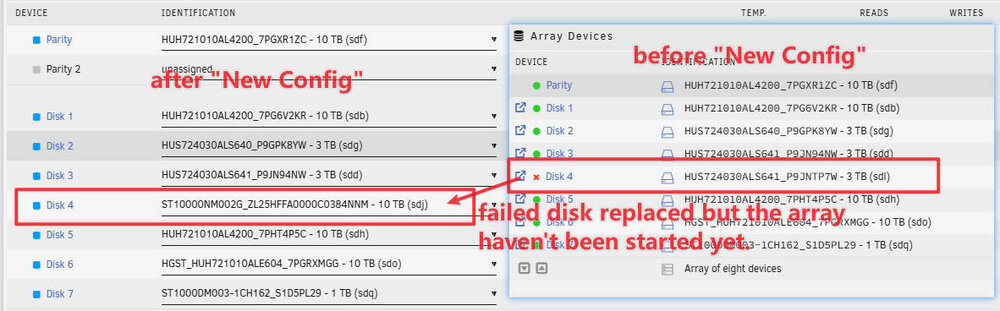
I have a disk failed and was trying to rebuild it. But I accidentally chose "New Config" and now all disks appears as "New". Yes I read the warning on the New Config page, after I proceed. Is there any way to rebuild the failed disk / recover the data? PS: The array have not been started after New Config, so the parity disk and all other data disks are good.
-
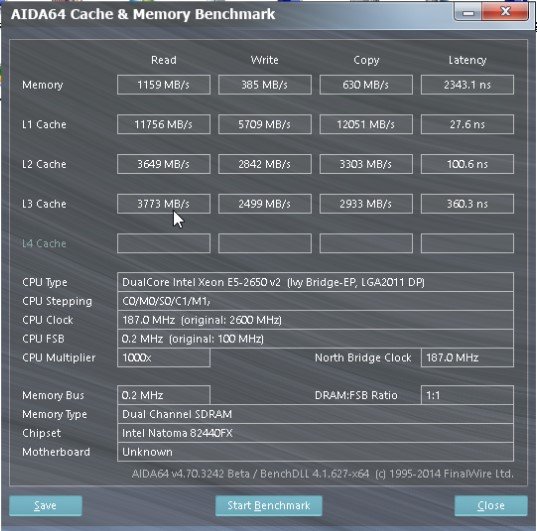
Hi there, I ran "AIDA64 Cache & Memory Benchmark" in the Win10 installed in the VM. The benchmark result shows a very poor read / write performance of Memory and Cache (see attached). The CPU Clock and FSB are also very low. Is there any way to tune up the performance? Host Configuration: CPU: E5-2650v2, 2.6G Memory: 64G DDR3 1600MHz Intel VT-x: Enabled VM Configuration: CPU: Host Passthrough, 2 cores, 4 threads Memory: 8G Machine: i440fx-5.1 BIOS: SeaBIOS Hyper-V: Yes Disk: 30GB on SSD