





JstatServer
Members
-
Joined
-
Last visited
-
Unfortunately my system is now hanging on the reboot screen. I still had the log open which is giving me this over and over in between still copying files. Feb 25 09:42:22 Tower emhttpd: shcmd (39486): /usr/sbin/zfs unmount -a Feb 25 09:42:22 Tower emhttpd: shcmd (39487): umount /mnt/user Feb 25 09:42:22 Tower root: umount: /mnt/user: target is busy. Feb 25 09:42:22 Tower emhttpd: shcmd (39487): exit status: 32 Feb 25 09:42:22 Tower emhttpd: shcmd (39488): rmdir /mnt/user Feb 25 09:42:22 Tower root: rmdir: failed to remove '/mnt/user': Device or resource busy Feb 25 09:42:22 Tower emhttpd: shcmd (39488): exit status: 1 Feb 25 09:42:22 Tower emhttpd: shcmd (39491): /usr/local/sbin/update_cron Feb 25 09:42:22 Tower emhttpd: Retry unmounting user share(s)...
-
I will try that, however I added the mover tuner plugin after this problem started to see if there was something I could identify through the plugin. So I suspect it will not be different.
-
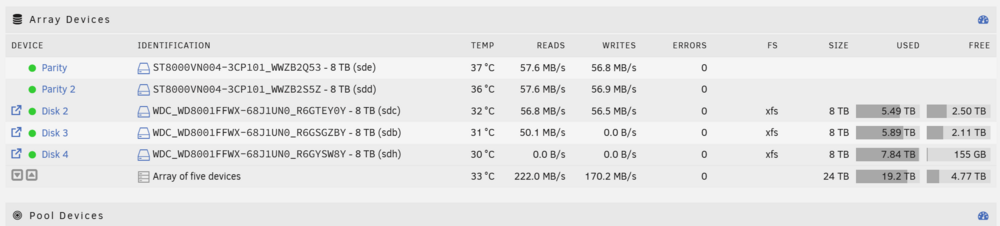
Sure this is the entry I am seeing in the log. It is a continuous list of these entries as it moves files. Yesterday the log was showing the path as /mnt/disk2 and the read/write confirmed the data was moving between disk 2 and 4, now it is showing data moving from disk 3 to 2. which I can confirm because the available space and size of the share on each drive is changing. Feb 25 09:14:39 Tower move: move: /mnt/disk3/assets/3D/Quixel/Megascans/Downloaded/3d/Cement_Curbs_sepxV_8K_3d_ms/Curb_Cement_Medium_Grey_Dirty_sepxV_8K_Albedo.jpg Success Feb 25 09:14:40 Tower move: move: /mnt/disk3/assets/3D/Quixel/Megascans/Downloaded/3d/Cement_Curbs_sepxV_8K_3d_ms/Curb_Cement_Medium_Grey_Dirty_sepxV_8K_Bump.jpg Success Feb 25 09:14:40 Tower move: move: /mnt/disk3/assets/3D/Quixel/Megascans/Downloaded/3d/Cement_Curbs_sepxV_8K_3d_ms/Curb_Cement_Medium_Grey_Dirty_sepxV_8K_Cavity.jpg Success tower-diagnostics-20260225-1213.zip
-
Fairly new to unraid here. I recently copied roughly 7 tb of data using krusader from an unassigned device to a share. Now I see read on one drive in the array and write on another drive. The log confirms that files are moving from one drive to another. So far I have seen drive 2 move assets to drive 3 until drive 3 is full, then it begins moving assets from drive 2 to drive 4 until drive 4 is full. Now I am seeing it move assets from drive 3 back to drive 2. Any ideas why this would be happening? The share I copied to is also synchronized to another off site server using resilio sync, but has reached 100% sync so no new files should be overwritten through that. No other docker apps are running. My current configuration is unraid 7.0.1 2x8tb parity 3x8tb array (drive 2,3,4, drive 1 slot is empty, I don't remember why I did this) 1x8th unassigned (will be added to array)
