





keitaro26
Members
-
Joined
-
Last visited
Everything posted by keitaro26
-
I did not run one since replacing the motherboard and CPU. When it was crashing prior, I did run one with no errors.
-
Got the new board installed and was running a parity check for many hours before it soft locked. My dockers are still accessible, but I can't get to the main interface. Here is the syslog, can someone interpret for me? syslog-192.168.1.110.log
-
Still crashing with everything turned off and the graphics cards removed. Seems likely that its MB or CPU, so I am going to swap those out for a spare Intel set I have and see if that fixes things. This is the first time I am changing my MB and CPU on Unraid, any gotcha's I should be aware of? it will be a i5-12600k and a ASROCK Z690 PRO RS I am testing with.
-
Just crashed. Here is the log. I don't see anything helpful in it. syslog-192.168.1.110.log
-
I've enabled the syslogs. I will reply with them when it crashes next.
-
I am hoping someone can help me in the right direction. Recently my server has been crashing every day. It doesn't seem to follow a logical process; sometimes it will be online nearly 24 hours, sometimes it crashes in 20 minutes. I've tried disabling all my docker containers, reinstalling my plugins, but nothing seems to help. I've attached my diagnostics, but I am not really sure what I am looking for in them. magi-diagnostics-20240804-0045.zip
-
Good to know, I will definitely rename them. As for the added authenticated origin stuff, adding that had no effect on the error.
-
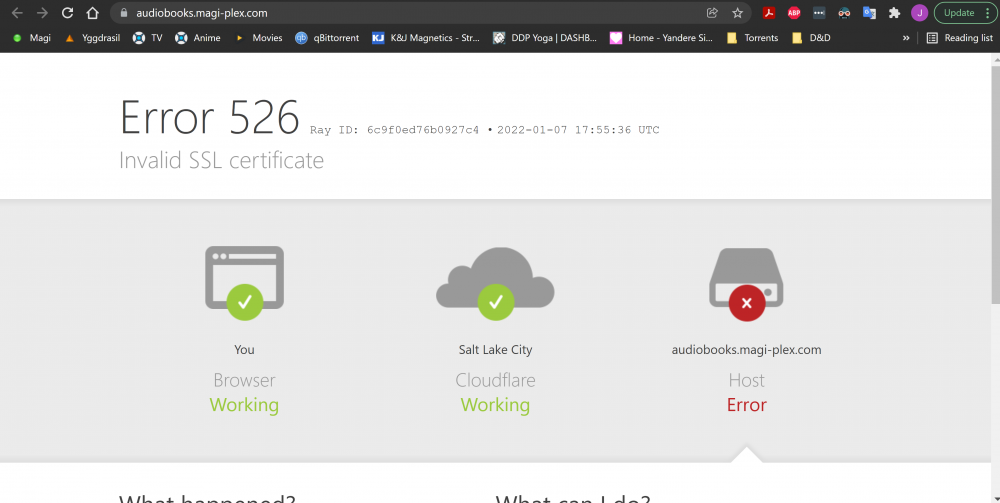
I do have both a cert and a key, and I have set them to the correct path in the code: server { listen 443 ssl; server_name audiobooks.magi-plex.com; access_log /var/log/nginx/audiobookshelf.access.log; error_log /var/log/nginx/audiobookshelf.error.log; ssl_certificate /config/magi-plex.com.pem; ssl_certificate_key /config/magi-plex.com.key; location / { proxy_set_header X-Forwarded-For $proxy_add_x_forwarded_for; proxy_set_header X-Forwarded-Proto $scheme; proxy_set_header Host $host; proxy_set_header Upgrade $http_upgrade; proxy_set_header Connection "upgrade"; proxy_http_version 1.1; proxy_pass http://192.168.1.110:13378; proxy_redirect http:// https://; } } But I get the following when I navigate to my url: Can you tell what I am doing wrong?
-
I have looked through those discussions, but no luck. I think the issue is the part of the code for the SSL, but I'm not entirely sure. I'll see about opening a new issue/discussion on github, but if anyone here has ideas, it's much appreciated.
-
I cannot seem to get the nginx proxy manager settings to work. I am using a Cloudflare DNS with strict SSL, meaning I need to use a custom cert provided by Cloudflare. When I set up the proxy host, I can use my browser to navigate to ABS just fine without using the code provided on the github, but the app does not connect to the server. Adding the code from the github makes Cloudflare say there is an invalid cert, and I can't figure out how to correct that. Any help would be much appreciated.
