




Skip to content
View in the app

A better way to browse. Learn more.

Unraid

A full-screen app on your home screen with push notifications, badges and more.

To install this app on iOS and iPadOS
  1. Tap the Share icon in Safari
  2. Scroll the menu and tap Add to Home Screen.
  3. Tap Add in the top-right corner.
To install this app on Android
  1. Tap the 3-dot menu (⋮) in the top-right corner of the browser.
  2. Tap Add to Home screen or Install app.
  3. Confirm by tapping Install.

Jakeklem

Members
  • Joined

  • Last visited

  1. So no chance of fixing the existing?
  2. From the GUI, I've done this before and it just shows this with an exit message after running a while. Also tried to run in terminal with Upper and lowercase "V". Similar result and I'm not noticing any changes at this time.
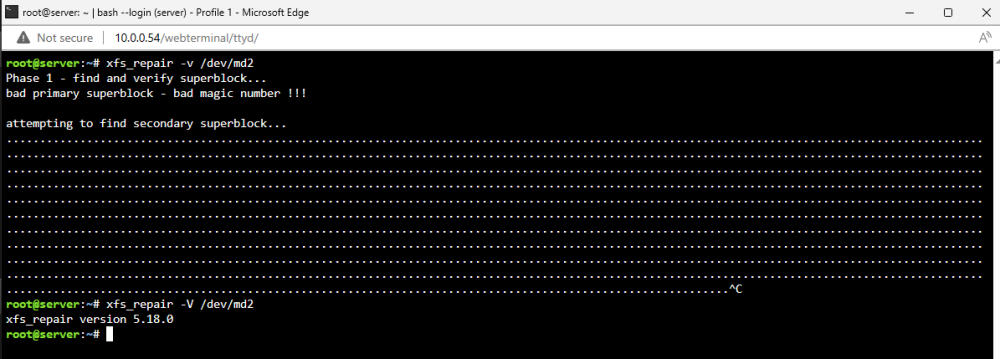
  3. I believe this began after a power loss. I've attempted fixing it through hardware reconfiguration by changing the disk to 2 different known working drives, using a different SATA cable, and using a different SATA port. I've also attempted to fix the issue by xfs_repair both through the GUI as well as command line. I followed the steps I found in these threads: I could use any help at this point and it's very much appreciated! server-diagnostics-20231025-1339.zip

Account

Navigation

Search

Search

Configure browser push notifications

Chrome (Android)
  1. Tap the lock icon next to the address bar.
  2. Tap Permissions → Notifications.
  3. Adjust your preference.
Chrome (Desktop)
  1. Click the padlock icon in the address bar.
  2. Select Site settings.
  3. Find Notifications and adjust your preference.
