






BSGNETS
Members
-
Joined
-
Last visited
Everything posted by BSGNETS
-
-
Hello, Can someone help me change my profile name from hbxnets to BSGNETS? Please! Thanks, Brent
-
I run XCP-ng as my main hypervisor. To me the backup options that are available using Xen Orchestra community edition, are very useful it has saved me many hours of work. Unraid is very solid so don't get me wrong. I've just started using XCP-ng before it was XCP-ng when ZenServer was still free.
-
Checked my servers this morning and all were good, thanks for the update.
-
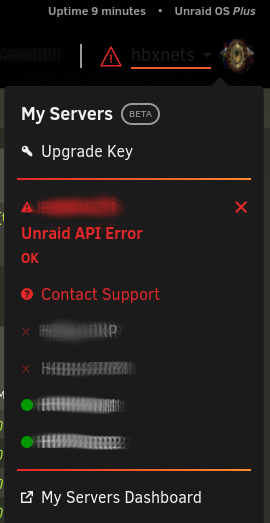
Look like the error comes and goes. I have 4 different servers on RC5 and it's random. I haven't noticed any other errors or problem just the API Error.
-
Looks like the issue resolved itself. I am not getting the API Error anymore.
-
Anyone else ever seen this error. I got after I upgraded to RC5, but notices on one of my other servers that has been upgraded since RC5 came out. Thanks, Brent
-
Hello Everyone, I wanted to give a big thanks to all that are involved with Unraid. I have been running a Plex server since Plex started back in 2008. I used Windows Server to start with. Then migrated to Ubuntu, the back to Windows Server. Been doing a lot of reading on Unraid. I have to said Unraid is well worth the money. It just works. The migration from Windows Server to Unraid was very painless and quicker than I had planned. Everyone's had work on this product is very much appreciated. I love it.



