clem-fandango
Members
-
Joined
-
Last visited
-
Ok so I powered on the server with SATA disconnected and power connected. Got into BIOS, obviously not detected. As I continue to boot to Unraid I plug in the SATA. Disk now visible in Unraid. A data rebuild has automatically kicked off so I'm going to leave it for the time being.
-
Thanks @JorgeB. Have tried in the past with no success. Have just tried again now, server doesn't even boot. Sits on the splash screen, doesn't accept keyboard input to get into the BIOS.
-
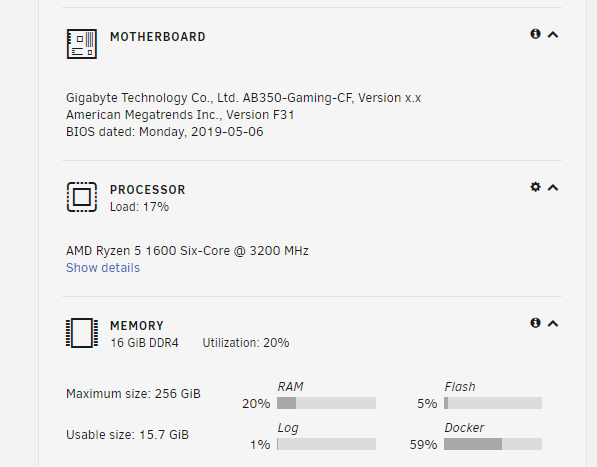
Hi all, BIOS or unraid not recognising disk. Formatted to xfs using gparted using a different linux workstation. Also visible on a windows workstation. Drive is a WD white, model WD140EDFZ. I shucked it from an enclosure and have tried putting electrical tape over the 3 pin but no success. Attached diagnostics. Have tried using this disk in the past - https://forums.unraid.net/topic/119375-692-unraid-wont-boot-with-new-hdd-attached/#comment-1091601 and am trying it again due to replacing a failed 8TB disk. Server specs listed in that post. Have swapped around SATA and power cables, other disks continuing to work throughout. Open to any ideas or suggestions. Thanks in advance athena-diagnostics-20220826-1329.zip
-
Funnily enough, it was initially connected via a molex to SATA adapter. I've tried switching them around so different disks have a different power connector. The server does now boot, but the disk isn't recognised in BIOS or unraid. I'll try electrical tape and test
-
thanks for the reply @Hoopster. Haven't got any tape to hand but will order some and update.
-
Hi all, still trialling the software, hopefully that isn't this limitation. I have 4 HDDs attached currently, 1 parity, 3 data. I'm trying to remove a 1TB data and add a 14TB drive (WD140EDFZ). I've been using this drive in an external enclosure for a couple of years. When I power on the server, it won't boot beyond the mobo splash screen. Keyboard incidently won't work at this point so can't enter BIOS. Thought it may be a power delivery issue but have tried with just this one drive attached and it won't boot. I've tried formatting the drive with both xfs and ntfs on a single partition and is usable from both my windows pc and a separate linux server I have. Any help greatly appreciated Attached diagnostics and specs athena-diagnostics-20220131-1538.zip