IronicRhetoric
Members
-
Joined
-
Last visited
-
I just created the NAS not 2 weeks ago, so I've pretty much been on the dashboard everyday. It took me a while to edit and move all 40TB over so that's why I was just not doing the parity over the weekend. There were no SMART warnings before I started the parity. Also, as soon as the parity finished I installed all the recommended plugins in the list below.
-
Yep there is a SMART warning for the disk. In fact, it is now unmountable. I put 3 other drives in (1 8TB and 2 4TB) and all three has SMART warnings, though they were older drives. All three of those have SMART warning. I can buy another HDD for the rebuild. lifestream-diagnostics-20220112-1757.zip
-
Ahh... didn't realize you needed the entire zip file. lifestream-diagnostics-20220111-1816.zip
-
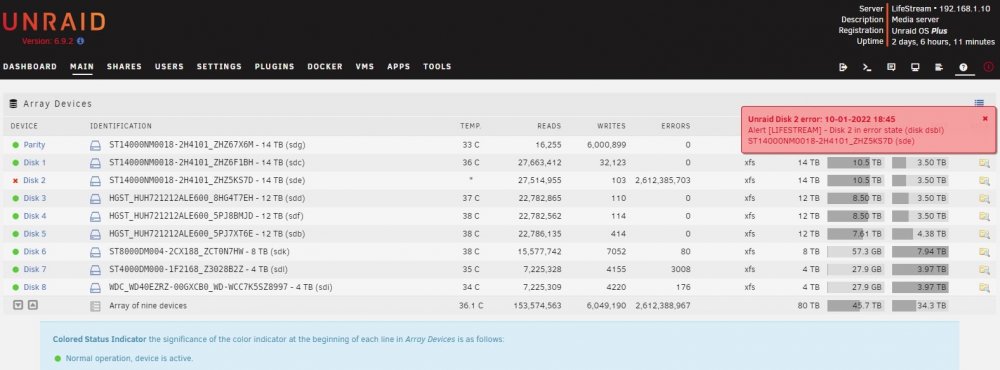
I've just built my first server. Everything installed and all of my files transferred just fine. Because I have 40TB of files to transfer I decided to create the parity once I was complete as it would slow down transfer rate or so I read. Anyway, over the weekend I started the parity and unfortunately it somehow found 2 billion errors (pic attached). I figured something must have gone horribly wrong (maybe lost connection for a minute) for it to find that many errors. The problem is, Unraid doesn't really provide any solutions and I have been looking around and the only thing I found was to change the cable. I changed the cable but nothing. I then ran some diagnostics which I'm not familiar with. Can someone point me in the correct direction to fix this. Or do I just need another HDD? This is a new 14TB HDD by the way. I think I've attached everything that I've seen asked for in other threads. ST14000NM0018-2H4101_ZHZ5KS7D-20220111-1753.txt ST14000NM0018-2H4101_ZHZ5KS7D-20220111-1839 disk2 (sdd) - DISK_DSBL.txt syslog.txt