ABHplex
Members
-
Joined
-
Last visited
-
Yeah I think that is what has been fucking me over, I am trying to use the inbuilt VPN feature of Qbittorrentvpn. I though I need to do something from that link but I think I was in the wrong place. I'm not using a VPN container just trying to use the inbuilt PIA feature. What settings do I need to get the Web UI to work?
-
Yes, I've had it running for about half a year now and now wanted to get the vpn running. I have added VPN_INPUT_PORTS and VPN_OUTPUT_PORTS, I have the config file inside the container and I even have the VPN working but I can't get the Web UI to work.
-
Do you know how much I need to do to setup everything for qbittorrent to use a PIA vpn while also being able to open the web UI?
-
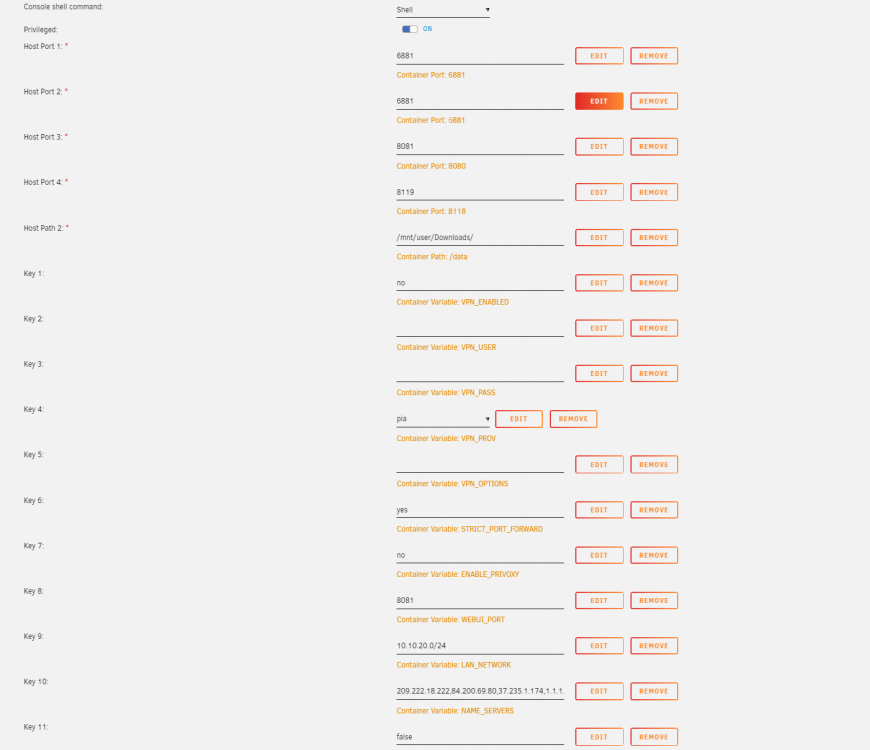
Helo guys, I've been using qBittorrentvpn docker for some time but I wanted to set up a PIA vpn up on it, but it has been a head scratcher for me This is the setup I have right now (the username and password for my PIA account have been taken out) and I have gotten it to work by just setting the VPN_ENABLED as yes... However I have then been unable to connect to the Web UI. I was reading https://github.com/binhex/documentation/blob/master/docker/faq/vpn.md Q24 and trying to follow that but I just don't understand what I'm supposed to be doing? I can't find the VPN_INPUT_PORTS variable in the normal setup and even if I did I am not quite sure how I supposed to set this up.