





ThaSpike
Members
-
Joined
-
Last visited
-
Hi, Been fighting with this for awhile. I'm trying to have two W11 VMs running on my server. Both have there own SSD. As long as I keep them on their virtual graphics and no other direct hardware passthrough everything is fine. As soon as I start giving one of them a dedicated GPU or other direct hardware access, the VM tab goes empty, as seen in attached image. If I go into setting, disable VMs and delete the libvirt.img it works again. As in, the add folder, add VM... buttons appear again, the VMs are gone. I can re-add my VMs with the virtual GPU and no other hardware. But as soon as I try to passthrough something...... It used to work flawlessly until a while ago, but since then this always happens when I try to recreate them. Thanks for any help.

-
Build a new Unraid server. Used this LSI 9201-8i RAID Controller Card as the controller for my drives, my mainboard only has 4 SATA ports, not enough. I get declining and horrible transfer speeds out of this card. When I first booted up the system and started transferring files over to the array I got about 55 MBytes/s speeds. This was from a spinning drive on one of the SATA ports on my MoBo to the spinning array connected to the LSI Controller. This was already very disappointing. Since yesterday that speed has gone down to 28 MBytes/s, with the server doing nothing else but transferring large files. My MoBo (Intel® B760 Chipset) has 1 x PCIe 5.0 x16 slot and one 1 x PCIe 4.0 x16 slot. I tried the card in both slots with no difference. I've even put a big fan directly below the Controller to see if it was a temp related problem, don't see any difference. I've checked the firmware on the card, latest. And it's set to IT mode. Did I get the wrong card? Did I get a bad card? What is wrong here? If I got the wrong card, please advise me on a replacement. Any help is very much appreciated.
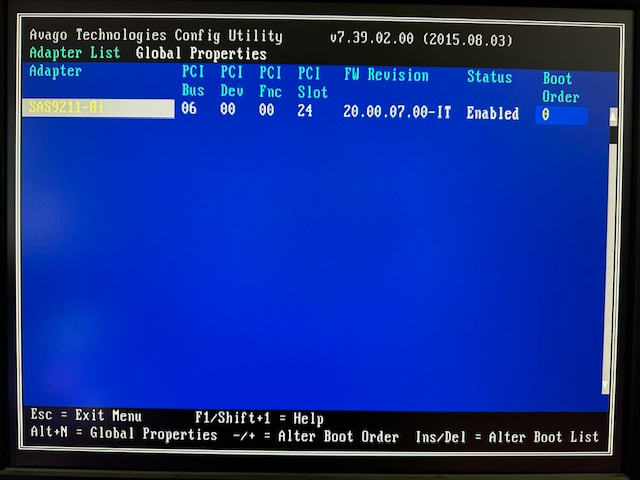
-
That sound very interesting, unfortunately way above my level of abilities concerning this.
-
Hi, Is it possible to put extra options in the bootmenu, as to have a choice of which VM(s) autostart. So I can choose to either start my gaming VM using all available resources or starting it with less resources and also starting a second different VM. Thanks

