




Skip to content
View in the app

A better way to browse. Learn more.

Unraid

A full-screen app on your home screen with push notifications, badges and more.

To install this app on iOS and iPadOS
  1. Tap the Share icon in Safari
  2. Scroll the menu and tap Add to Home Screen.
  3. Tap Add in the top-right corner.
To install this app on Android
  1. Tap the 3-dot menu (⋮) in the top-right corner of the browser.
  2. Tap Add to Home screen or Install app.
  3. Confirm by tapping Install.

Alvingo

Members
  • Joined

  • Last visited

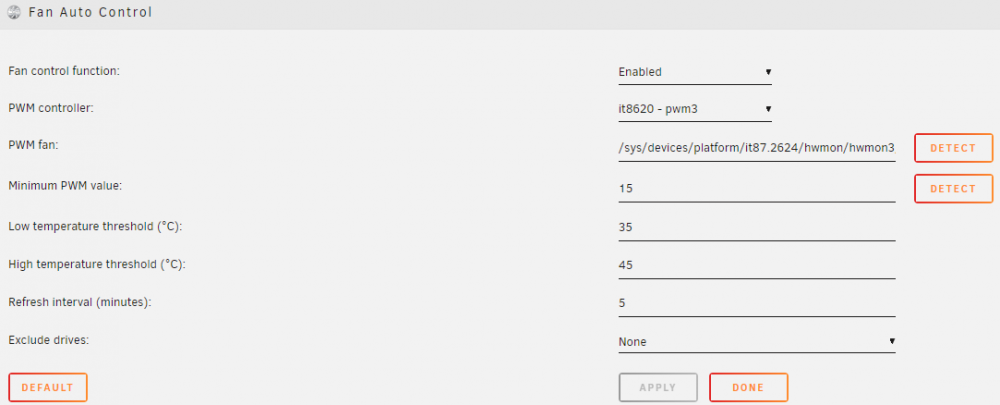
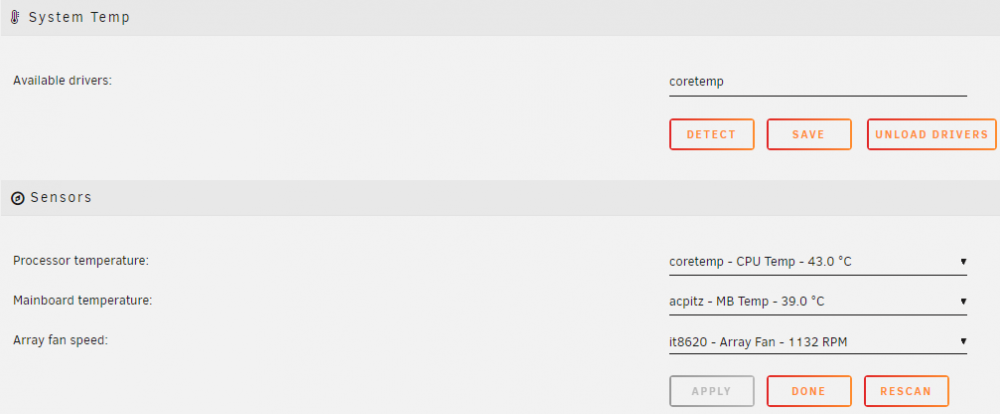
  1. Hi There, I just want to post here just in case it is not answered or overlooked in the Dynamix forum link. I got the same sensor `ITE IT8613E Super IO Sensors` when I ran 'sensors-detect' on my new Terramaster F4-422 (10Gbe). I have found out in avforum the nearest chipset that it will work is by invoking this command: modprobe it87 force_id=0x8620 Then put it inside your `go` file as: root@TNAS:/boot/config# cat go #!/bin/bash # Start the Management Utility /usr/local/sbin/emhttp & # sensors modprobe it87 force_id=0x8620 My Dynamix Auto Fan Control should detect it in 'it8620 - pwm3' and it look like this: Installing Dynamix System Temperature, should look like this: During my preclear of my new HDD's, my fans kicks in up to 2000RPM to cool off the NAS.
Account

Navigation

Search

Search

Configure browser push notifications

Chrome (Android)
  1. Tap the lock icon next to the address bar.
  2. Tap Permissions → Notifications.
  3. Adjust your preference.
Chrome (Desktop)
  1. Click the padlock icon in the address bar.
  2. Select Site settings.
  3. Find Notifications and adjust your preference.


