patric110
Members
-
Joined
-
Last visited
-
Hi Jorge, After I followed your instruction and repeated the operation, the parity swap operation completed successfully with no kernel panic. I am attempting a second parity swap procedure with the second parity drive. Three times in arrow the same kernel panic happens. kernel: kernel BUG at fs/buffer.c:3351! kernel: invalid opcode: 0000 [#1] SMP NOPTI
-
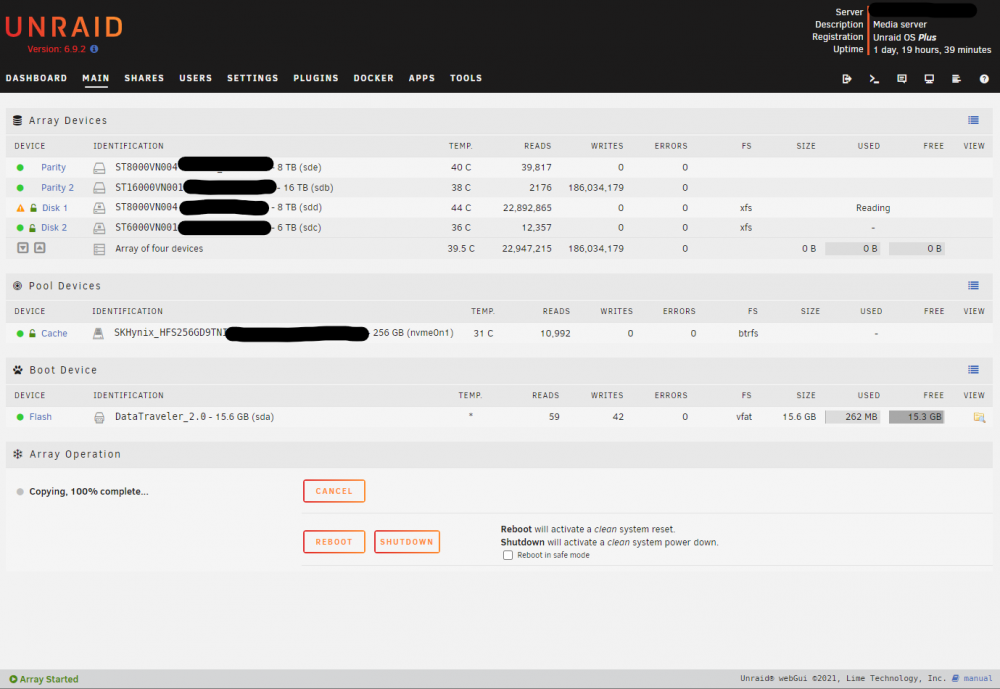
Hi, thanks! I saw the crash, too. Which happened after the copy completed. How is this operation performed now? It seems like the steps are in a very specific order to introduce a new drive to the array and perform the Parity Swap. Now that the unraid has seen the new drive and one of the drives has been removed. I don't want to risk a data loss.
-
Hello, I performed a Parity Swap operation following the steps in the manual. I removed a 6TB drive and replaced it with a 16TB parity drive. Clicked the copy button and waited for the operation to complete. After 24 hours, the webUI reports copying 100% complete. But instead of seeing a button to now Start the array, the copy button remains. The interface says the array is started in the bottom left and the 8tb drive is being emulated. An important note, I never was prompted to enter the array passphrase at any point of this operation. I was expecting to click Start so the 8tb Data Drive could be repopulated per the instructions-per the manual. Unraid Version: 6.9.2 XFS Encrypted Old Array: 6TB Data Drive 1 6TB Data Drive 2 8 TB Parity Drive 1 8 TB Parity Drive 2 Attempted Operation: 6TB Data Drive 1 16TB Parity Drive 2 <- Replaced 8 TB Parity Drive 1 8 TB Data Drive 2 <- To become Data Drive. Does anyone have any pointers? Much appreciated! syslog.txt