





Cernel
Members
-
Joined
-
Last visited
-
Seems like everything is working. Currently reinstalling all the apps. Thanks so much for all the help. My VMs also got deleted for some reason, but I have backups, so it should be fine. From the scrub, there's seems to really have been some issues :) Definitely sending you some beer money 🍻 Thanks again

-
@JorgeB I did a reboot and got a bunch of new error messages, new up-to-date diagnostics: srv-unraid-prod-diagnostics-20250920-1500.zip
-
The docker services won't start, and my logs are being spammed with "Sep 20 13:36:27 srv-unraid-prod shfs: assign_disk: /appdata (123) No medium found"
-
So far so good :) They both seem to have been added successfully. Here's the new diags: srv-unraid-prod-diagnostics-20250920-1357.zip
-
Label: none uuid: 33d7bd6e-5c15-43f5-af67-4940080c6fe4 Total devices 1 FS bytes used 416.00KiB devid 1 size 1.00GiB used 126.38MiB path /dev/loop2 Label: none uuid: a7f0f2e8-593b-403a-adfc-56feadb94442 Total devices 2 FS bytes used 478.26GiB devid 1 size 931.51GiB used 577.01GiB path /dev/nvme0n1p1 devid 2 size 931.51GiB used 567.01GiB path /dev/nvme1n1p1
-
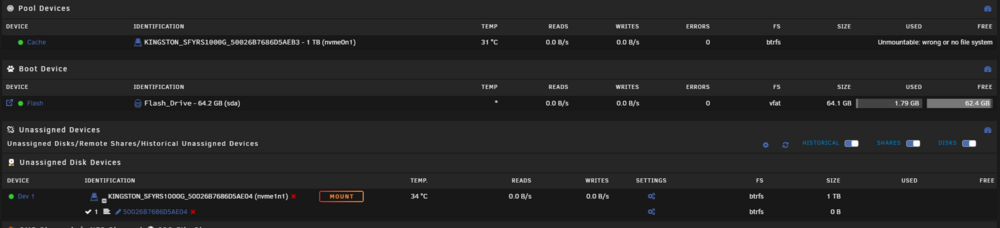
I tried moving one of the NVMe disks to a different slot, and after a reboot it showed 2 drives in the BIOS. I then tried moving the drive back to the original slot, and it still showed up after a reboot. So now both drives seems to be back on showing up in unraid, but unraid now tells me that there are no pools available. How do I get the pool back online? Yesterday I had everything working with only one of the cache drives, but now one shows unmountable, and the other shows up under the unassigned devices. Is my data lost?
-
Good call. Will try that after the parity check has completed. Appreciate the help so far. Did get a new warning from the server as well: "Warning [SRV-UNRAID-PROD] - pool BTRFS too many profiles (You can ignore this warning when a pool balance operation is in progress)" Guessing it's just in reference to the fact that it's set up with 2 slots, but only 1 disk is attached?

-
Yes they are NVMe devices. I did try a power cycle after collecting the diagnostics, no change.
-
The cache disks are m.2 drives, so there's no cables to replace. The server is currently doing a parity check, so I don't want to shut it down to check the BIOS right now. It's done in about 7 hours, so will update the thread when it's done. Thank you.
-
I have 2 cache disks and all of a sudden the second one went down, I only noticed after all my docker services were offline. First thing I did was a reboot. After the reboot, the server gave me the message: "Warning [SRV-UNRAID-PROD] - Cache pool BTRFS missing device(s)". When checking the Main page, the second cache just has a red x mark, and shows device missing. The array also went offline and showed an unclean shutdown. I collected the diagnostics, see attached. I also tried a full shutdown after, left it offline for 5min and started it back up, no change. Since I do have 2 cache disks I started the array back up with the "write corrections to parity" enabled, and now my docker services are back up and working. Never encountered an issue like this before, so any help on what the next steps are would be highly appreciated. Thanks in advance. srv-unraid-prod-diagnostics-20250918-2223.zip
-
Well damn, thanks for the heads up.
-
After reading a little about this online. From what I understand the message: "Memory cgroup out of memory" means a specific docker container ran out of memory, not the actual server. I checked the docker ID and found which docker container it was referencing. Then using docker inspect, saw that the docker is limited to 2GB of RAM. Problem solved.
-
I have the "Fix Common Problems" plugin installed, which just reported "Out Of Memory errors detected on your server". I can't say that I've noticed any issues, and my current memory usage is nowhere near maxing out at 64GB. Hoping someone here would be able to provide some insight into what happened. Attaching diagnostics, no reboot has been done.
-
Hello everyone, I've been experiencing weird failures of my Unraid server. There would be these sudden shutdowns maybe once a month. I set up the syslog server, but no shutdown events are recorded. Suddenly I noticed that when I tried to make changes to the dockers, I would get: "Execution error 403". This would not get fixed with a reboot. The next day my cache drive showed as unmountable, with the error: "Unmountable: Unsupported or no file system" As of this moment, I don't have access to my cache, the cache drive showed corruption, the parity is showing as valid (checked just a couple days ago). Running Unraid 6.12.6 Things I've tried: Ran memtest86 3 times on the RAM, which resulted in FAILED every time. Used the command: "btrfs dev stats /mnt/cache" which showed 1 corruption error. Tried rebooting several times, no changes. Tried unassigning and reassigning the pool and reboot. Used the command: "btrfs rescue zero-log /dev/nvme0n1" which failed. I do have the "appdata" folder backed up. I will RMA the RAM sticks, but was wondering if there's anything else I should also do here. Any and all tips appreciated
-
Problem seems to have fixed itself.



