DocBec
Members
-
Joined
-
Last visited
-
Will do! Thanks for the heads up! Is that coming from my sas card or expander?
-
I rebooted, and now my first 6 and parity drives are up. In the process of rebuilding the array. Have new cards and cables ordered. This isn't the first time this has happened and is SMART extended are all normal, so likely is a card or cable issue. If someone can have a look anyways and shed some light on whether I might be right or not, that would be great.
-
Here is the attached diagnostics file. Diagnostics-20240730-1837.zip
-
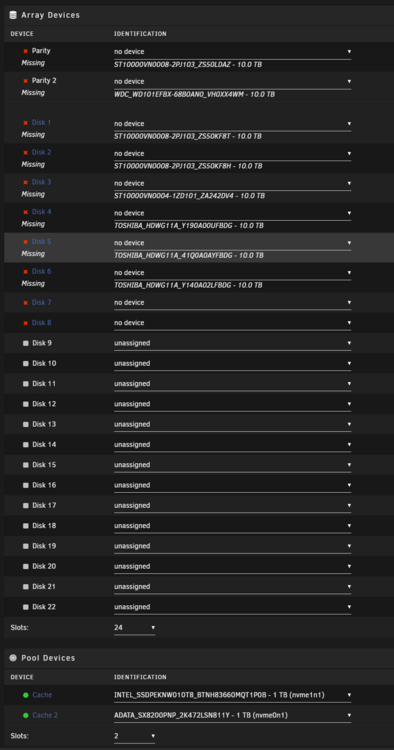
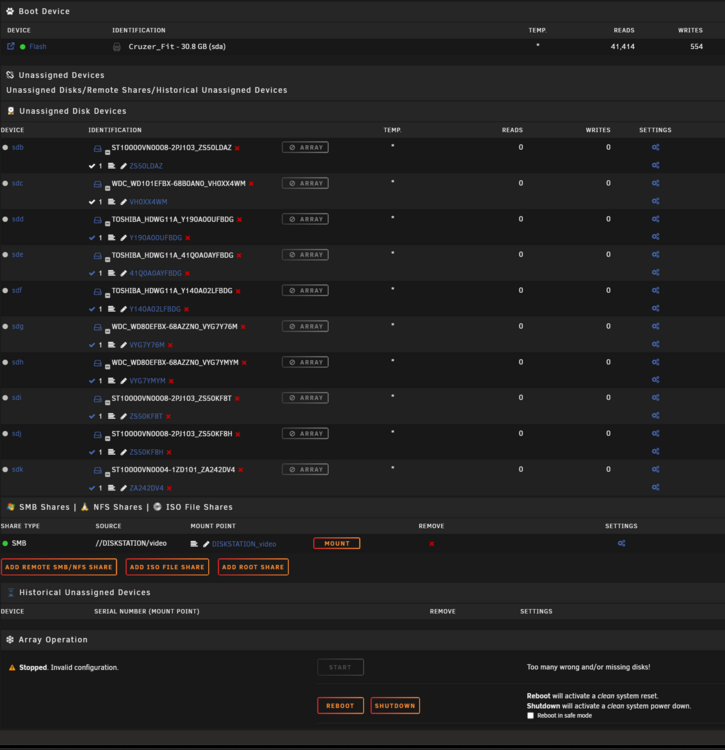
Wondering if I can get some help here. I believe I have a cabling or controller issue. The drives when parity is being checked are incorrectly being labelled with errors and then going offline. Now 2 of my drives have gone down, and Unraid has removed all of the disks from the array. Luckily I still have the drive order saved, but I don't know how to add them back to the array without losing data since they are all removed. Here is the current state: What is the correct procedure to rebuild the array without data loss? Do I go under New Config and add the drives? Do I use "Use the 'Preserve current assignments' selection to populate the desired disk slots after the array has been reset."? I'm scared to lose data and have a rebuild, so I will wait on a response if anyone can lend a hand. I have logs/diagnostics as well if needed. Thanks!