





Ruski
Members
-
Joined
-
Last visited
-
Yeah i searched on Google and found serveral forum posts insisting it would give performance issues. I think for now ill just invest in a second drive so it protected and later on the road upgrade the whole rig. This is just my starter getting into unraid.
-
No the only option is Raid+AHCI or IDE. I think its just a z200 thing.
-
Okey, i reconnected the 2TB drive because it was in a 2.5 to 3.5 cage so it mabye that was a problem. I looked in the BIOS i could turn off the raid but then it would have been switched to IDE mode. So i attached my diagnostics. Is this better? is the connection problem still there? the check came out with 0 errors imkonas-diagnostics-20220205-2316.zip
-
No it isn't. The computer i build this from is an old HP z200 so its a workstation pc so it probably build in to the motherboard
-
I dont, it just straight from the power supply.
-
How could i fix that. Because it's working fine rn?
-
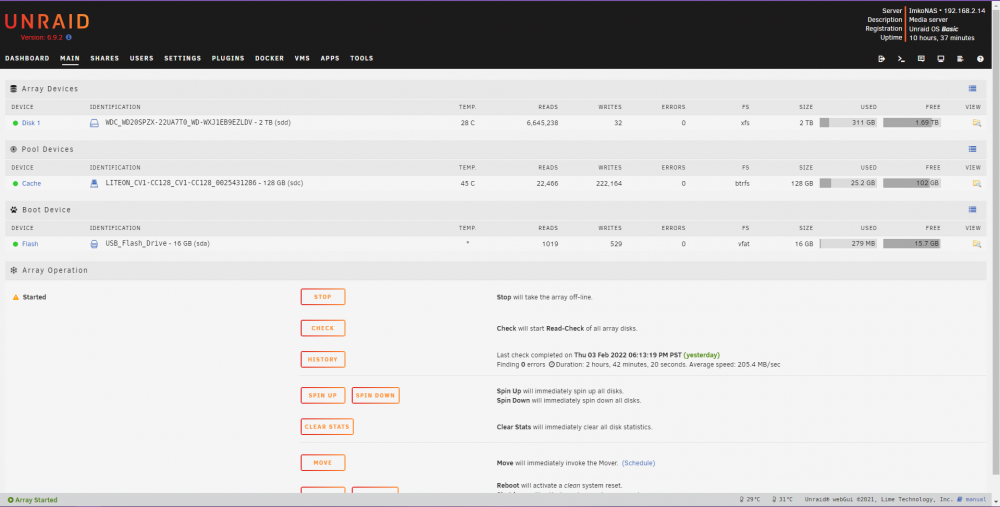
The scan is complete and it has 0 errors now. and all the files are back. What i did was shutdown the system, Reconnect the cables, Turn system back on. Then i ran a check it still had 488 milion errors. Then in main i stopped the array. The devices list popped up i deselected WDC 2TB and scrolled down it said i cant start it cuz missing drive (makes sense) then on disk 1 i just reselected WDC 2TB. Started the array and checked 0 errors and the files now work So i dont know how it fixed it but it did. diagnostics are in attachments imkonas-diagnostics-20220204-0920.zip
-
I think i fixed it. (ill mark it as Solution when the check is ready but its taking a while) I stopped the array. Unassigned the drive. Reassigned the drive. Started the array. So far 50% no errors
-
Okey i tried reconnecting the cables. Now it shows more files in my explorer. But i cant open them becuase its says its damaged. I did a new diagnostics (Added) what can i try next? imkonas-diagnostics-20220203-2310.zip
-
SATA DATA cable and SATA power
-
How can i turn those off? i didnt even know it used them or that i even had them. This server is just a old computer i reused
-
My fault. USB as boot device and a Ssd as pool device Its connected by a SATA DATA cable and SATA power. Do i reseat them both on the pc and the drive?
-
Ruski changed their profile photo
-
Here is the diagnostics. I am pretty new to all of this so if u need anything els just tell me and ill try to get hands on the information imkonas-diagnostics-20220202-0041.zip
-
Hello, I have ran in to a bit of a problem to say the least. I have a unraid server with just a boot ssd and a 2tb hdd for storage, its not protected or anything. I rarely use it and i put some backup stuff on there. After a month i scanned it and went to bed and woke up to 480 milion errors. Windows is not showing any files and krusader isn't showing any files in my storage folder. But unraid tells me in using 301GB of space on the drive? does this mean not everything is gone or am i too late If u can help me it would be greatly appricated. Friendly regarts, Ruski



