





Beijergard
Members
-
Joined
-
Last visited
Everything posted by Beijergard
-
I set the scheduler to correct, and ran another test with correction, took a diagnostic, then took another test without correction and it had zero errors. Took a nother diagnostic after that. So it seems fine, but as always I am worried about possible disk errors because I had this error "disk1 (ST8000VN004-2M2101_WKD03SNJ) has read errors" a few weeks ago, but the drive is not disabled, and the smart data looks fine to me. plexworm-diagnostics-20250204-2156.zip plexworm-diagnostics-20250206-0707.zip
-
Well that was very embarrasing, in the Main page, the correction is always checked so I just assumed it would be on the scheduled aswell. Running a new one now.
-
Hi there! My monthly check just resulted in 18800 errors, so I searched the forum for similar problems and ran another parity check without correcting and got the same amount of errors. I have two diagnostics, one after the first check and one after the other one. Can you please help me? Thanks in advance plexworm-diagnostics-20250202-0904.zip plexworm-diagnostics-20250203-1859.zip
-
I just updated to 7.0.0 this morning and after reboot the parity check started right away, then after about 30% it slowed down drastically, under 1MB/s. The log showed a lot of problems with ATA 4, so i shut down the server and used another port on the motherboard and another sata cable, but it is still really slow. Any idea what is going on? plexworm-diagnostics-20250118-2038.zip
-
I just updated to 7.0.0 this morning and after reboot the parity check started right away, then after about 30% it slowed down drastically, under 1MB/s. The log showed a lot of problems with ATA 4, so i shut down the server and used another port on the motherboard and another sata cable, but it is still really slow. Any idea what is going on? plexworm-diagnostics-20250118-2038.zip
-
Thank you! That power cycle actually seems to fix it. Now it has ben up and running for quite a while. Could this be an indication of a failing m2 drive or something else? Here is a smart report for the m2 drive. The drive is about 5 years old by now.
-
Hi there. My Unraid have been a bit problematic for a while now with different errors and this seems to be the most irritating one. All my dockers went offline today and I got Execution Error 403 when I tried to start them. After a reboot, which took a lot longer than usual, my cache drive is now gone.. It is a single Kingston A1000 480GB, and now I wonder what is the smartest next step? My mobo only has one M.2 slot, but some avalible SATA ports. I will remove the drive and try using it in a USB case to see if I can connect to it. And if all data is gone, I actually don't know what is lost. I haven't done any writes to the shares recently so there should not be any data loss there. But all appdata from Plex and Jellyfin might be gone I suppose. plexworm-diagnostics-20240114-2200.zip
-
Thank you, I just read the update notes for 6.12.6 and saw this tip. I will try it.
-
So just now the server has crashed again. Here is the diag file. Please help me plexworm-diagnostics-20231220-1808.zip
-
Okay, thank you, I set it up the wasy way, and hope to have more information if it crashes igain.
-
Hi. I have had my server for a few years with no major issues but today the server was not detected on the network, so I hauled out a 10m hdmi and connected it to my tv but there was no signal. I saw no other option but to power it off manually and then start it again. At that point I got a video signal to my tv, all the unix code flashed by but then the video signal was lost. At that point I could connect to the GUI again and download a diagnostic. Does anyone know the cause of this? plexworm-diagnostics-20231215-1904.zip
-
I discussed it with a friend who knows Unraid and Unix a whole lot more than me, and we tried this. I only have two dockers, some plugins but no VMs, so I think I will put the 128 nvme back in and start using it again. Just have to figure out how to put the appdata and dockers on the ssd.. Edit, I just freed up a 480GB Nvme from my gaming PC, I will put it in the Unraid server tomorrow, then I can use the disk as a cache aswell, 128GB isnt quite enough I believe.
-
Ok, now the second Parity Check is done with corrections unchecked and this time with zero errors. Attaching diagnostics if you want to take a look. Does this mean that all is good now? plexworm-diagnostics-20220211-2215.zip
-
I had issue with the cache being full and mover doing nothing, scheduled or manually. I have a 128gb nvme, which I initially wanted to use only for dockers, but when I starter using it as cache it got full and never emptied, had to move files with midnight commander and might have messed something up. I also have a 250gb sata ssd, but I dont want to take up any more sata and power cables. So yeah I can but the 128gb back for the dockers.
-
Okay, now after reboot the docker service is unable to start. Dont know if it has something to do with me removing the cache drive about one week ago..? Edit, I removed the vDisk for the dockers and reinstalled them again plexworm-diagnostics-20220210-1521.zip
-
Yes i unchecked the corrections in scheduler, and then I unchecked "write corrections to parity" under main and pressed Check. I don't know how else to run it manually, and it seems strange that it ran corrections even though I unchecked the box?
-
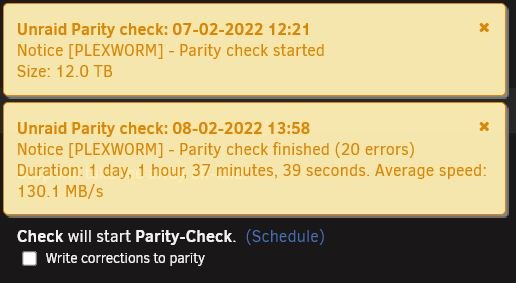
Ok, so now the parity check is done. I unchecked the box for corrections. Is there anything I should or not should do now? plexworm-diagnostics-20220209-0811.zip
-
Okay, I should have attached the photos from the start. I havent turned of the parity correction but I will do it now and run a check and see what the results are. I am truly greatful for your respectful answers and your help!
-
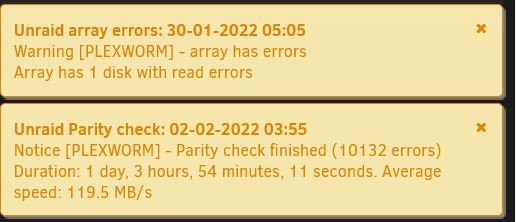
I never saw the disk as disabled. The lost and found just contained 17 files named with a lot of numbers, and filesize from 20-100kB, so I guess nothing too important. I might have used wrong words(if so, im sorry), the Parity check said Disk 1 has read errors, see jpg.

-
Ok, the disk is now visible and the array is back online. Here is the diagnostics. plexworm-diagnostics-20220207-1740.zip
-
Ok, now that is done, here is the output.
-
Would you be so kind to hand me the full terminal commandline for that? I will surely mess it up.
-
With the drive in Unassigned devices i pressed the checkmark which started a file system check with this output I feel like i'm way out of my comfort zone here when it comes to command lines, yes of course I can just copy and paste them but I have almost no idea what I am doing. I don't know if i'm supposed to run xfs_repair -n /dev/sd1 or xfs_repair -n /dev/sdb1.
-
Corrections are set to Yes. Just to be clear, shall Disk 1 still be unassigned or shall I put the drive back as Disk 1? "Disk 1 Missing no device ST8000VN004-2M2101_WKD03SNJ - 8 TB Array Operation Stopped. Missing disk. Start will disable the missing disk and then bring the array on-line. Install a replacement disk as soon as possible. Yes, I want to do this"
-
I do not know, it was a scheduled montly check.. I tried to mount it in unassigned but nothing seemed to happen. Downloaded diagnostics, attaching it in this post. plexworm-diagnostics-20220207-1517.zip
