



Skip to content
View in the app

A better way to browse. Learn more.

Unraid

A full-screen app on your home screen with push notifications, badges and more.

To install this app on iOS and iPadOS
  1. Tap the Share icon in Safari
  2. Scroll the menu and tap Add to Home Screen.
  3. Tap Add in the top-right corner.
To install this app on Android
  1. Tap the 3-dot menu (â‹®) in the top-right corner of the browser.
  2. Tap Add to Home screen or Install app.
  3. Confirm by tapping Install.

NostyBoy

Members
  • Joined

  • Last visited

  1. I’m going to go ahead and say no to this… is there an idiots guide I can follow to running a scrub?
  2. Hi guys, New RAM fitted and everything is fully functioning again. Thanks for the help!
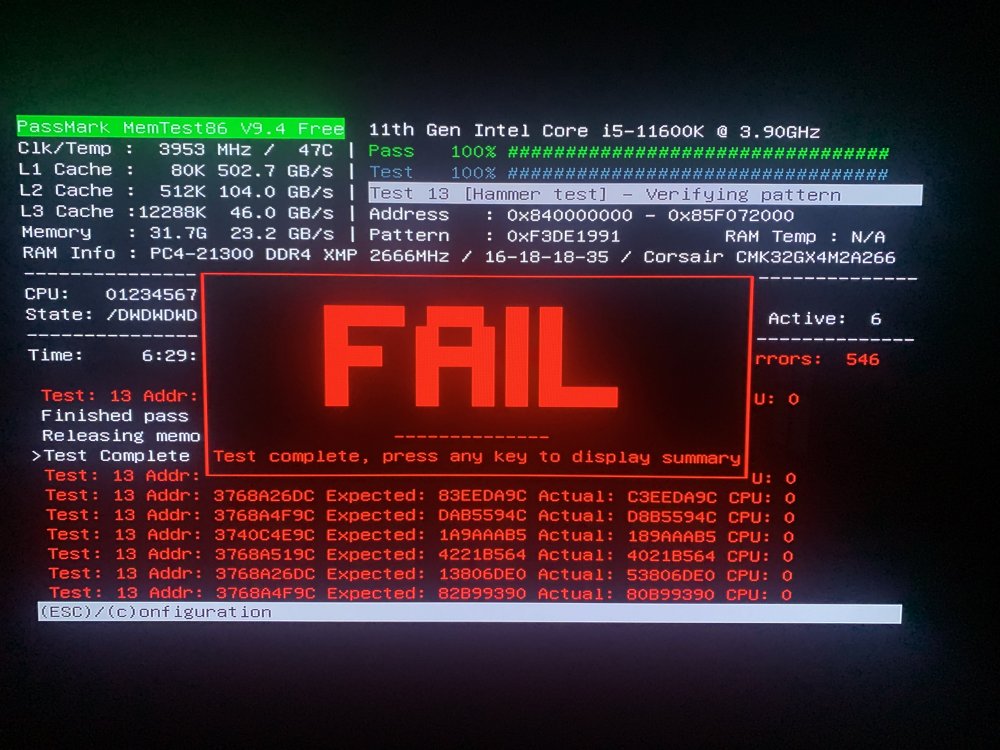
  3. Thanks for this! I ran memtest and it looks as though I have issue's 😂 Would it be a simple case of replacing the RAM and restarting my array?
  4. Hi Guys, New to Unraid so please forgive me if i've done anything dumb My server was working fine for some time, then i started getting an error saying "/var/log is getting full" i rebooted my array and things continued to work for a while Now it tells me the log is full and my cache drive and docker image cannot be written to I've attached the logs, any help is appreciated bamboo-diagnostics-20220308-1741.zip

Account

Navigation

Search

Search

Configure browser push notifications

Chrome (Android)
  1. Tap the lock icon next to the address bar.
  2. Tap Permissions → Notifications.
  3. Adjust your preference.
Chrome (Desktop)
  1. Click the padlock icon in the address bar.
  2. Select Site settings.
  3. Find Notifications and adjust your preference.