Pirat
Members
-
Joined
Everything posted by Pirat
-
@Masterwishx Strict mode, as in the snapshots in the destination are always kept mirrored from the source (--delete-target-snapshots), comes with some risks that make me prefer having pruning for local backups be a separate step. For example, if you mistakenly delete one or multiple snapshots on the source, then they will also be removed from the backup. Keeping pruning separate is the safer option. Yeah, Sanoid can be a bit strange with its scheduling, but it should at least be relatively consistent going forward. My daily snapshots are usually taken between 23:30 and 00:15 for reference. Have you figured out all your issues then?
-
@Masterwishx Thanks for the suggestions! I agree that your first 2 suggestions would be useful. Could you clarify how the sound notification works in Spaceinvaderone's script? Since I never used that myself. I will add these to my backlog. Regarding your questions: The "Snapshot creation and pruning" is pretty much just a GUI for the Sanoid config file. The plugin automatically runs Sanoid every 15 minutes, and when it runs, Sanoid checks whether any new snapshots should be created or pruned according to the config. Sub-hourly snapshots are not exposed in the GUI (I should perhaps add that), so the most frequent backup you can set is hourly by setting snapshot retention hourly > 0. Sanoid will then automatically create snapshots every hour. If you have "Trigger backup after snapshot creation" set together with "Create snapshots automatically: yes", then there is no need to have cron enabled for that backup. Cron schedule for backups is mostly useful for remote backups, as you say, or if you have snapshot creation done externally (as in not with BuddyBackup). The latter case can make cron useful for both local and remote destinations.
-
Hey! BuddyBackup does not conflict with the sanoid plugin. See https://forums.unraid.net/topic/186256-zfs-buddybackup-plugin-guide/page/2/#findComment-1548639
-
Hi. The lines you show here are not errors, they are normal sshd logs showing that an SSH session is started or closed, which happens every time BuddyBackup sends a backup to a remote destination. Nothing to worry about! If you get spammed by them, you should probably have a look at your schedules and reduce how often your backups are sent.
-
The focus of this plugin is to simplify the backup process specifically between two UnRaid machines using this plugin. With that said, it's possible to have the other side run on any OS as long as it's done the same way buddybackup does. See https://github.com/Piratkopia13/unraid-buddybackup/issues/2#issuecomment-2658728152 for my comment on how you could receive backups on a non-UnRaid target, for example.
-
Thanks for the suggestion! I added it as an issue on the github for future tracking, and my own thoughts on it GitHubAllow using -F flag when running restore · Issue #18 · Pi...From hydkrash on unraid forums (https://forums.unraid.net/topic/186256-zfs-buddybackup-plugin-guide/page/2/#findComment-1572178) : I had to recreate a local pool and dataset. When I was performing ...
-
What you are showing in the first screenshot is that you have full disk encryption set in Unraid (luks). This is different than zfs dataset encryption. In order to send raw encrypted zfs datasets, they have to be encrypted by zfs. You can still have luks as well but it might be unessesary depending on your needs. The easiest way to create an encrypted zfs dataset in unraid is to use the ZFS master plugin.
-
Ah, for local destinations you can add a new entry in the snapshot creation and pruning section, disable autosnap and enable auto pruning and set your desired retention there.
-
Received snapshots are pruned according to the set snapshot retention in the "Buddy's Backups" section on the machine that receives the backups. Regarding snapshots being created on the same day, that does sound weird... Snapshot creation timing is handled by the default sanoid config, see https://github.com/jimsalterjrs/sanoid/blob/master/sanoid.defaults.conf. I have thought about exposing this config under advanced settings in the plugin to allow for more control. Perhaps that could help your case as well 🤔
-
I don't have anything like this planned, but it's a cool idea! I have enabled discussion on the GitHub repo. Feel free to create a post for finding backup buddies.
-
Thanks for the suggestions! Sadly, manually creating snapshots that would also be included when Sanoid runs pruning is not really possible afaik. I'm also not seeing any way of excluding child datasets with Sanoid (https://github.com/jimsalterjrs/sanoid/wiki/Sanoid). But let me know if I'm missing something!
-
Hi @MothyTim BuddyBackup uses its own instance of sanoid and syncoid and will therefore not conflict with the sanoid plugin! However, if you transfer over your backup configs and is happy with buddybackup there is no reason to keep the sanoid plugin installed anymore 😁
-
You can just add the local destination dataset to the snapshot creation and pruning section. Disable autosnap, enable autoprune and select retention.
-
Just pushed version 2025.03.02 with support for restoring snapshots from local backups @MowMdown
-
I will investigate the cron snapshot not being created on a fresh install, that shouldn't happen 🤔 Your syncoid error there looks to me like the destination parent dataset (cache/appdata) doesn't have any snapshots, but all the child datasets do. I think this could happen if you for instance created the destination dataset yourself instead of letting syncoid create it on the first backup. Please verify if that is the case for you, and if it is the easiest way to solve that is manually syncing the oldest snapshot for the parent dataset with `zfs send cache/appdata@name-of-oldest-snapshot | zfs recv -F backup_hdd/zfs_backup/appdata_backup`. Note the -F flag which is destructive and will rollback the destination to match the source. You could also change the backup destination to a new dataset that doesn't exist and re-run the full backup.
-
I recommend installing the plugin from the apps tab, and updating the plugin should work. No need to manually uninstall/reinstall any more. Could you confirm with version of the plugin you are on? Also, do you get any other print in the log other than "Local backup failed. Error code 2."? This means that syncoid did not exit cleanly and the actual error should have been printed above. You could also try running the backup from the button in settings and see if you get anything more printed in the popup.
-
@adamzetpl I just pushed a new version that fixes the issues you found! After updating, you can disable the buddy's backup section again if you aren't using it. Thanks for letting me know of the issues! 🏆
-
@adamzetpl Ah. I'm guessing sanoid doesnt like that empty first section (the []). It's there because you have enabled Buddy's Backup section, but not selected a destination dataset. Try also setting any destination dataset in that section and see if sanoid starts working. (note that it will autoprune snapshots in the selected dataset) I will get both these bugs fixes asap.
-
That's odd. Could you send the output of cat /boot/config/plugins/buddybackup/sanoid.conf as well as cat /boot/config/plugins/buddybackup/snapshots.cfg The sanoid.conf is created from the snapshots.cfg when you modify anything in the snapshot creation/pruning setting section. You can also manually force the update of sanoid.conf by running: /usr/local/emhttp/plugins/buddybackup/scripts/rc.buddybackup.php update_sanoid_conf but that really shouldn't be necessary.
-
@adamzetpl You just found another bug! For some reason I put the sanoid cron to be enabled only if you have enabled the "Buddys Backups" section. You can enable that for now and that should set up the automatic sanoid cron for you. I will get it fixed in the next version!
-
First of all, to clear up possible confusion, ZFS uses the ARC (adaptive replacement cache) to speed up read operations. All write operations are fully protected in case of a power loss. Furthermore, as the name implies, the size of the ARC is adaptive depending on the available system memory. On the opposite, as far as I know, btrfs still has the known "write hole" issue in raid5/6 arrays which can cause undetectable data loss on a power loss. That's actually one of the reasons I switched from btrfs to zfs 😁 Regarding adding support for btrfs snapshots, I'm definitely not against it! I will put it in the backlog, but my time is limited so don't expect anything soon.
-
@MowMdown I just pushed an update that fixes the bug you found. I don't think Unraid allows auto updates of manually installed plugins, so you might have to uninstall it and then re-install it with the link from the first post. Your backup configs will be saved!
-
@MowMdown That warning is very much a bug. It's referring to destination in the "buddys backups" section, which you haven't even set. So it's some logic error, I'll get it fixed. Thanks for reporting! A button for restoring exists, but is currently available only when the destination is remote, as offsite backups was the focus of this plugin. That said, I might add a restore wizard for local backups in the future as well to make that part easier!
-
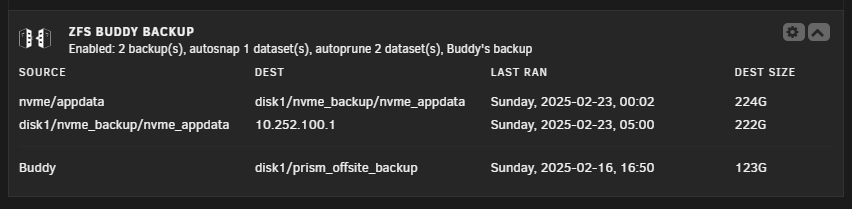
Different people have different setups and different needs for backup solutions. I know there are different solutions circulating already for Unraid and ZFS, but many use root ssh connections to function which is not okay at all in my opinion. This plugin aims to solve that, among other things. If you use ZFS and need a backup solution between two Unraid servers that this plugin does not satisfy, I would be interested to hear about your setup and why this plugin doesn't work for you. I might not be able to solve the problems, but hearing different needs could help guide the direction I take this plugin in the future. For reference, since I wrote this plugin to be my main backup solution, the following is my setup: I have a ZFS pool consisting of some nvme ssds where I store all appdata, VM disks etc. In my array I have a couple of HDDs of which one is formatted with ZFS. I perform daily snapshots on the nvme pool and sync those snapshots to the ZFS disk in the array. Every week I sync the same snapshots to a buddy's Unraid server. This follows the classic 3-2-1 backup rule - have three copies of your data, stored on two different types of media, with one copy kept offsite. The example images in the guide above show how I have this setup in the plugin. It fills all my backup needs, from snapshot creation and pruning, to local backups, to remote offsite backup and restore.
-
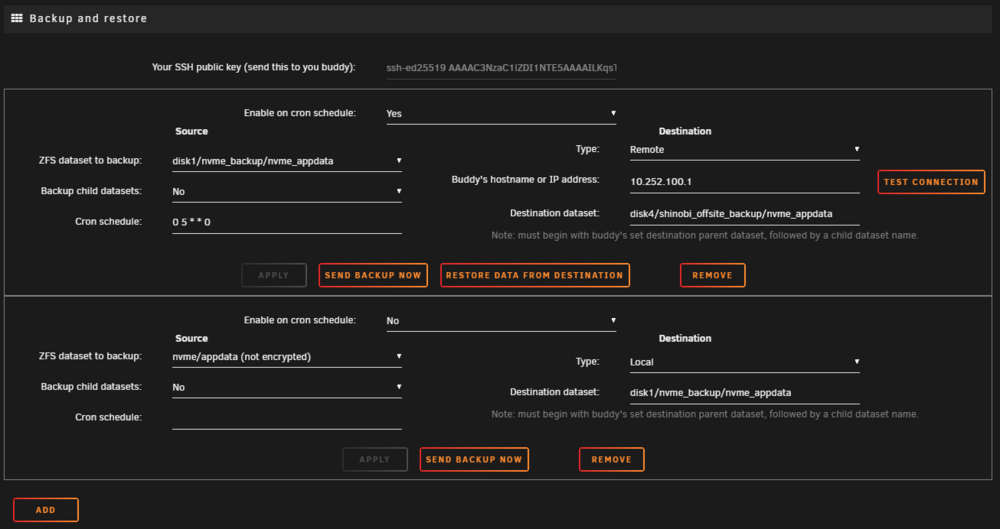
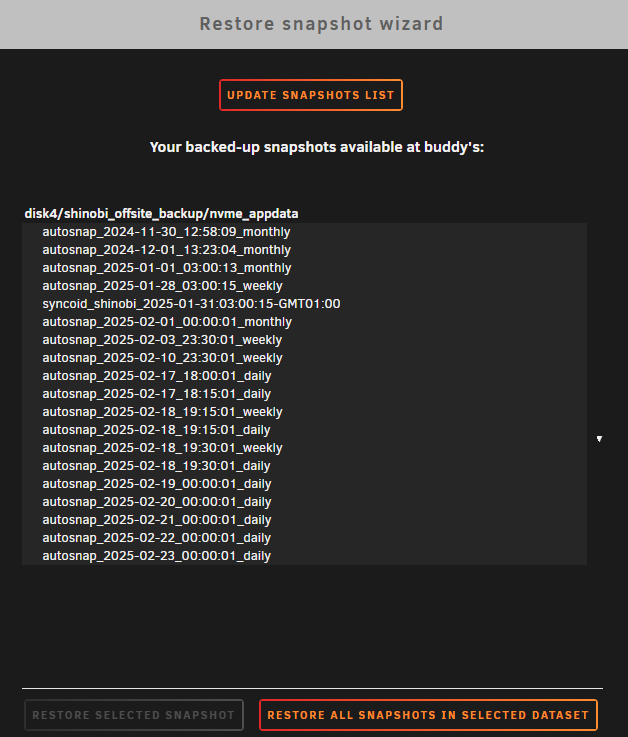
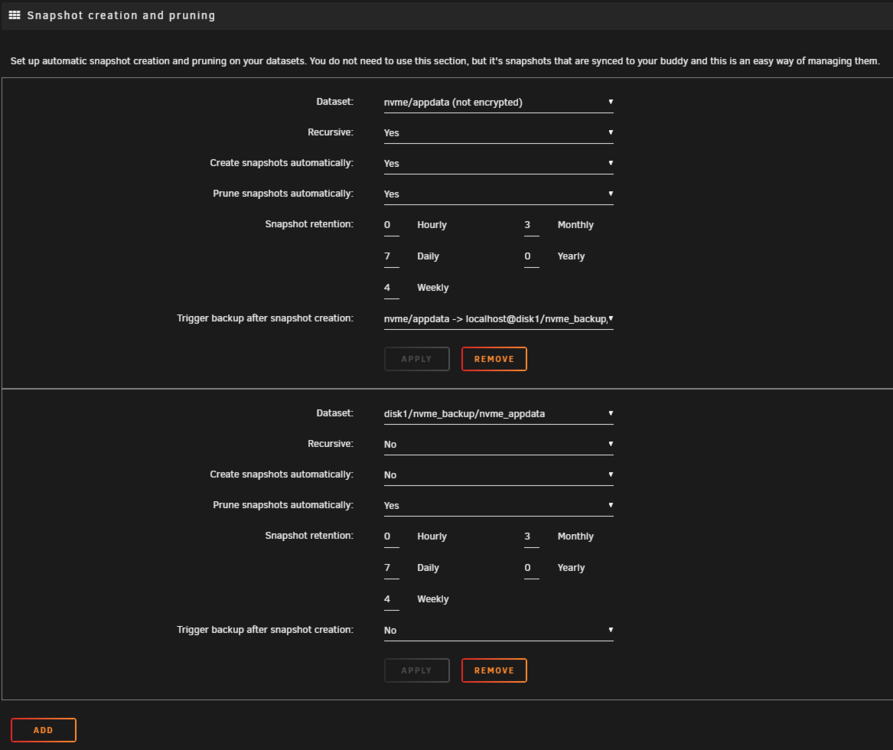
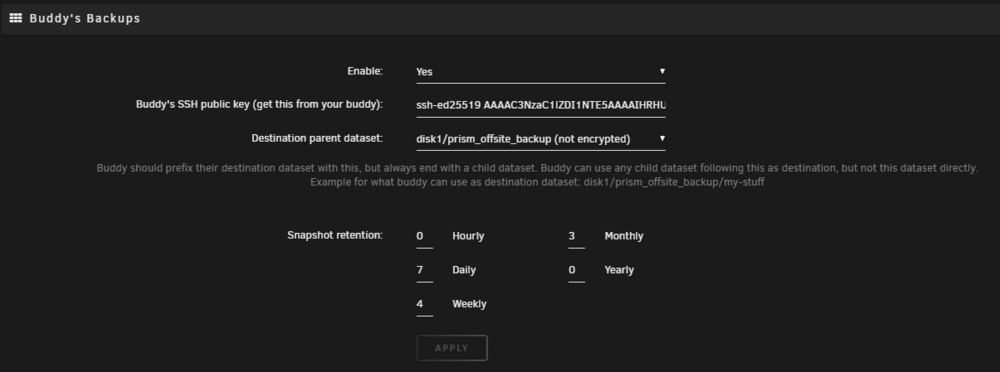
ZFS BuddyBackup is a plugin that aims to make ZFS snapshot maintenance, and backups between two Unraid servers easier to maintain and more secure. Disclaimer: I take no responsibility for any harm caused by using this plugin. Please report any bugs or issues to me. This plugin is fully open source, and I encourage you to review the source to ensure you understand how it operates and verify its security. You can find the source code here: https://github.com/Piratkopia13/unraid-buddybackup. Install the plugin through Community Applications. I wrote this plugin to work for my own use case, but it's hopefully of use to others as well. I found it tricky to balance a simple setup with the requirements and customization that I wanted, so this is a short guide to how this plugin works and how it can be used. Before starting, you need to run Unraid 6.12.0 or later and have the data you want to backup to a remote destination on an encrypted ZFS dataset. I enforce encryption to make security a must and not an afterthought. Even if you trust your backup buddy, using encryption is a good idea. You also need a secure connection to your buddy's machine. This plugin uses SSH over default port 22. Never expose this publicly outside your network, instead set up a VPN connection like TailScale or WireGuard between the machines. ZFS BuddyBackup will automatically set up a non-root ssh user that only has access to run the commands needed to perform backups and restores. The plugin also set up ZFS permission delegation to only allow access to the dataset you specify as the backup target. The plugin settings are divided in 4 important sections: "Backup and restore", "Snapshot creation and pruning", "Buddy's Backups", and Log. Let's go through them one by one. Backup and restore This is where you set up your backups, or restore data from them. Click Add at the bottom of this section to add a new backup. In the example image below I have two different backups set up, one with a local dataset as the destination, and one to my Buddy's Unraid server. On the left side you specify source settings: Choose the dataset to backup - it must be encrypted. I also recommend enabling zstd compression on this dataset. Enable "Backup child datasets" if you want snapshots in child datasets to be included. Cron schedule specifies when the backup will run, see https://crontab.guru/. On the right side you specify destination settings: Set type to either Remote or Local - If you use local backups you can use a non-encrypted dataset as source. If type is remote: Specify the VPN IP address to your buddy (who also has this plugin installed), and send your SSH public key, shown the the top of the section, to your buddy. Your buddy should paste this into the "Buddy's SSH public key" field in the "Buddy's Backups" section. The destination dataset is the name of the dataset on your buddy's server that will receive your dataset and snapshots. It must begin with what your buddy has set in the "Buddy's Backups" section, followed by a child dataset name that does not already exist. If type is local: The destination parent dataset is the name of the local dataset that will receive the source dataset and snapshots. Make sure it's set to a dataset that does not already exist. To restore data from any backup, use the "Restore data from destination" button and a restore wizard will show up, looking like this: Select the snapshot or dataset to restore and it will then prompt you for the destination. Snapshot creation and pruning If you already create snapshots some other way you can disregard this section. Under the hood the plugin uses Sanoid, so if you know what Sanoid is, this section is basically a GUI for the sanoid conf. If you don't know what Sanoid is, this is where you specify how many snapshots to automatically create and keep. You can add as many datasets as you want to this section by pressing the Add button at the bottom. "Recursive" specifies whether options should be applied to datasets under this one, including this one. Create/Prune snapshots automatically will create or prune snapshots following the retention settings. Snapshot retention specifies how many and how frequent snapshots should be created/pruned. In the example below I keep snapshots every day for the last week, one snapshot every week for the last 4 weeks and one snapshot every month for the last 3 months. Trigger backup after snapshot creation allows you to select a backup setup in the above section to be triggered after a new snapshot has been created. Buddy's Backups This is where you set up receiving backups from your buddy. Enter your buddy's public key as explained in the first section. Choose a local dataset where your buddy's dataset and snapshots will be placed under. Note that datasets are sent raw (and encrypted) so any settings you do on this dataset, like compression, will not have any effect on the data received. Snapshot retention lets you specify how many and how long your buddy's backups are kept on your server. Make sure you set this in cooperation with your buddy to balance data usage with how far back they need backups. Log Shows the full log file. In case you need to clear it, the log location in the system is /var/log/buddybackup.log. ----------------------------------------------------------------------- Advanced Settings Here you will find optional settings for eg. using UTC timezone for logs and setting how many days the last backup was ran before coloring text in the dashboard panel as a warning. Dashboard panel Buddy backup adds this panel to the Unraid Dashboard. It shows stats on currently active backups, snapshot creation/pruning and a list of when each backup was last completed with their respective size on disk. Note that the destination size is updated only after a backup is completed, meaning if you do any manual changes in the dataset, the destination size in this panel will not reflect that until the next backup is performed. Future plans Check out my development backlog here: https://github.com/users/Piratkopia13/projects/1