





IMDS
Members
-
Joined
-
Last visited
-
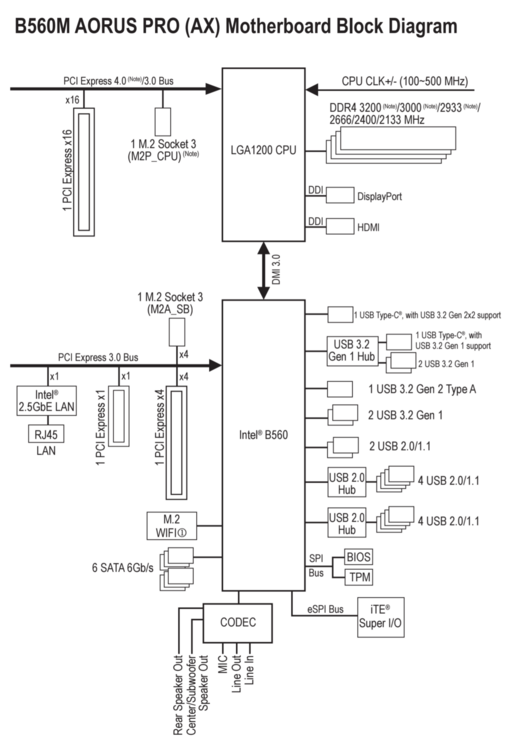
Thanks @Wody! The thing is that I have my x16 slot free, as I'm only using an integrated gpu, so I can do a faster card with 4 SATA SSDs at full speed, right? Here's a diagram of my board: And this is what I'm currently planning to do, so please let me know if it makes sense: 1. Keep my 3x 8TB HDD xfs array on motherboard's SATA slots (maybe expand it with 1 more drive if I run out of space, but I don't think that will happen any time soon) 2. Get an expansion card in the x16 PCI slot for 4x 1TB SATA SSDs in RAIDz1 as cache for the array (Or 6x 1TB in RAIDz2). I plan to have them set to run mover only if more than 80% full, which I shouldn't ever hit, or if files are older than a month. 3. Get 1x Samsung 990 Pro 2TB NVMe in the first PCI 4.0 slot for appdata, running zfs, so I can take snapshots and push them to the SSD pool. That should all run at full speed with a proper card? (An actual card suggestion would be great 😅) But also, does it make sense to run appdata snapshots like I suggested or should I just keep using appdata backup plugin? And is it ok to run mover like suggested for a server with just nextcloud and plex type of media?
-
Well, I wanted to do it for the speed, but if there are no performance benefit without a huge investment (either in really expensive PCI 4.0 expansion card or switching to a different platform that supports bifurcation), I guess I'll have to do something else.. Do you know if PCI or M.2 to SATA expansion cards have the same bifurcation limitation? Or would these work at full bandwidth with like 4x 2.5 SATA SSDs? I have 2x 1TB Crucial MX500, but only one more SATA port left available on my board.. So I might just get one of these cards and add 2 or 3 more MX500 in a RAIDz1 for caching. PCI to SATA: https://a.co/d/91Y4ti7 https://a.co/d/8RS5XZx M.2 to SATA: https://a.co/d/5BgNzmm https://a.co/d/8I6BYzt
-
I'm not that familiar with different chipsets.. Would something like this work? https://sabrent.com/products/ec-p4bf Or do you have other suggestions? I wanted to go with Samsung 990 Pros for their PCI 4.0 speed and zfs z1 config to boost that even further with 3 drives.. So I wouldn't want to start with a 3.0 adapter 😅
-
Hi all, I recently lost my NVMe drive that I used for Docker and now I want to replace it with 2 or 3 new drives, most likely Samsung 990 Pros in zfs z1 configuration. But my motherboard (Gigabyte B560M AORUS PRO) only has one PCI 4.0 and one PCI 3.0 M.2 slots.. So I'd like to get a PCI to quad M.2 expansion card, but I don't think my board supports bifurcation (it's not mentioned in the manual and I couldn't find a setting in BIOS), so I'm not sure which card to buy.. Or should I start thinking about replacing the board all together? Any recommendations would be appreciated, I'm really a novice when it comes to these things.. And I've just randomly stumbled upon "bifurcation" in some card's reviews. This is the full setup I'm currently running: CPU: Intel i7-11700 MB: Gigabyte B560M AORUS PRO RAM: 32 GB DDR4 3x 8TB HDD for the Array - WD Red 2x 1TB SSD for protected cache - Crucial MX500
-
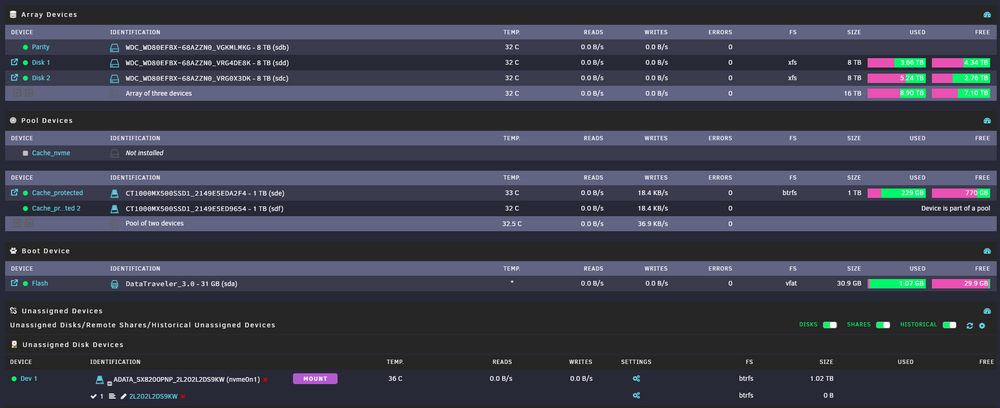
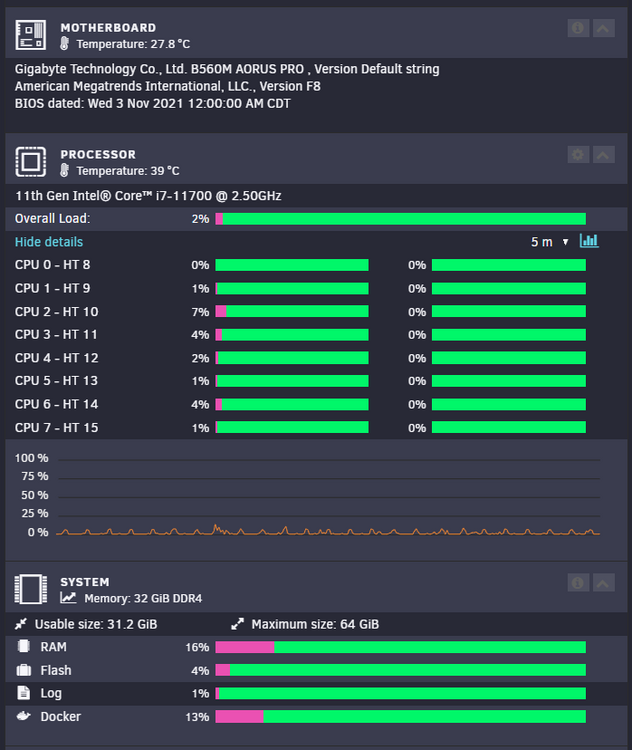
Hi y'all! I'm a relatively lite Unraid user - running just media automations with ARRs & Plex, and Nextcloud. And my Docker (1TB XPG 8200 Pro) started having issues after just 2.5yrs of running and I had to remove it and move docker to another pool. So my first question is - is it normal for a Docker drive to die after just 2.5 years? And the second one is - what should I replace it with? I want to do 2x NVMe to have some redundancy, as it was a huge pain to get the docker data moved to a different pool when the drive's segments are failing 😅 I'm looking now at 2x 2TB Samsung 990 lineup and I'm not sure if "Pro" is necessary or can I go by with Evo or Evo Plus? Or is there any better/cheaper drives I could run? My motherboard has 1x PCI 4.0 x4 and 1x PCI 3.0 x4 M.2 slots, so I can't even run full PCI 4.0 speeds... But should I maybe get a PCI card maybe? And if so, which one? This is the full setup I'm running: CPU: Intel i7-11700 MB: Gigabyte B560M AORUS PRO RAM: 32 GB DDR4 3x 8TB HDD for the Array - WD Red 1x 1TB NVMe for Docker and unprotected cache - XPG 8200 Pro 2x 1TB SSD for protected cache - Crucial MX500 Any help would be greatly appreciated!
-
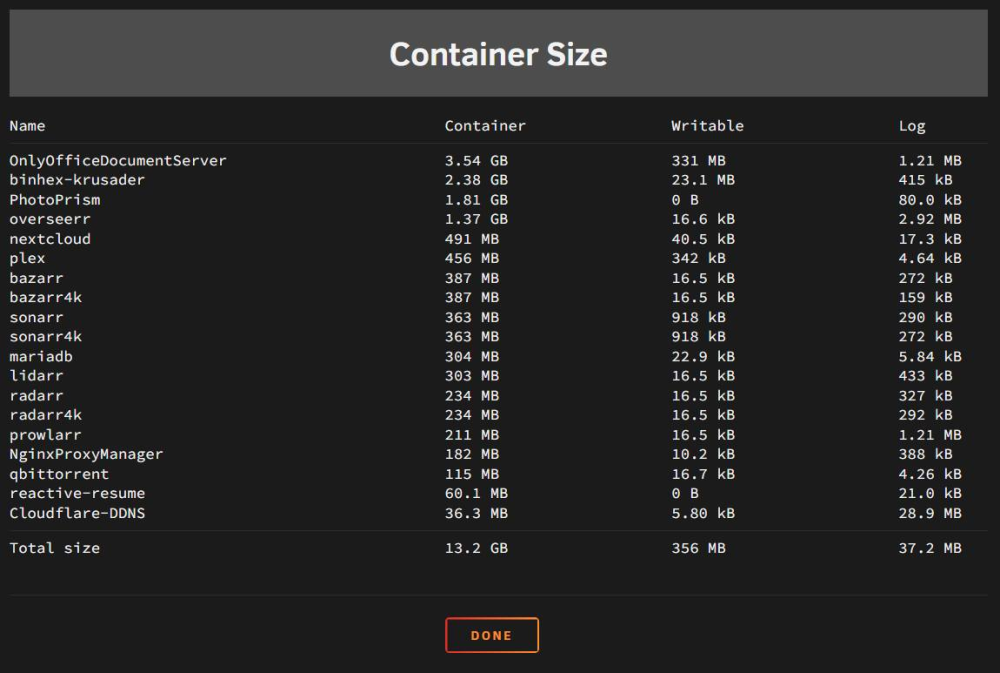
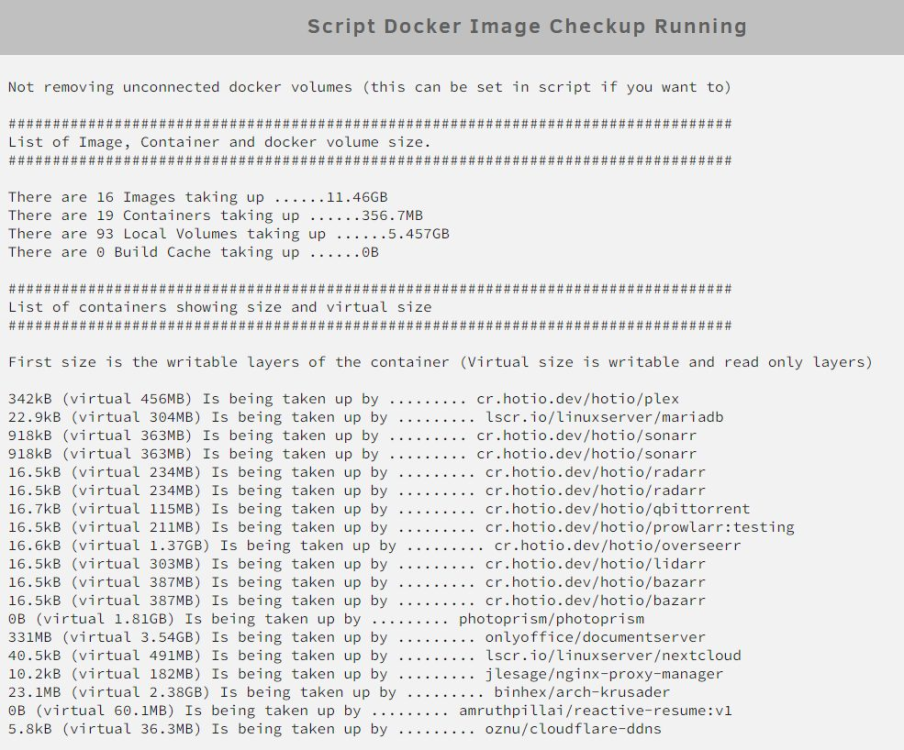
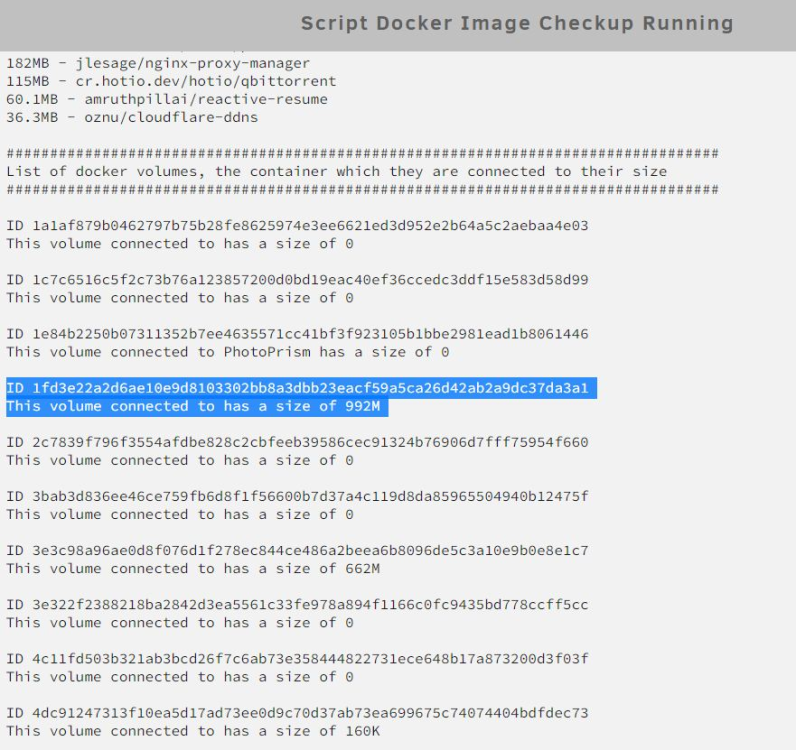
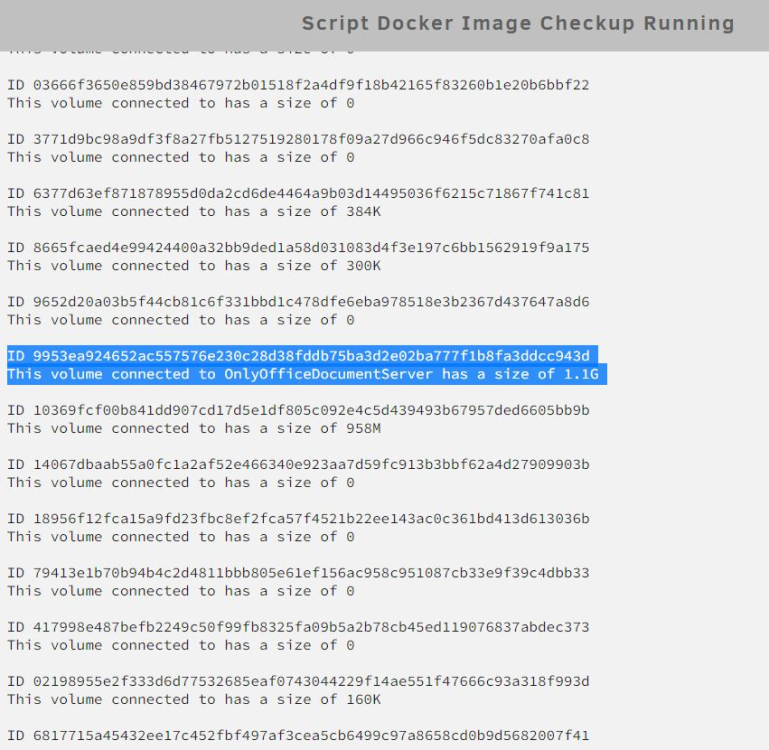
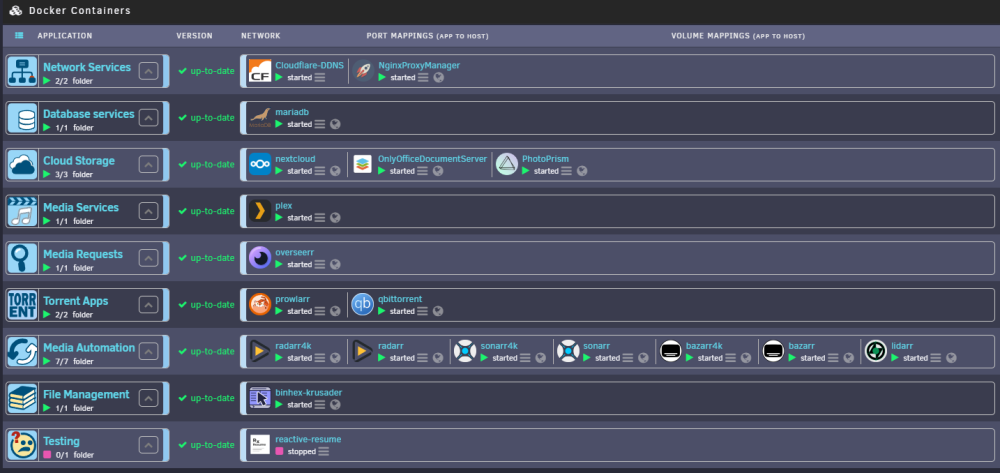
Hey everyone, I have a bit of a problem with my docker image - it gets filled up, but I can't pinpoint with what.. I followed Spaceinvader's guide that I found, but the problem still persists: https://www.youtube.com/watch?v=9DxPEfbAJJ0 I have 32GB in this server and 25GB allocated for docker image, and my container size seems to be about 13GB, but the actual usage is about 17GB. And the problem is that I have a few volumes with a lot of data that don't seem to be attached to anything, and also some volumes that are attached to specific dockers, but I don't know how to troubleshoot it further. Can someone tell me how to find these volumes per their IDs? And also, what should be my next steps to get rid of them or remap them correctly? Also, is this maybe considered "normal" for these dockers that I'm running, and do I just need to upgrade my RAM? Any help would be greatly appreciated!
-
I'll make sure I create a few USB backups and screenshots of everything, but that would be great! Thank you!
-
Currently, they're just attached to regular SATA ports on the motherboard. And NVMe into it's MOBO slot of course. And I'm running a pretty basic NAS setup with Media server - no VMs, just docker:
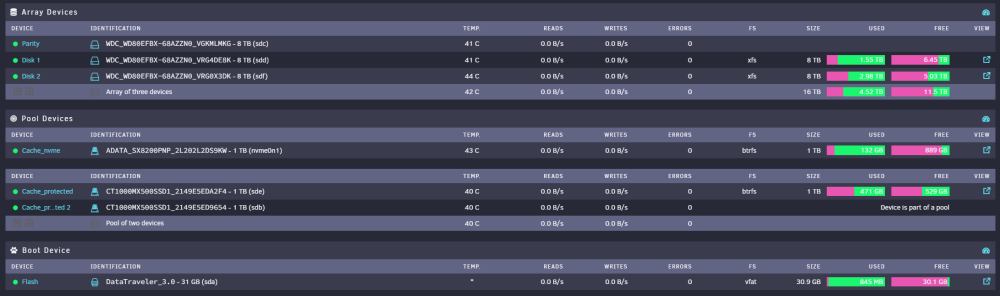
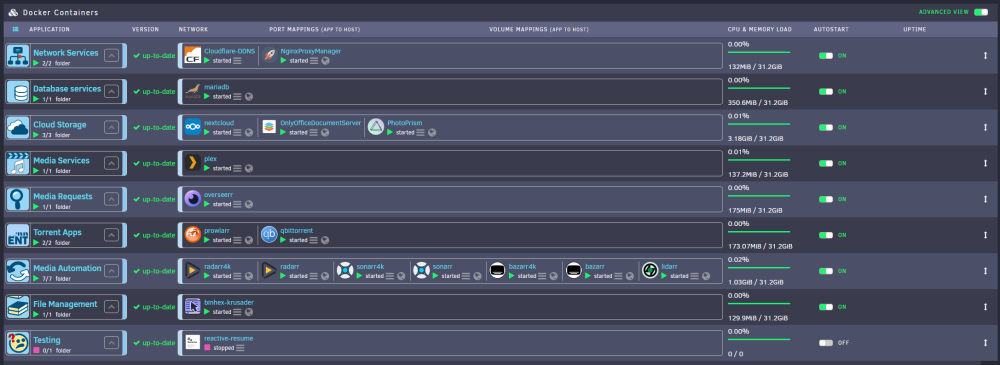
-
Hi all, I'm soon to move from my home country to the US. And of course, I need to move my unraid server, but US customs might give me a hard time if I try to bring the whole machine. Therefore, my plan is to just bring the storage (HDDs, SSDs and NVMe drives), along with my boot USB, and build a new machine there when I arrive. My question is, would this be okay for the server and will it just boot up on a new CPU/MOBO/RAM combo? I know that the unraid license is tied to the USB stick, but I just want to check if I need to do any preparation beforehand? Below are my current specs, and I'll probably upgrade to a stronger CPU/MOBO combo: CPU: Intel® Core™ i3-10105 MOBO: Gigabyte B560M AORUS PRO BIOS: F8 RAM: 32GB (2x16GB) 3600MHz HDD: 3x 8TB WD Red SDD: 2x 1TB MX500 NVMe: 1TB ADATA XPG SX8200 Pro Thanks!
-
I got the error again in normal operation Any idea on what it might be? Or how I can troubleshoot it? I've attached the syslog file from diagnostics. syslog.txt
-
I did actually had to reboot my server due to a UPS started shutdown during a power outage and I guess that's when I got the error now that I think about it.. Okay, so if I ignore it now in "fix common problems", will it show up if it happens again? Or should I leave it as is?
-
Hi all, I got a "Machine Check Events detected on your server" error in "Fix Common Problems" plugin, and it says that I should "install mcelog via the NerdPack plugin", but that plugin seems to be depreciated, and the "NerdTools" that came in it's place doesn't have "mcelog". So I've downloaded diagnostics and in syslog.txt I found a few errors: Any advice on how should I approach solving this problem? I saw on the forum that "mce" errors can be ignored, but I just want to make sure. These are my NAS specs: CPU: Intel® Core™ i3-10105 MOBO: Gigabyte Technology Co., Ltd. B560M AORUS PRO BIOS: F8 RAM: 32GB (2x16GB) 3600MHz HDD: 3x 8TB WD Red SDD: 2x 1TB MX500 NVMe: 1TB ADATA XPG SX8200 Pro Thanks!


