Skip to content
View in the app

A better way to browse. Learn more.

Unraid

A full-screen app on your home screen with push notifications, badges and more.

To install this app on iOS and iPadOS
  1. Tap the Share icon in Safari
  2. Scroll the menu and tap Add to Home Screen.
  3. Tap Add in the top-right corner.
To install this app on Android
  1. Tap the 3-dot menu (⋮) in the top-right corner of the browser.
  2. Tap Add to Home screen or Install app.
  3. Confirm by tapping Install.

Murderhobo

Members
  • Joined

  • Last visited

  1. No idea myself, unless its some kind of environment variable in unraid for me.
  2. Replaced with that code and reran php -f Did I need to add the first part before the code to it? Its been ages and I foget php coding. edit: oh, the plugin works fine , forced transcode/
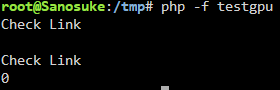
  3. Running that the output is; Check Link is Link nvidia Yeah, the device ID

  4. Works, you rock
  5. On unraid 7.0.1 ofc and 11a
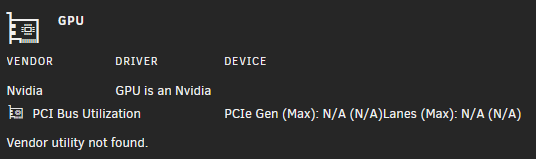
  6. 2nd patch still can't find vendor utility
Account

Navigation

Search

Search

Configure browser push notifications

Chrome (Android)
  1. Tap the lock icon next to the address bar.
  2. Tap Permissions → Notifications.
  3. Adjust your preference.
Chrome (Desktop)
  1. Click the padlock icon in the address bar.
  2. Select Site settings.
  3. Find Notifications and adjust your preference.