





adrianedelen
Members
-
Joined
-
Last visited
-
Thanks everyone for looking into this.
-
I am not copying from one disk to another explicitly. I am using the webUI move tool to move files and directories between shares and directories within shares. here are the steps to reproduce in details: 1. create a new share with two directories src and dest. In srccreate a text file hello_world.txt with the content new_content In dest create a text file hello_world.txt with content old_content using the file move tool, ensuring overwrite existing files is disabled/unselected move src/hello_world.txt to dest Expected behavior: the software will abort, throw an error, pause, alert the user, or otherwise intercept the transfer, due to the mismatch in content. Actual behavior: the content in dest/hello_world.txt is overwritten old_content -> new_content Here is a link to a video showing the behavior, the quality ended up being quite low, Im unsure why that is, but it shows the overwriting in action. demo
-
I am going to guess that the GUI move on the webui just uses mv but doesn't specify something like -n for no clobber. If that is the the case i would consider it a bug, since the web GUI afaik can only be (and is intended to be) accesses by the root user, there can be some unexpected scenarios that happen.
-
version 7.1.2 Without having 'overwrite existing files' selected, it seems that unraid still is overwriting existing files when using the web UI's move functionality. I don't know if this is a bug or intended behavior, but it has caused me to accidentally overwrite thousands of files that had the same name instead of either aborting the operation, pausing to inform/confirm, or renaming the files. Steps to recreate: inside of a directory, create a test file: 'a.txt' with content Hello World copy the file to another directory in the original directory change the content of the file, without changing anything else Hello World 1 using the unraid web UI select the move option, ensure overwrite existing files is un-selected. see that a.txt has been overwritten with the new content. While I will obviously stop using the unraid UI for any and all file transfer operations moving forward, I am wondering what process Unraid uses under the hood to do these moves and if the files are lost or not.

-
Looks like an upgrade to 7.0.1 fixed, referencing this thread seemed to be the root cause in my scenario as well (too many disks, 7.0.1 upped the limit)
-
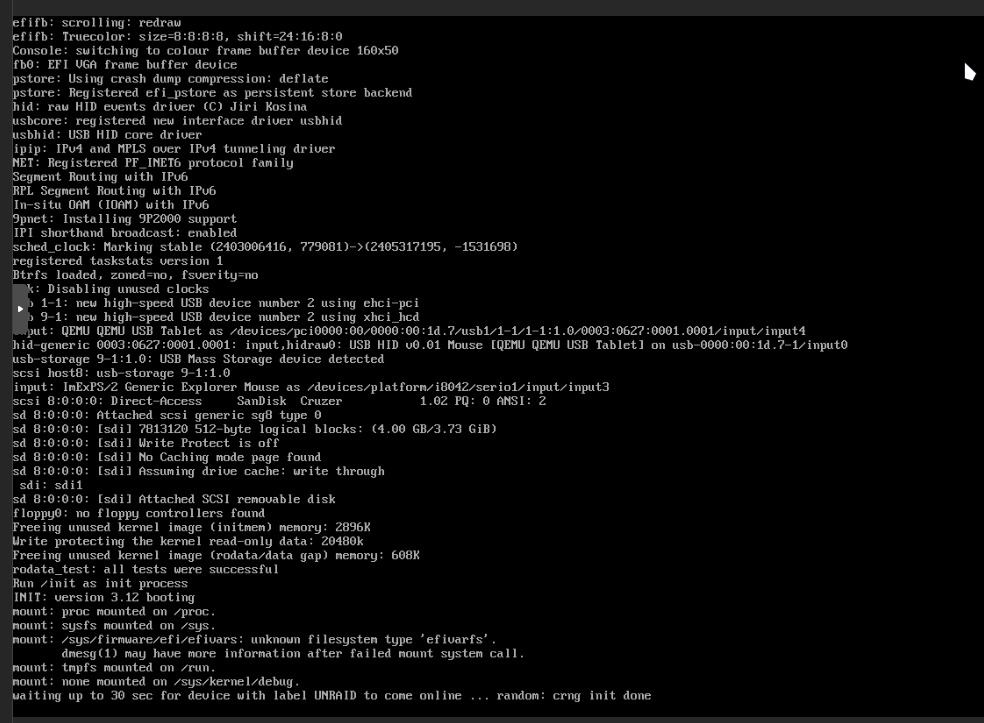
If I create an EFI disk like proxmox wants (which seems to be part of the issue, i get the following screen:

-
Hello All, have a fresh install of pve and an existing unraid setup, trying to port the existing bare metal unraid setup to a VM. USB thumb drive pass through appears successful, however it fails when attempting to unmount / this happens with legacy or UEFI mode, though with UEFI mode, I have to manually navigate into EFI-/boot from the UEFI shell to get it to work. i have tried all of the usb ports (including usb 3 and 2) to no avail. edit: the screenshot is cut slightly, but there isn't really more information, it fails to unmount / and then says 'not found - press ENTER key to reboot'
-
Sorry for the delay, got caught up with work. After restarting so far it seems like everything is running normally. Attached are the updated diagnostics. Do you know what may be happening that would require a reboot. normally I am able to leave the server on indefinitely, usually only shutting down when I need to do maintenance, or the power will be out. gary-diagnostics-20230421-1740.zip
-
Recently (around 1 week ago) I noticed my docker image started to grow. After some reading I found typical causes to be writing files to the image instead of to a mapped path, so I started to look into that route. I however wasn't able to find anything. Later I decided to change the docker image size since it was approaching 100% and I didn't want to fill it up ( I hadn't found the root cause of the growing image size, however I also did not want everything to go offline as I needed some services available) after changing the docker image size (increasing) the docker service failed to start throwing these PHP errors Warning: stream_socket_client(): unable to connect to unix:///var/run/docker.sock (No such file or directory) in /usr/local/emhttp/plugins/dynamix.docker.manager/include/DockerClient.php on line 712 Couldn't create socket: [2] No such file or directory Warning: Invalid argument supplied for foreach() in /usr/local/emhttp/plugins/dynamix.docker.manager/include/DockerClient.php on line 898 ok, I have seen mention of this on the forums before, seems like a corrupted docker image. no big deal, I deleted the image, rebuilt it, and this time I didn't install about 1/2 of the previous dockers that were not as important in an attempt to reduce the image size and find the offending container that was causing the image to grow. after getting everything going again, I logged in this morning only to find websites failing, and containers not responding. I saw the container was showing ~85% usage of allocated space (30GB) so I went to the docker page and calculated the image size, unfortunately I didn't take a screenshot, so I don't remember the size for the logs/writable portions, however I know the total container size was showing as 30.5GB. Something isn't adding up, the dashboard is reporting ~85% but the calculated size is well over the allocated size. I shut down the docker service, went to change the image size again to increase to around 60GB (the previous size I had used for years with no problems) and now the docker service is failing to start again with the same PHP errors. I saw that issues like this can arise from full drives, but everything is reporting with 100s of GB of free space on every drive, with the cache drive have ~500GB free. In summary: Docker image growing Resized image Docker service failed to start rebuilt image with less containers docker image filled up again resized image docker service failed to start again. Thanks for any help! gary-diagnostics-20230421-1032.zip
-
I run a lot of non-priority containers on my network that will occasionally demand 100% or the majority of system resources. an example would be cloud backups that will occasionally read from several disks and consume a high amount of bandwidth. This is fine except for scenarios when I need those resources actively, for example plex. A typical scenario may be: 1. Watching a movie on plex 2. another container starts an operation that is indexing files and uploading them. 3. this causes plex to buffer. I have tried to schedule operations to occur during offpeak hours, but it can be hard to manage, since the time I or someone else would be using plex is not consistent. So my question is: I know that CPU priority can be configured, Is it possible to give the Plex (or any given specific docker) container higher priority for disk access and network bandwidth?
-
After making the cstate change it looks like server performance has improved. If we go another day or two without a crash I will consider it resolved and mark the solution. Thanks for the help.
-
Ok I am looking into these changes now. I will try those out and report back on the next crash. In the meantime, I had a crash (lockup) around midnight last night. Attached is the syslog as it is one the flash drive. it seems to be enlightening, but a little beyond my comprehension syslog
-
Attached is the diagnostics zip. I will update this post with the syslog after the next crash (I just restarted so it may be a few hours) Thanks, for the quick response. bignas-diagnostics-20230224-2031.zip
-
I have been experiencing periodic crashes as of late, at differing times, it seems to happen no later than 24 hours after a boot up, the server will become entirely unresponsive, even in gui mode, the screen is locked up, no mouse/keyboard input. I can attach log files, I am just not sure what to attach. I am at a loss as to what is causing this and could use some troubleshooting guidance. Thanks.
-
I figured out the problem. Mods can close this topic if needed. For anyone in the future, it was a pretty dumb problem. For some reason with the new hardware the static IP for unRAID was wiped (locally) I booted into safe mode, no plugins, was able to connect to webui locally and re assign the IP address.

