





schmidtflo
Members
-
Joined
-
Last visited
-
Okay, just to make sure I understood correctly: - clone old disk5 with ddrescue to a brand new one (I'll just go and buy one) - take out new disk5 (18TB) that I just installed out of the NAS and not use it anymore (for now) - use cloned disk5 as regular disk5 in the array from now on, create a new config with all disks (all disks, including disk3 which is then useable again with new config as well as cloned disk5), this will re-generate the parity on the parity-drive Or can I use new disk5 (18TB), format it, and ddrescue old disk5 onto it, then using it as regular disk5 from now on?
-
Or, should I check a few files on disk5 (the replacement disk) if they are fine and not broken?
-
The large number of errors only occured while rebuilding the array after replacing the faulty disk. Therefore my idea was to bring the SATA-cable-error disk back into the array (therefore array should be good except for the new disk with wrong parity calculated), then format the new disk to start another rebuild. What do you think of this, is this a viable solution?
-
Yep, seems to be failing. My strategy would be, mount disk3 (that one with the broken SATA cable) again (how to do this, as unraid marks it as disabled?). Then, do I have to re-build the parity from disk5 (the actually exchanged one) again, like by formatting the new disk5 and start a rebuild? Or is it fine, as the rebuild wasn't cancelled by the system, even tho the errors occured? galileo-smart-20240724-1446.zip
-
Sure, the disk5 i removed originally can be found as sdf in the smart logs galileo-diagnostics-20240724-0956.zip
-
As addon: The old disk (that I replaced with the new 18TB one) shows 11 CRC errors and 15 Reallocated sector count, which is why I wanted to replace it.
-
Both were mounted successfully (GUI popup said error while mounting, but syslog seems fine, they are listed as mounted in GUI and can be accessed via terminal [browsing the folder structure without any obvious errors) I in between actually replaced the SATA cable (beforehand i just not used it anymore, but when reinstalling it the old disk i put back in also threw CRC errors, so I then used a factory new cable, now no error is shown anymore. So for me, both disks seem to be in a fine-ish state. How to continue now? Probably disk3 (with the high error amounts) can be mounted again without errors now, as the SATA Cable was swapped? Is then everything fine, or do I have to "restart" the rebuild?
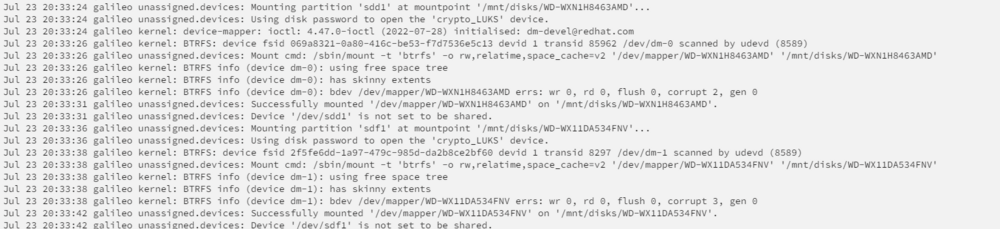
-
Old party history shows nothing too strange except for the rebuild. I already switched to a different SATA port at the reboot, afterwards it was not mountable anymore. I have dismounted it from the server. Should I reinstall it again to check? It was not disabled and still readable when I removed it.
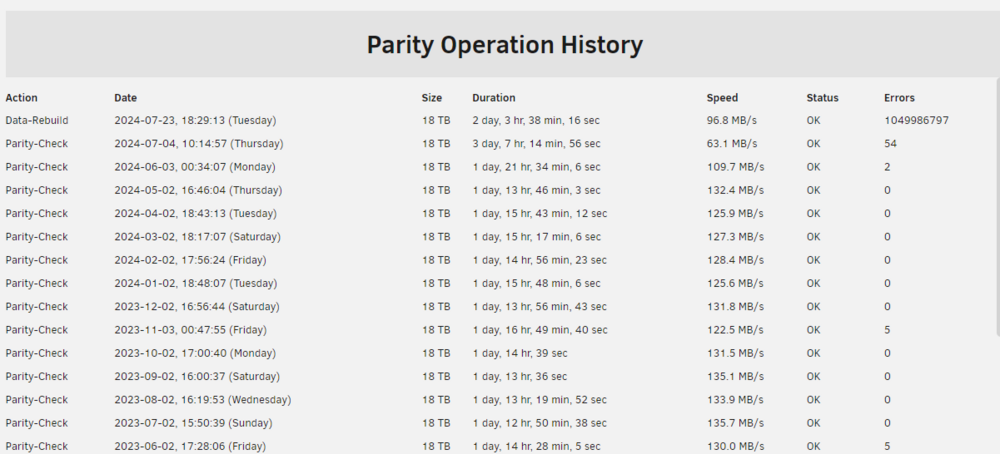
-
Oh, and I just noticed, Fix common problems also reports "Unable to write to disk5: Drive mounted read-only or completely full." - which is the disk I just replaced.
-
Hey, following situation, my unraid server is version 6.11.5 (wanted to get my array to a good state again, before updating..) - My UnRaid was running fine, build two years ago, with 2x 18TB (1 parity) and a 14TB added later; also using 4x 6TB from my old Synology (having already over 7 years of runtime). - First disk started to show some errors (very few), parity was always able to correct it, disk was not disabled. - A second disk (in the logs disk3) started to show CRC errors now and then, I saw it can just occur and nothing to worry about. - I bought another 18TB, precleared it and kept it as hot spare - Now a few days ago I finally decided to retire the first disk with the errors, and replace it by the hot spare 18TB. Used the normal guide for that, then started to rebuild the array. - Suddenly, after a few hundred GB, disk3 started to throw a lot of errors (nearly as much errors as reads). Rebuild went down to 2MB/s for some hours. Later on, it continued normally with expected rebuild speeds. It finished a few hours ago, just showing that there were a lot of errors, but indicating parity still valid. - directly afterwards, disk3 was disabled because of the error counts. After a reboot (where I switched to a different SATA cable), it now is not even mountable anymore ("Unmountable: Wrong or no file system"). SMART check shows nothing strange (from what I can see), except for CRC errors. A extended smart check is running now. What should I do now? Might there be some data loss? I still have the old removed HDD, did nothing to it yet. The new 18TB HDD could hold the data of both failed disks without any issues, is there a way to move the data? galileo-diagnostics-20240723-1912.zip

