kkmedia
Members
-
Joined
-
Last visited
Everything posted by kkmedia
-
@dlandon As promised, here is the latest diagnostics file. AAAI made sure to change the Debug log Level to "none" and rebooted my computer! Have a great day! kkmedia kkmedia-unraid-diagnostics-20230112-0922.zip
-
@dlandon Thank you for your quick response, I will be sure to follow your instructions and post the diagnostics file once it happens again! Thanks again!
-
Greetings! I have been having this really weird problem with a Remote SMB share for a while now and finally I have had enough of it, so I am hoping somebody can help me figure out and fix this problem Ok, where do I start, I have a remote SMB share where I store my Media and any files that are handled by SABnzbd and Sonarr, both Docker containers are on my Unraid server. When I have this problem, I would normally reboot the server and the remote SMB share shows the proper storage values, then if SABnzbd starts downloading too many files at once, let's say 10 for arguments sake, all of a sudden, it gets paused and when I check, it shows this: Then when I check the status of that remote share, I get this: I do have another remote share on that same computer and it does not have this problem. So what I have to end up doing is rebooting my UNraid server and everything goes back to normal, until of course SABnzbd starts downloading multiple files again. I have attached my diagnostics files, believe me, you might find numerous problems, but I am more than willing to take any negative feedback as long as I can get them fixed! Thank you in advance. kkmedia kkmedia-unraid-diagnostics-20230110-1545.zip


-
Greetings! I have been having this really weird problem with a Remote SMB share for a while now and finally I have had enough of it, so I am hoping somebody can help me figure out and fix this problem Ok, where do I start, I have a remote SMB share where I store my Media and any files that are handled by SABnzbd and Sonarr, both Docker containers are on my Unraid server. When I have this problem, I would normally reboot the server and the remote SMB share shows the proper storage values, then if SABnzbd starts downloading too many files at once, let's say 10 for arguments sake, all of a sudden, it gets paused and when I check, it shows this: Then when I check the status of that remote share, I get this: I do have another remote share on that same computer and it does not have this problem. So what I have to end up doing is rebooting my UNraid server and everything goes back to normal, until of course SABnzbd starts downloading multiple files again. I have attached my diagnostics files, believe me, you might find numerous problems, but I am more than willing to take any negative feedback as long as I can get them fixed! Thank you in advance. kkmedia kkmedia-unraid-diagnostics-20230110-1545.zip
-
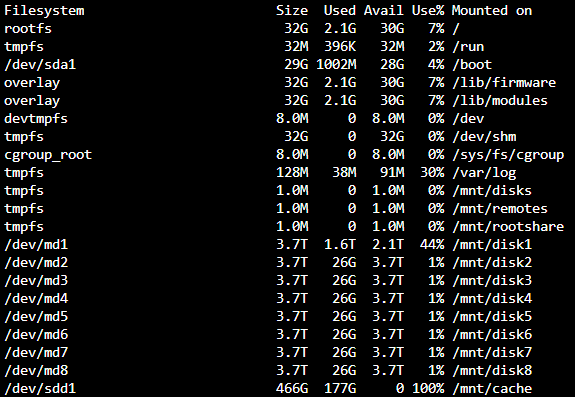
Greetings! I am a relatively new user to Unraid, and I have been enjoying Unraid up to this point. All of a sudden, I started getting error messages saying "No space on Device" etc. I have read through a lot of posts but nothing seems to work. I acknowledge that it has to be a setting somewhere that I overlooked when setting up shares, my cache drive etc. so I am welcome to any criticism about that . Here is a couple screenshots: I have attached my Diagnostics file. I think it is odd that my cache drive says it is 100% but shows that I have only used 190GB of 500GB. And when i try to create a file on my /mnt/user/appdata folder, I also get the "no Space on device", I just checked it again and now it says "Read-only file system" Any assistance is appreciated. Thank you in advanced. kkmedia-apollo-diagnostics-20221104-1543.zip