





atraikov
Members
-
Joined
-
Last visited
Everything posted by atraikov
-
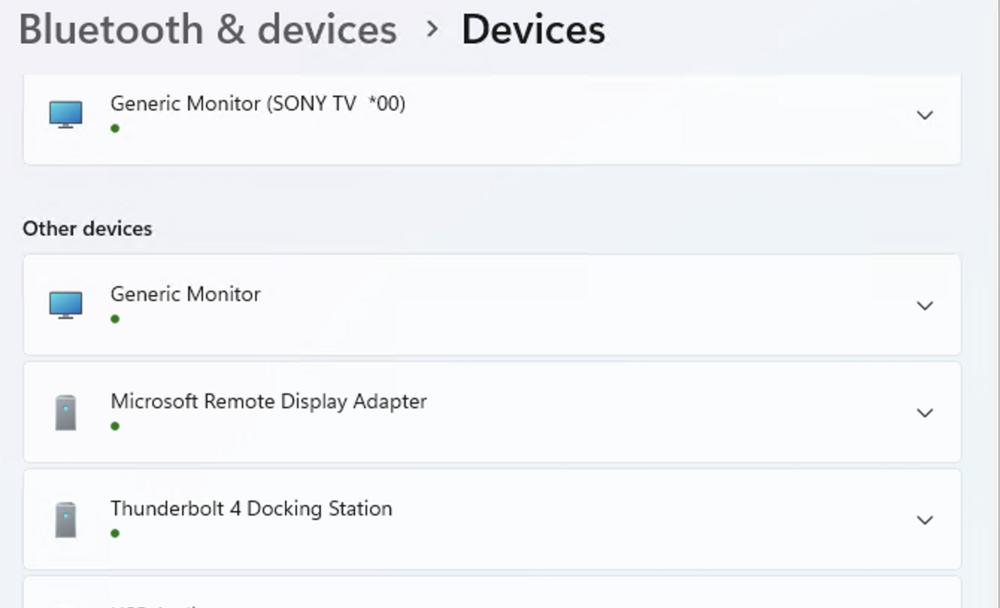
The docker hub is a Ugreen thunderbolt 4 that works properly when i connect it to a laptop. But I when I move the same cable to the usb 4 passhtrough, the windows vm only shows thunderbolt 4 docker and doesn't recognize any connected devices to it (microsd, flash drive, bluetooth usb). There is another usb keyboard attached on the passthrough and it works properly... There is something with the docker stations in general. The older unraid pc i had did not prsent issues. Motherboard: ASRock X870E Taichi , Version Default string American Megatrends International, LLC., Version 3.40 BIOS dated: Wed 27 Aug 2025 12:00 AM Unraid : 7.3.1 Docker station: https://www.amazon.com/UGREEN-Revodok-Docking-Station-Display/dp/B0FM45VH8N/ref=sr_1_4?crid=RXTTHA3U9ZK0&dib=eyJ2IjoiMSJ9.-ROzQ6mS84m-4zLSIIQy1BbbBNnUrBFWxqTydRMdZKenM3huWvy7BXq7EaD_XKMaPgrZjNjvrI_hoEjTXoEDKoN7npffsgoKLYKblKbn7znBM0Ew5LRpVVWeWKvuhuem1u4fHa_1wjE2OhZW1YHyBPj9JQALSy0YzmXYJcQ5zsP2lsPcKrxrSJg0eB7adyJRojgVNU4L9ZUeH4yA5JXDkna2Fic0Roj80XE7vqypHj0.tLVOvpLlL9dQ5Oc-cN0WZX3Ojm6tsr4T-GpJS2c0n7c&dib_tag=se&keywords=ugreen+thunderbolt+4+dock&qid=1782554828&sprefix=ugreen+thunder%2Caps%2C248&sr=8-4 diagnostics and syslog attached. tower-diagnostics-20260627-1308.zip syslog.txt
-
@richardoswald @uaktags I just signed up to also thank for this! Literally restored weeks of lost work!
-
Clsoing off for now. Seems like it was a network issue.
-
Hi, If I download over SMB from another machine within the local network I hit up to 20 mb/s. But if I access the SMB from unraid VM, I reach 500+ mb/s. I will try to rule out a networking problem. All ethernet ports are 1gbit. Diagnostics attached. thewall-diagnostics-20220317-1624.zip
-
@ghost82 Moving to a single line worked. Much appreaciated! I will see if all is good now.
-
Understood, will make the ammendments. Attaching syslog. thewall-syslog-20220303-1659.zip
-
This is syslinux.cfg contents (/boot/syslinux/syslinux.cfg😞 default menu.c32 menu title Lime Technology, Inc. prompt 0 timeout 50 label Unraid OS menu default kernel /bzimage append initrd=/bzroot video=vesafb:off video=efifb:off label Unraid OS GUI Mode kernel /bzimage append initrd=/bzroot,/bzroot-gui label Unraid OS Safe Mode (no plugins, no GUI) kernel /bzimage append initrd=/bzroot unraidsafemode label Unraid OS GUI Safe Mode (no plugins) kernel /bzimage append initrd=/bzroot,/bzroot-gui unraidsafemode label Memtest86+ kernel /memtest
-
Yeah, syslog got 128 mb of this same message, I dumped it and now it is not running. Restarting...
-
Sharing. Currently, the monitor is turning on, but no image comes through. When I stop the VM, signal also stops. On windows 11 I get this: "2022-03-03T13:55:00.782938Z qemu-system-x86_64: vfio_region_write(0000:01:00.0:region1+0x298c8, 0x0,8) failed: Device or resource busy" On windows 10 I don't get anything, but there might also be a problem with displaying log information currenty. thewall-diagnostics-20220303-1805.zip
-
Unraid version: 6.9.2 My motherboard is: ASUSTeK COMPUTER INC. TUF GAMING B560M-PLUS WIFI, Version Rev 1.xx American Megatrends Inc., Version 1203 BIOS dated: Thu 28 Oct 2021 12:00:00 AM PDT 11th Gen Intel® Core™ i7-11700K @ 3.60GHz Nvidia card; https://www.techpowerup.com/gpu-specs/gigabyte-rtx-3060-gaming-oc-rev-2-0.b9471 0. I am trying to rum a Windows 10 VM with passthrough Nvidia (tried with both SeaBIOS and OVMF). 1. The card is bound to VFI successfully: IOMMU group 13: [10de:2487] 01:00.0 VGA compatible controller: NVIDIA Corporation Device 2487 (rev a1) IOMMU group 13: [10de:228b] 01:00.1 Audio device: NVIDIA Corporation GA104 High Definition Audio Controller (rev a1) 2. I have added the those 2 items settings to the os config: video=vesafb:off video=efifb:off 3. The XML config of the VM is set as: <hostdev mode='subsystem' type='pci' managed='yes' xvga='yes'> <driver name='vfio'/> <source> <address domain='0x0000' bus='0x01' slot='0x00' function='0x0'/> </source> <alias name='hostdev0'/> <rom file='/mnt/user/isos/vbios/GA104.rom'/> <address type='pci' domain='0x0000' bus='0x00' slot='0x05' function='0x0' multifunction='on'/> </hostdev> <hostdev mode='subsystem' type='pci' managed='yes'> <driver name='vfio'/> <source> <address domain='0x0000' bus='0x01' slot='0x00' function='0x1'/> </source> <alias name='hostdev1'/> <address type='pci' domain='0x0000' bus='0x00' slot='0x05' function='0x1'/> </hostdev> 4. I have extracted the vbios via GPU-Z. And tried with that version and also stripped the Nvidia header. Both same result (attached here) 5. This is the result I get when I start the VM: -device virtserialport,bus=virtio-serial0.0,nr=1,chardev=charchannel0,id=channel0,name=org.qemu.guest_agent.0 \ -device vfio-pci,host=0000:01:00.0,id=hostdev0,x-vga=on,bus=pci.0,multifunction=on,addr=0x5,romfile=/mnt/user/isos/vbios/GA104.rom \ -device vfio-pci,host=0000:01:00.1,id=hostdev1,bus=pci.0,addr=0x5.0x1 \ -device usb-host,hostbus=1,hostaddr=5,id=hostdev2,bus=usb.0,port=1 \ -device usb-host,hostbus=1,hostaddr=11,id=hostdev3,bus=usb.0,port=2 \ -device usb-host,hostbus=2,hostaddr=7,id=hostdev4,bus=usb.0,port=3 \ -device usb-host,hostbus=1,hostaddr=4,id=hostdev5,bus=usb.0,port=4 \ -device usb-host,hostbus=1,hostaddr=14,id=hostdev6,bus=usb.0,port=5 \ -device usb-host,hostbus=2,hostaddr=4,id=hostdev7,bus=usb.0,port=6 \ -device usb-host,hostbus=1,hostaddr=12,id=hostdev8,bus=usb.0,port=7 \ -device usb-host,hostbus=1,hostaddr=9,id=hostdev9,bus=usb.0,port=8 \ -device usb-host,hostbus=1,hostaddr=8,id=hostdev10,bus=usb.0,port=9 \ -sandbox on,obsolete=deny,elevateprivileges=deny,spawn=deny,resourcecontrol=deny \ -msg timestamp=on 2022-03-03 11:02:45.887+0000: Domain id=19 is tainted: high-privileges 2022-03-03 11:02:45.887+0000: Domain id=19 is tainted: host-cpu char device redirected to /dev/pts/1 (label charserial0) 2022-03-03T11:02:46.538185Z qemu-system-x86_64: -device vfio-pci,host=0000:01:00.0,id=hostdev0,x-vga=on,bus=pci.0,multifunction=on,addr=0x5,romfile=/mnt/disk1/isos/vbios/GA104.rom: Failed to mmap 0000:01:00.0 BAR 1. Performance may be slow Anything comes to mind? GA104_modified.rom GA104.rom

