Werner Bober
Members
-
Joined
-
Last visited
-
Hi, I just figured out a solution. I mapped port 8082 in the SWAG template and it worked. Maybe there is a better solution? Regards Werner
-
Hi there, I'm using the linuxserver SWAG application for serval apps. It works pretty good. But I couldn't find a configuration file for my Seafile. I looked in many forums but I can't find a solution. The webinterface works fine. I can login and I can view files in the browser. But I can't down- or upload any files. Than I get an 502 error. I think in my configuration file the "seafdav" section is missing. But I can't find the right solution. With NPM it worked fine but I'll switch to SWAG because of Authelia and fail2ban. Maybe someone of you have a solution. Regards Werner seafile.subdomain.conf
-
Hi, something happend with the USB 2.0 port. Other devices (UPS, smart home antenna) working well, only the flash go offline after one or two days. Since five days I use a USB 3.1 port (same flash drive) and everything works well. Maybe I find out where the problem is. The main thing is that it is running again. Thanks again for your help.
-
Now I have tried a back USB 2.0 port. Since Sunday it works fine. Now the keyfile is missing again after reload the dashboard. I already made a BIOS update, checked the USB port settings in the BIOS. Everything is ok. Two days works fine, than the keyfile is missing. Now I will downgrade to 6.10. There I don't had problems. I'll give a feedback... Hopefully it helps.
-
Yes, it's USB 2.0. But now I have only USB 3.0 ports. On the USB 2.0 ports I've the same failure (with the old and the new flash drive). Maybe the same controller...
-
OK, many thanks for your help. I'll try an USB port at the back. Maybe the controller of the front ports are defective. Yes, in unraid under /boot is nothing... I'll give a feedback if it's helped. Thanks again.
-
Hi, thanks for your quick reply. Attached is the diagnostic file. unraid-diagnostics-20221009-1320.zip
-
Hi, since the update to 6.11 (now the latest version 6.11.1) I have the third time a missing keyhole error. I have used a new flash drive and another USB port. But after a few days it's the same problem. The keyfile is missing and there are no VM or Docker tabs visible. The containers are running. If I reboot the system, something is ok for about two days. Is there a bug in 6.11? Can I downgrade to 6.10 ( there I don't had problems)? Regards Werner
-
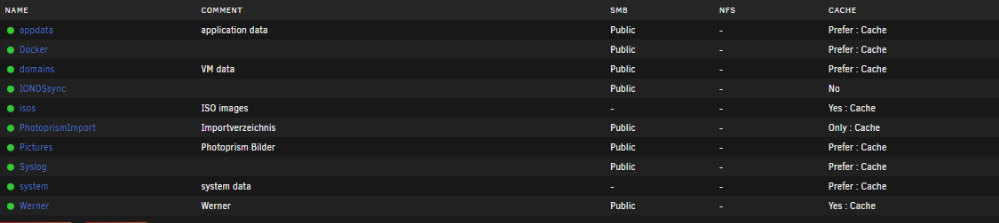
Moin, ich habe 2 NVME Speicher nachträglich eingebaut. Die VM und Docker Maschinen waren heruntergefahren, Docker und VM in den Settings deaktiviert. Die Shares habe ich auf Cache Prefer bzw. Yes gesetzt. Anschließend den Mover gestartet. Docker und VM wieder aktiviert und die Maschinen gestartet. Nun habe ich das Problem, dass die Daten unter Appdata nur teilweise auf dem Cache liegen. Einige Daten liegen auf dem Cache sowie auf der Disk. Das ist vermutlich der Grund, warum sich die HDD's nicht schlafen legen. Muss ich noch andere Schritte beachten? Der Cache ist 1 TB groß, Daten für den Cache ca. 300 GB. Ach ja, das Verzeichnis, das auf Cache only steht, wurde gar nicht auf dem Cache angelegt. Vielen Dank schon einmal für eure Hilfe. Gruß Werner