silman
Members
-
Joined
-
Last visited
-
this is because the group ID (and user ID) exist only inside the docker container, if you launch a console into the container you can see this with `cat /etc/group`, the ID of the group is carried out of the container but unraid just sees the ID number and is like "well i guess its group ID 421 which isn't aliased to any group name" So when you created the group manually with `groupadd -g -421 foundry` you were aliasing it on your unraid box. IDK if this will persist between boots, depends if the group config is stored on the unraid flash drive. But yeah for now you got it. I should mention that you could have also used the plugin Appdata Backup to create backups of anything in the appdata share automatically which can include your foundry worlds if you have them placed there.
-
you can change the FOUNDRY_UID (under "show more settings) docker container environmental var to your own user if you wish. But maybe more appropriate would be the either change FOUNDRY_GID to a specific group you want the files to be create under or you can add your own user the `foundry` group which is the default.
-
The Game Data Path is where your worlds are stored (Specifically it's the world's folder within the Data that is contained inside the Game Data Path) back up the entire Game Data Path for ease and safety. For me, I set Game Data Path to something stored on the Array. Then my array is backed up in any of the standard fashions (Personally I use Backblaze)
-
I'm trying to get my Android phone VPN'ed into unraid so i set up wireguard (on unraid 6.10.3) with the following settings: I set up my phone as a peer with the following settings I turned "Enable host connection to custom networks" in the docker settings, and i set up a static route on my unifi dream machine router as such: And my ports are forwarded And i checked that its open ❯ nc -vnzu xx.xx.xxx.xx 5180 Connection to xx.xx.xxx.xx port 5180 [udp/*] succeeded! Nothing seems to work. Not only can i not access docker containers, i cant even access the unraid server at 10.0.0.13 What am i missing? One thing to note is i'm running pihole on a raspberry pi located at 10.0.0.12 (hence the DNS address). My router assigns 10.0.0.12 as the DNS server for things on my network. Could pi-hole be screwing things up? I searched around and the only thing i could find was to enable all origins which i did: I can only really test over LTE right now since i'm home. So i disable WiFi and enable the wireguard VPN on the phone, using t-mobile LTE, nothing seems to work. The wireguard page in unraid always says "tunnel is inactive" so it's like its not even creating the tunnel at all. **EDIT: SOLVED. Unraid has an "active" toggle thats very small and i didnt notice....**
-
I had a similar setup. with this container just point the data folder at your /mnt/user/Foundry. The felddy container itself downloads and runs the foundry app so it's all within the docker.img. Look at my second post in this thread and you will see Game Data Path pointing to /mnt/appstorage/Foundry. I use `appstorage` as my unraid share on HDD (not cache/SSD) which persistently stores data used by `appdata` (which only stores docker apps necessary persistent files). So all extra media specific to my docker apps is on HDD (since it can get quite large, as you know).
-
Moving over is easy! You can delete all the other stuff in the appdata folder besides the 'data' folder (the folder containing Data, Logs, and Config dirs) and then just point your Game Data Path to that data folder. Then you can delete the fithwum docker (and image) and start up this one.
-
The fithwum one is very basic and very manual. You have to install/unzip the foundry version yourself into the appdata. Moreover it does not handle the options lock file very well and i found many times where it got stuck with a world loaded if i didnt return to setup before shutting down the container. This container avoids that by not storing those files (unless you tell it to preserve them), it's much more robust all around in my experience - having used the fithum container for the past few months and now this one very recently. This container has multiple methods to automatically download a specific or latest version (using either username/password auth or a time based release URL) and can cache the download for you so container restarts don't need to redownload, it lets you configure the admin password and license key from the template, it let's you configure the containers GID and UID, the local and remote host names so the in-app join link is correct, it lets you set the default language for the foundry app, it lets you can configure proxy settings, and provide custom SSL certs if you want, lets you minify the javascript or disable minification for module development, lets you configure Universal Plug and Play, automatically launch a specified world, and lastly let's you provide it scripts (from a list of URLs and/or local scripts) to run after boot-up (This is particularly useful for those who use a certain radioactive module, as there are scripts out there to automatically install it and change the necessary javascript file in the app). Feel free to learn more here: https://github.com/felddy/foundryvtt-docker
-
Great to see it was resolved! I will add this to the third post about container cache. I just got home and started testing it. I found two things: 1) the user and group for the container_cache dir and all files inside must be set to 421 (the id the container uses); you can run chown -R 421:421 container_cache 2) the file must be all lowercase format foundryvtt-x.xxx.zip I will add this to the third post about the container cache method.\ Thanks for bringing this to my attention!
-
hmm yeah i can't tell anything obviously wrong with that, i'm not able to access my server right now so i can't compare what my permissions are. One thing i can suggest is to move those pre-downloaded zips somewhere else, then ask the person who has the Foundry key to generate a timed-URL, copy that into RELEASE_URL and keep CONTAINER_CACHE set, make sure to set FOUNDRY_VERSION to the version of the release that the timed-URL was generated from. Then start up the container (before the timed URL expires) and let it download it for you, then you can go into the container_cache directory and see what the permissions are for it. My guess is that the user and group IDs will be different. Just something to try, i know it's not nearly as convenient as copying in a pre-existing ZIP that you had on hand but maybe if we figure out what the container is doing we can mimic it.
-
Hi d3fc0n0wltraps, That is super weird. I definitely tested this scenario (in fact i used 9.238 when i tested it!). One thing you can try is to set the container tag to the version you want so instead of `felddy/foundryvtt:release` you can try `felddy/foundryvtt:9.238` which will force it to always use that version, but you should not have to if you are using the container cache method. I was able to have the 9.238 zip in the container cache just like you did with the `release` tag and it worked fine. I can imagine if the zip permissions aren't set right maybe the container can't access it? But i'm not sure, what permissions are set for the container_cache folder and the zip inside it? I actually had the container download the 9.238 version for me using USERNAME/PASSWORD method and then re-used it after deleting the username and password from the template to check that it was using that zip. So maybe the permissions set by it downloading it for me makes the difference? Can you go to into the advanced settings for the template and change the `CONTAINER_VERBOSE` variable to true so we can take a deeper look at the logs.
-
Ah i assumed there was some CA Plugin to give us the same feature as the custom repository box that is being taken away. I guess testing templates will just be more manual given they need to be copied to that location.
-
what is this? Is there a way to add custom private repositories to the CA Apps page?
-
Oh, i didn't know it was going away.... Why bother removing a feature at all? I find the ability to add custom repositories nice, i used it a lot to test how my template would look to users who first downloaded it. Taking away perfectly fine functionality seems like a miss, couldn't Limetech just have hidden it behind an "advanced" toggle? I'm not even sure how template authors are going to test their template easily now. Thanks for the info i guess, it doesn't feel great that CA apps xml must hosted on github; in fact, it feels a little odd to ignore Gitlab and Bitbucket considering they still have a huge market share and many developers prefer those to Github. I would understand if Unraid had a central gitlab repo for all it's CA apps, but that's not the case.
-
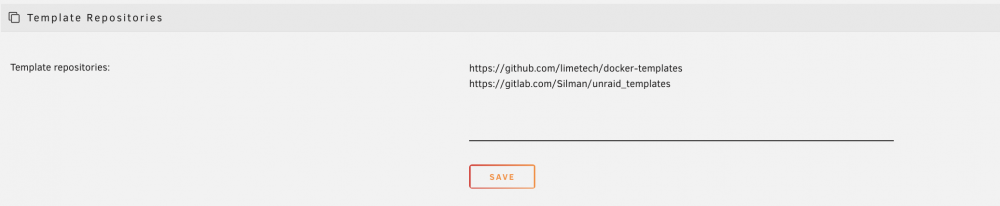
Currently xml templates seem to be required to be hosted on Github. When I tried to add my xml template repo from Gitlab the template never showed up, but when i cloned the repo to gitlab it worked. I prefer Gitlab and many other developers do too, would it be possible to support Gitlab for hosting xml?
-
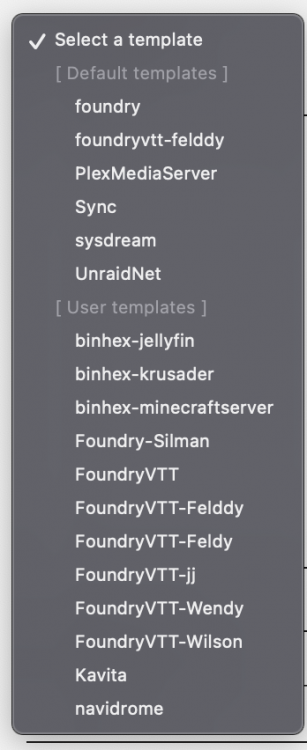
I've been playing around with docker containers and making my own template and now i have a ton of stale templates in my templates list. How do i clean them?