





MilkSomelier
Members
-
Joined
-
Last visited
Everything posted by MilkSomelier
-
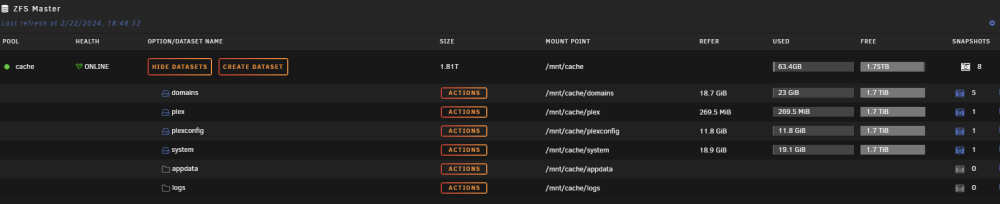
I recently switched my cache pool to ZFS after watching an SI video. To my surprise, I discovered that I can't take snapshots of the appdata folder using the ZFS master plugin, unlike to the other folders. Any idea what might be preventing me from doing so?
-
If there is any way to have a copy of the parity disk in a remote location
-
Sooo... there is no maner right?
-
If phisically anything happens to the parity disk i have a copy in another location
-
I know probably someone already have done that , so my take is a copy of the existing parity drive but in a remote location . Is there anny way?
-
it was the bios fault
-
I followed the classic tuto from spaceinvader one , all the drivers work well but i dont know if it is the screen driver or another thing I tried with diferent drivers and accesing via QEMU but the screen resolution is always locked to 800x600
