




Skip to content
View in the app

A better way to browse. Learn more.

Unraid

A full-screen app on your home screen with push notifications, badges and more.

To install this app on iOS and iPadOS
  1. Tap the Share icon in Safari
  2. Scroll the menu and tap Add to Home Screen.
  3. Tap Add in the top-right corner.
To install this app on Android
  1. Tap the 3-dot menu (⋮) in the top-right corner of the browser.
  2. Tap Add to Home screen or Install app.
  3. Confirm by tapping Install.

Akram

Members
  • Joined

  • Last visited

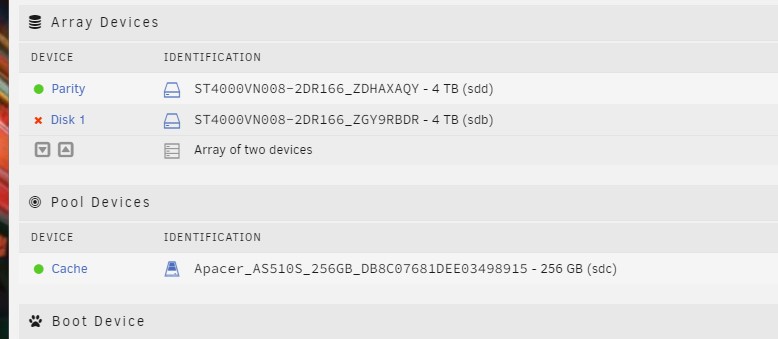
  1. Hi I attached a picture of the state of the disks before replacing the cache disk and adding an additional disk ..I followed the steps to change the cache disk in the this video I hope I can recover my files Thanks for your help
  2. Akram started following issue with my Unraid
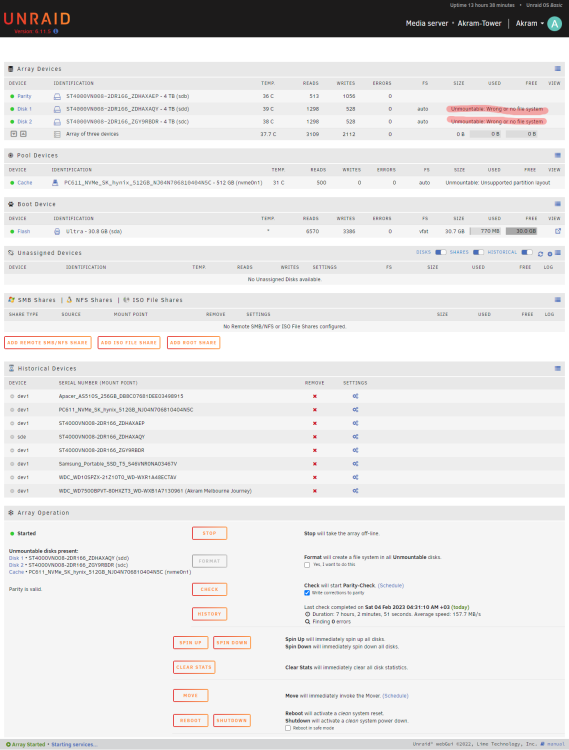
  3. Hi I'm having a problem with my unraid system. At first, a message "DEVICE IS DISABLED, CONTENTS EMULATED" appeared on one of the disks. So I thought that the disk was broken and I added another disk of the same size and also replaced the cache disk with another m.2 disk (I followed the correct steps in replacing the cache disk)..but so far none of my files have appeared.. What is the way to recover the stored data? Thanks akram-tower-diagnostics-20230204-1022.zip
Account

Navigation

Search

Search

Configure browser push notifications

Chrome (Android)
  1. Tap the lock icon next to the address bar.
  2. Tap Permissions → Notifications.
  3. Adjust your preference.
Chrome (Desktop)
  1. Click the padlock icon in the address bar.
  2. Select Site settings.
  3. Find Notifications and adjust your preference.