





KTFirst
Members
-
Joined
-
Last visited
-
Hi. So my issue does not seem to be mapping or that my MacBook can not make backups, it does. However, when I enter Time Machine I only see backups going back about 2-3 days, even if it has done backups for a long time... any help/tips on this would be really appreciated.
-
Hi. I am a new unraid user. I set up time-machine as per instructions (the ability built in not an application). Backups work fine. Plenty of space on drive/share. However Time Machine only backs up a day or two. That is when going into Time Machine I can only access current day and maybe 1-2 day back, even if I backup every day for months. Please advise.
-
So if anyone is interested. I actually just changed my torrent client on the Mac (from u-torrent) and it solved my problem. Go figure.
-
Hi. So tried that (extended SMART) and get read error. Will replace. THANK you all for all the help!
-
I have an unraid NAS, no issues as far as I know. BUT... when I map a share to my Mac 1 Mini it works fine, but... then it drops, simetimes in 10min sometimes in a day... It just disconnects. Then I map the drive again, and it works.. then it starts over. Any tips welcome.
-
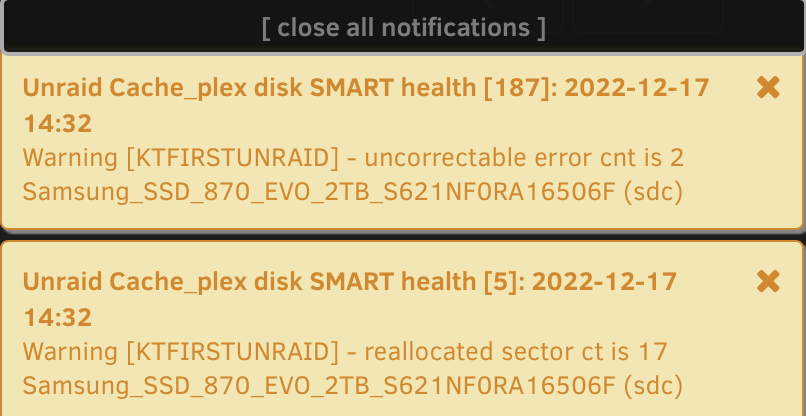
So I did that. Seemed to work (to be honest I do not know other than I have not got any errors). But, I did a "balance" on my plex cache and then got an error. REALLY sorry for being such a nube guys...
-
Guys, I am not sure what that means. Please advise. BR T
-
Actually would like RAID 1 (mirroring)
-
ktfirstunraid-diagnostics-20221216-1348.zip
-
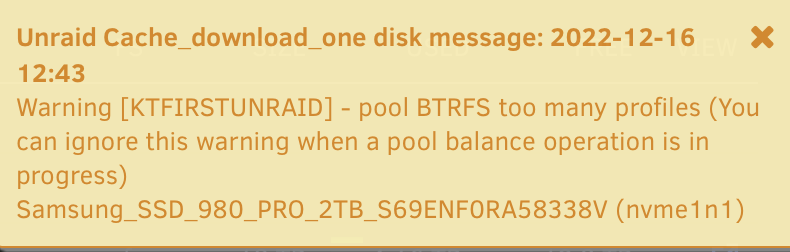
Hi. Sorry newbie here... get an error and do not know why or how to fix it. PLEASE advise.

-
Hi. Got a yellow triangle next to my Library (user shares). Running latest unraid (9..). The NFS permission is says "-" and the SMB says "public". Please advise.
-
Hi. I am looking for a good (high quality) Mini SAS SFF-8088 to SAS36P SFF-8087 card (to convert my LSIBroadcom SAS 9305-24iPCIe 3.0 x8) to expansion to one external case to fit more discs (I assume I need an additional card in the other case too)... the Silverstone solution looks good... BUT can not get hold of it. DO you have any tips on new cards that are available?
-
Read up on that. Two things, can you enable turbo write for a while (e.g. during large transfers) then disable it? (obviously wo having to redo all stuff)...?
-
Hi. The way I ”measure” is on dashboard it says inbound for the NIC. It states ”361.0 Mbps” for ex. So assumed it is bit.
-
Hi. I have a Epyc, 128GB RAM, Supermicro MB with 10Gbit LAN, running 10Gbit... and running Ironwolf PROs 18TBs disks (five in array, no cache), no other items or VMs (Krusader docker). I am copying from a high end RAID5 NAS to the UnRaid server (using Krusader, mounted the RAID5 NAS into Unraid). I get transfer speeds constantly of about 250Mbps... I understand Unraid is not raid. But this seems a slow to me. Tips would really be appreciated.

