Chris2NyCE
Members
-
Joined
-
Last visited
-
10-4. Thanks. Hopefully it doesn't happen again but if need be, ill go about it differently next time.
-
So after the repair said it was successful, was I not supposed to choose the drop down to put it back in the array before restarting?
-
Status only changed after i click the 'fix' option after is zerod the log. It said it was 'successful' and when I told it to recheck, it did not find any errors. I went back to restart the array and then the arrary startes with errors, showing no drive. I stopped, reselected that drive , started and it showed blue, and said it was new (or new config) and the option was to rebuild. If i stopped the array, there was no difference. It passed the check but kept showing as new when restarted. During the rebuild tho it went disabled again with like 1700+ errors.
-
All I had to do was run the fix, zero the log, re run the fix and than thats where it started acting like a new drive. Since it was staying it was 'new', the only options it was giving me was to start the parity rebuild, so I just told it to go ahead and rebuild. However during the rebuild, it showed heavy read errors and went disabled again (which stopped the rebuild), So I'm guessing there's actually an issue with the drive itself which is why running operation failed, the fix failed, and the rebuild failed. I plan to just swap the drive tonight and cut my losses.
-
Looks like about 30 minutes into the rebuild it encountered too many read errors and disabled itself. Going under the assumption that this drive has just failed at this point. So ill close the thread.
-
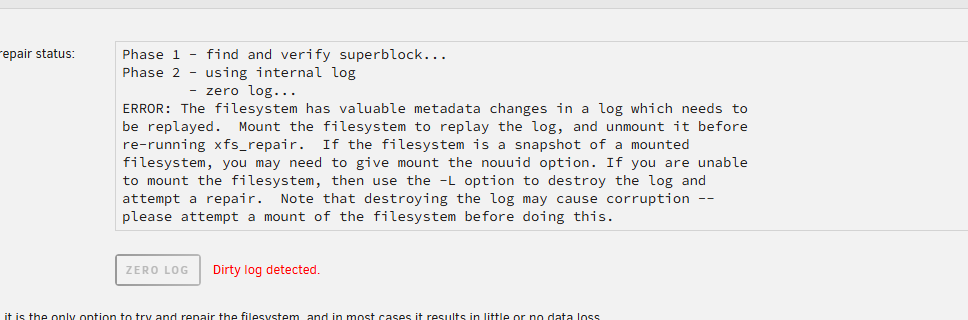
It wouldnt fix as it said it had a log issue then gave me the option to zero the log. It would not let me mount the disk so per both instructions i ran the zero log; Now the drive comes up as "new" and looks to want to be over written and parity rebuilt :-/ Guess ill just let it do its thing and rebuild, hoping it wont happen again

-
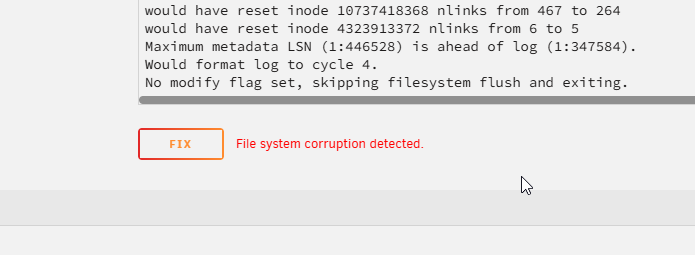
Here was the log BTW; <?> Phase 1 - find and verify superblock... Phase 2 - using internal log - zero log... ALERT: The filesystem has valuable metadata changes in a log which is being ignored because the -n option was used. Expect spurious inconsistencies which may be resolved by first mounting the filesystem to replay the log. - scan filesystem freespace and inode maps... - found root inode chunk Phase 3 - for each AG... - scan (but don't clear) agi unlinked lists... - process known inodes and perform inode discovery... - agno = 0 Metadata corruption detected at 0x4779ac, xfs_dir3_block block 0x85b9ef8/0x1000 corrupt directory block 0 for inode 180 no . entry for directory 180 no .. entry for directory 180 problem with directory contents in inode 180 would have cleared inode 180 bad nblocks 433697 for inode 39178757, would reset to 444961 bad nblocks 381574 for inode 39178758, would reset to 384646 bad nblocks 391059 for inode 39178759, would reset to 363411 bad nblocks 315575 for inode 39178760, would reset to 312503 bad nblocks 329410 for inode 39178761, would reset to 332482 bad nblocks 291846 for inode 39178762, would reset to 232454 bad nblocks 311021 for inode 39178763, would reset to 305901 bmap rec out of order, inode 39178766 entry 3 [o s c] [182256 44977846 58363], 2 [32752 43980083 178176] correcting nextents for inode 39178766 bad data fork in inode 39178766 would have tried to rebuild inode 39178766 data fork would have cleared inode 39178766 imap claims a free inode 39178767 is in use, would correct imap and clear inode - agno = 1 Metadata corruption detected at 0x477a4b, xfs_dir3_block block 0x8775c8e8/0x1000 corrupt directory block 0 for inode 2147483813 no . entry for directory 2147483813 no .. entry for directory 2147483813 problem with directory contents in inode 2147483813 would have cleared inode 2147483813 would fix bad v3_pad. imap claims a free inode 2162929513 is in use, would correct imap and clear inode imap claims a free inode 2162929523 is in use, would correct imap and clear inode imap claims a free inode 2162929524 is in use, would correct imap and clear inode Metadata corruption detected at 0x477a34, xfs_dir3_block block 0x880a1c30/0x1000 corrupt directory block 0 for inode 2282363970 no . entry for directory 2282363970 no .. entry for directory 2282363970 problem with directory contents in inode 2282363970 would have cleared inode 2282363970 bad inode type 0 inode 2282363971 would have cleared inode 2282363971 bad inode type 0 inode 2282363973 would have cleared inode 2282363973 bad nblocks 426527 for inode 2282363974, would reset to 0 would fix bad v3_pad. imap claims a free inode 2282364121 is in use, would correct imap and clear inode local inode 2282364143 data fork is too large (size = 1372933218, max = 120) bad data fork in inode 2282364143 would have cleared inode 2282364143 - agno = 2 Metadata corruption detected at 0x4779ac, xfs_dir3_block block 0x100d195d8/0x1000 corrupt directory block 0 for inode 4294967425 no . entry for directory 4294967425 no .. entry for directory 4294967425 problem with directory contents in inode 4294967425 would have cleared inode 4294967425 imap claims a free inode 4308692419 is in use, would correct imap and clear inode Metadata corruption detected at 0x477a1c, xfs_dir3_block block 0x101b9ae68/0x1000 corrupt directory block 0 for inode 4323913344 no . entry for directory 4323913344 no .. entry for directory 4323913344 problem with directory contents in inode 4323913344 would have cleared inode 4323913344 bad inode type 0 inode 4323913350 would have cleared inode 4323913350 bad nblocks 357990 for inode 4323913385, would reset to 342630 bmap rec out of order, inode 4323913396 entry 3 [o s c] [0 0 0], 2 [259072 541595171 81997] correcting nextents for inode 4323913396 bad data fork in inode 4323913396 would have tried to rebuild inode 4323913396 data fork would have cleared inode 4323913396 bad nblocks 437661 for inode 4323913397, would reset to 513437 bad nblocks 293515 for inode 4323913398, would reset to 227979 bad nblocks 485084 for inode 4323913399, would reset to 446172 imap claims a free inode 4323913400 is in use, would correct imap and clear inode - agno = 3 imap claims a free inode 6454545384 is in use, would correct imap and clear inode would fix bad v3_pad. imap claims a free inode 6455003466 is in use, would correct imap and clear inode imap claims a free inode 6455006497 is in use, would correct imap and clear inode - agno = 4 Metadata corruption detected at 0x4779ac, xfs_dir3_block block 0x2015b78c0/0x1000 corrupt directory block 0 for inode 8594108550 no . entry for directory 8594108550 no .. entry for directory 8594108550 problem with directory contents in inode 8594108550 would have cleared inode 8594108550 imap claims a free inode 8594108551 is in use, would correct imap and clear inode bad inode type 0 inode 8594108560 would have cleared inode 8594108560 Metadata corruption detected at 0x4779ac, xfs_dir3_block block 0x2017f76c8/0x1000 corrupt directory block 0 for inode 8594108563 no . entry for directory 8594108563 no .. entry for directory 8594108563 problem with directory contents in inode 8594108563 would have cleared inode 8594108563 imap claims a free inode 8594108566 is in use, would correct imap and clear inode imap claims a free inode 8594108576 is in use, would correct imap and clear inode Metadata corruption detected at 0x477a4b, xfs_dir3_block block 0x2017f76d0/0x1000 corrupt directory block 0 for inode 8594108591 no . entry for directory 8594108591 no .. entry for directory 8594108591 problem with directory contents in inode 8594108591 would have cleared inode 8594108591 imap claims a free inode 8612687554 is in use, would correct imap and clear inode imap claims a free inode 8612687599 is in use, would correct imap and clear inode bad inode type 0 inode 8615065344 would have cleared inode 8615065344 imap claims a free inode 8615079525 is in use, would correct imap and clear inode - agno = 5 Metadata corruption detected at 0x4779ac, xfs_dir3_data block 0x280000098/0x1000 corrupt directory data block 0 for inode 10737418368 Metadata corruption detected at 0x4779ac, xfs_dir3_data block 0x281e315d0/0x1000 corrupt directory data block 2 for inode 10737418368 no . entry for directory 10737418368 no .. entry for directory 10737418368 Metadata corruption detected at 0x4779ac, xfs_dir3_block block 0x28068ccd0/0x1000 corrupt directory block 0 for inode 10737418369 no . entry for directory 10737418369 no .. entry for directory 10737418369 problem with directory contents in inode 10737418369 would have cleared inode 10737418369 Metadata corruption detected at 0x4779d0, xfs_dir3_block block 0x2825fdc08/0x1000 corrupt directory block 0 for inode 10737418383 no . entry for directory 10737418383 no .. entry for directory 10737418383 problem with directory contents in inode 10737418383 would have cleared inode 10737418383 bad inode format in inode 10744216697 imap claims a free inode 10744216695 is in use, would correct imap and clear inode imap claims a free inode 10744216696 is in use, would correct imap and clear inode bad inode format in inode 10744216697 would have cleared inode 10744216697 imap claims a free inode 10744216698 is in use, would correct imap and clear inode bad nblocks 1485252 for inode 10744216705, would reset to 1482180 imap claims a free inode 10777439308 is in use, would correct imap and clear inode would fix bad v3_pad. Metadata corruption detected at 0x477a4b, xfs_dir3_block block 0x28262acd8/0x1000 corrupt directory block 0 for inode 10777439432 no . entry for directory 10777439432 no .. entry for directory 10777439432 problem with directory contents in inode 10777439432 would have cleared inode 10777439432 imap claims a free inode 10777439437 is in use, would correct imap and clear inode imap claims a free inode 10777439438 is in use, would correct imap and clear inode - agno = 6 imap claims a free inode 12928993170 is in use, would correct imap and clear inode imap claims a free inode 12928993171 is in use, would correct imap and clear inode bad nblocks 1422878 for inode 12928993210, would reset to 1410590 imap claims a free inode 12928995196 is in use, would correct imap and clear inode - agno = 7 Metadata corruption detected at 0x4779a0, xfs_dir3_block block 0x3834a8de0/0x1000 corrupt directory block 0 for inode 15032385673 no . entry for directory 15032385673 no .. entry for directory 15032385673 problem with directory contents in inode 15032385673 would have cleared inode 15032385673 imap claims a free inode 15032385678 is in use, would correct imap and clear inode imap claims a free inode 15032385686 is in use, would correct imap and clear inode imap claims a free inode 15072244454 is in use, would correct imap and clear inode bad nblocks 1083937 for inode 15072244469, would reset to 1475105 Metadata corruption detected at 0x477a4b, xfs_dir3_block block 0x3834a7f08/0x1000 corrupt directory block 0 for inode 15087599386 no . entry for directory 15087599386 no .. entry for directory 15087599386 problem with directory contents in inode 15087599386 would have cleared inode 15087599386 - process newly discovered inodes... Phase 4 - check for duplicate blocks... - setting up duplicate extent list... unknown block state, ag 0, blocks 42242842-42305305 unknown block state, ag 0, blocks 42611207-42616326 unknown block state, ag 0, blocks 43110810-43138457 unknown block state, ag 0, blocks 43456152-43587207 unknown block state, ag 0, blocks 43778657-43781728 unknown block state, ag 0, blocks 44158259-44209458 unknown block state, ag 0, blocks 44324582-44325605 unknown block state, ag 0, blocks 44708134-45040304 unknown block state, ag 0, blocks 61286476-62288221 unknown block state, ag 0, blocks 99675851-100798214 unknown block state, ag 1, blocks 16148241-16203701 unknown block state, ag 1, blocks 16583481-16714536 unknown block state, ag 1, blocks 16860064-16860064 unknown block state, ag 1, blocks 16873383-17053631 unknown block state, ag 1, blocks 22949640-23747025 unknown block state, ag 1, blocks 75048454-75500361 unknown block state, ag 2, blocks 1278998-1344517 unknown block state, ag 2, blocks 5009939-5087762 unknown block state, ag 2, blocks 5955617-6484627 unknown block state, ag 2, blocks 7123604-7154990 unknown block state, ag 2, blocks 22322447-22509172 unknown block state, ag 2, blocks 25553510-25746477 unknown block state, ag 2, blocks 35771677-35787036 unknown block state, ag 2, blocks 68910151-71034029 unknown block state, ag 3, blocks 1511808-1513839 unknown block state, ag 3, blocks 2830532-3871135 unknown block state, ag 3, blocks 4015269-4017316 unknown block state, ag 3, blocks 5690288-5694383 unknown block state, ag 3, blocks 10706092-10730667 unknown block state, ag 3, blocks 43823928-45087081 unknown block state, ag 3, blocks 67180379-67405926 unknown block state, ag 4, blocks 2187966-2610586 unknown block state, ag 4, blocks 2741627-2807146 unknown block state, ag 4, blocks 2841916-2843947 unknown block state, ag 4, blocks 10898483-11357234 unknown block state, ag 4, blocks 12178042-12208761 unknown block state, ag 4, blocks 14736717-14849006 unknown block state, ag 4, blocks 15507876-15573395 unknown block state, ag 4, blocks 15704436-15724948 unknown block state, ag 4, blocks 16132132-16186297 unknown block state, ag 4, blocks 45579362-46346292 unknown block state, ag 5, blocks 22206029-22255148 unknown block state, ag 5, blocks 33938492-34135067 unknown block state, ag 5, blocks 47560074-47746133 unknown block state, ag 5, blocks 47875894-47883504 unknown block state, ag 5, blocks 89709179-91832041 unknown block state, ag 5, blocks 93622821-94738740 unknown block state, ag 5, blocks 96952480-96955551 unknown block state, ag 6, blocks 37973688-38039207 unknown block state, ag 6, blocks 38053509-38086260 unknown block state, ag 6, blocks 38134849-38191175 unknown block state, ag 6, blocks 87939970-87952257 unknown block state, ag 7, blocks 21367766-21498821 unknown block state, ag 7, blocks 71878423-72672687 - check for inodes claiming duplicate blocks... - agno = 0 - agno = 2 - agno = 7 - agno = 4 entry "Season 4" at block 0 offset 168 in directory inode 4294967424 references free inode 4294967425 would clear inode number in entry at offset 168... entry "Season 6" at block 0 offset 192 in directory inode 4294967424 references free inode 8594108550 would clear inode number in entry at offset 192... - agno = 5 corrupt block 0 in directory inode 15032385673 would junk block no . entry for directory 15032385673 no .. entry for directory 15032385673 corrupt block 0 in directory inode 10737418368 would junk block entry "Season 5" at block 0 offset 216 in directory inode 4294967424 references free inode 10737418369 - agno = 1 would clear inode number in entry at offset 216... entry "Season 9" at block 0 offset 240 in directory inode 4294967424 references free inode 8594108563 would clear inode number in entry at offset 240... entry "Season 8" at block 0 offset 264 in directory inode 4294967424 references free inode 10737418383 would clear inode number in entry at offset 264... entry "Season 7" at block 0 offset 288 in directory inode 4294967424 references free inode 15032385673 would clear inode number in entry at offset 288... entry "Season 11" at block 0 offset 336 in directory inode 4294967424 references free inode 8594108591 entry "Baywatch - S10E06 - Sunday in Kauai.mkv" at block 0 offset 1160 in directory inode 2147483781 references free inode 2162929513 - agno = 6 corrupt block 0 in directory inode 8594108550 would junk block no . entry for directory 8594108550 no .. entry for directory 8594108550 problem with directory contents in inode 8594108550 would have cleared inode 8594108550 entry "Season 3" at block 0 offset 96 in directory inode 159 references free inode 2147483813 would clear inode number in entry at offset 96... problem with directory contents in inode 15032385673 would have cleared inode 15032385673 would clear inode number in entry at offset 1160... corrupt block 2 in directory inode 10737418368 - agno = 3 entry "Season 8" at block 0 offset 96 in directory inode 12884902031 references free inode 15087599386 would clear inode number in entry at offset 96... bad inode type 0 inode 8594108560 would have cleared inode 8594108560 would junk block entry "The Big Bang Theory - S07E04 - The Raiders Minimization.mp4" at block 0 offset 328 in directory inode 8594108561 references free inode 8594108566 would clear inode number in entry at offset 328... would clear inode number in entry at offset 336... entry "The Big Bang Theory - S07E12 - The Hesitation Ramification.mp4" at block 0 offset 920 in directory inode 8594108561 references free inode 8594108576 would clear inode number in entry at offset 920... entry "Beethoven's 2nd (1993).mp4" in shortform directory 15032385677 references free inode 15032385678 would have junked entry "Beethoven's 2nd (1993).mp4" in directory inode 15032385677 would have corrected i8 count in directory 15032385677 from 2 to 1 corrupt block 0 in directory inode 4294967425 would junk block no . entry for directory 4294967425 no .. entry for directory 4294967425 problem with directory contents in inode 4294967425 corrupt block 0 in directory inode 180 would junk block no . entry for directory 180 no .. entry for directory 180 problem with directory contents in inode 180 would have cleared inode 4294967425 would have cleared inode 180 corrupt block 0 in directory inode 8594108563 entry "The White Tiger (2021)" at block 3 offset 2840 in directory inode 10737418368 references free inode 12928995196 would clear inode number in entry at offset 2840... entry "Wyrmwood Apocalypse (2022).mkv" in shortform directory 15032385685 references free inode 15032385686 would have junked entry "Wyrmwood Apocalypse (2022).mkv" in directory inode 15032385685 would junk block no . entry for directory 8594108563 no .. entry for directory 8594108563 corrupt block 0 in directory inode 2147483813 would have corrected i8 count in directory 15032385685 from 2 to 1 would junk block problem with directory contents in inode 8594108563 entry "The VelociPastor (2018)" at block 3 offset 3592 in directory inode 10737418368 references free inode 2162929523 would clear inode number in entry at offset 3592... no . entry for directory 2147483813 no .. entry for directory 2147483813 problem with directory contents in inode 2147483813 would have cleared inode 2147483813 entry "Shameless (US) - S01E10 - Nana Gallagher Had an Affair.mkv" at block 0 offset 672 in directory inode 39178756 references free inode 39178766 would clear inode number in entry at offset 672... entry "Shameless (US) - S01E11 - Daddyz Girl.mkv" at block 0 offset 744 in directory inode 39178756 references free inode 39178767 would clear inode number in entry at offset 744... bad nblocks 433697 for inode 39178757, would reset to 444961 bad nblocks 381574 for inode 39178758, would reset to 384646 bad nblocks 391059 for inode 39178759, would reset to 363411 would have cleared inode 8594108563 entry "The Big Bang Theory - S10E19 - The Collaboration Fluctuation.mp4" at block 0 offset 1456 in directory inode 12884902048 references free inode 12928993170 would clear inode number in entry at offset 1456... entry "The Big Bang Theory - S10E20 - The Recollection Dissipation.mp4" at block 0 offset 1536 in directory inode 12884902048 references free inode 12928993171 would clear inode number in entry at offset 1536... entry "Season 18" at block 0 offset 264 in directory inode 4294967478 references free inode 2282364121 would clear inode number in entry at offset 264... bad nblocks 315575 for inode 39178760, would reset to 312503 entry "Voyagers (2021)" at block 3 offset 3696 in directory inode 10737418368 references free inode 8612687599 would clear inode number in entry at offset 3696... bad nblocks 329410 for inode 39178761, would reset to 332482 bad nblocks 291846 for inode 39178762, would reset to 232454 entry "We're the Millers (2013)" at block 4 offset 288 in directory inode 10737418368 references free inode 10744216695 would clear inode number in entry at offset 288... bad nblocks 311021 for inode 39178763, would reset to 305901 entry "Teenage Mutant Ninja Turtles Mutant Mayhem (2023)" at block 4 offset 584 in directory inode 10737418368 references free inode 10744216697 would clear inode number in entry at offset 584... entry "Season 13" at block 0 offset 216 in directory inode 4294967487 references free inode 180 would clear inode number in entry at offset 216... entry "Season 10" at block 0 offset 240 in directory inode 4294967487 references free inode 2282363970 would clear inode number in entry at offset 240... entry "Season 5" at block 0 offset 264 in directory inode 4294967487 references free inode 4323913344 would clear inode number in entry at offset 264... bmap rec out of order, inode 39178766 entry 3 [o s c] [182256 44977846 58363], 2 [32752 43980083 178176] correcting nextents for inode 39178766 bad data fork in inode 39178766 would have tried to rebuild inode 39178766 data fork would have cleared inode 39178766 free inode 39178767 contains errors, would correct no . entry for directory 10737418368 no .. entry for directory 10737418368 free inode 2162929524 contains errors, would correct corrupt block 0 in directory inode 10737418369 would junk block no . entry for directory 10737418369 no .. entry for directory 10737418369 problem with directory contents in inode 10737418369 would have cleared inode 10737418369 entry "We Grown Now (2024).mkv" in shortform directory 6454545383 references free inode 6454545384 would have junked entry "We Grown Now (2024).mkv" in directory inode 6454545383 would have corrected i8 count in directory 6454545383 from 2 to 1 corrupt block 0 in directory inode 8594108591 would junk block no . entry for directory 8594108591 no .. entry for directory 8594108591 problem with directory contents in inode 8594108591 would have cleared inode 8594108591 corrupt block 0 in directory inode 2282363970 would junk block no . entry for directory 2282363970 no .. entry for directory 2282363970 entry "The Whale (2022).mkv" in shortform directory 15072244453 references free inode 15072244454 entry "Shameless (US) - S05E05 - Rite of Passage.mkv" at block 0 offset 152 in directory inode 6455003464 references free inode 6455003466 would clear inode number in entry at offset 152... corrupt block 0 in directory inode 10737418383 free inode 6455003466 contains errors, would correct problem with directory contents in inode 2282363970 would junk block would have junked entry "The Whale (2022).mkv" in directory inode 15072244453 would have cleared inode 2282363970 no . entry for directory 10737418383 would have corrected i8 count in directory 15072244453 from 2 to 1 bad inode type 0 inode 2282363971 would have cleared inode 2282363971 no .. entry for directory 10737418383 problem with directory contents in inode 10737418383 would have cleared inode 10737418383 bad inode type 0 inode 2282363973 would have cleared inode 2282363973 bad nblocks 426527 for inode 2282363974, would reset to 0 entry "TAYLOR SWIFT THE ERAS TOUR (2023).mkv" in shortform directory 4308692418 references free inode 4308692419 would have junked entry "TAYLOR SWIFT THE ERAS TOUR (2023).mkv" in directory inode 4308692418 would have corrected i8 count in directory 4308692418 from 2 to 1 bad nblocks 1083937 for inode 15072244469, would reset to 1475105 free inode 4308692419 contains errors, would correct bad nblocks 1422878 for inode 12928993210, would reset to 1410590 entry "The Blue Lagoon (1980).mkv" in shortform directory 6455003519 references free inode 6455006497 ould have junked entry "The Blue Lagoon (1980).mkv" in directory inode 6455003519 would have corrected i8 count in directory 6455003519 from 2 to 1 entry "." at block 0 offset 64 in directory inode 4323913344 references free inode 4323913344 entry "South Park - S05E04 - Scott Tenorman Must Die.mkv" at block 0 offset 1848 in directory inode 4323913344 references free inode 4323913350 would clear inode number in entry at offset 1848... bad bestfree table in block 0 in directory inode 4323913344: would repair table imap claims in-use inode 4323913344 is free, would correct imap bad inode type 0 inode 4323913350 would have cleared inode 4323913350 bad inode type 0 inode 8615065344 would have cleared inode 8615065344 entry "Season 2" in shortform directory 4323913372 references free inode 10777439432 would have junked entry "Season 2" in directory inode 4323913372 would have corrected i8 count in directory 4323913372 from 2 to 1 bad inode format in inode 10744216697 would have cleared inode 10744216697 bad nblocks 1485252 for inode 10744216705, would reset to 1482180 bad nblocks 357990 for inode 4323913385, would reset to 342630 entry "Shameless (US) - S03E06 - Cascading Failures.mkv" at block 0 offset 296 in directory inode 4323913392 references free inode 4323913396 would clear inode number in entry at offset 296... entry "Shameless (US) - S03E10 - Civil Wrongs.mkv" at block 0 offset 552 in directory inode 4323913392 references free inode 4323913400 would clear inode number in entry at offset 552... bmap rec out of order, inode 4323913396 entry 3 [o s c] [0 0 0], 2 [259072 541595171 81997] correcting nextents for inode 4323913396 bad data fork in inode 4323913396 would have tried to rebuild inode 4323913396 data fork would have cleared inode 4323913396 bad nblocks 437661 for inode 4323913397, would reset to 513437 bad nblocks 293515 for inode 4323913398, would reset to 227979 bad nblocks 485084 for inode 4323913399, would reset to 446172 free inode 4323913400 contains errors, would correct entry "Team America World Police (2004).mkv" in shortform directory 10777439307 references free inode 10777439308 would have junked entry "Team America World Police (2004).mkv" in directory inode 10777439307 would have corrected i8 count in directory 10777439307 from 2 to 1 entry "Criminal Minds - S02E09 - The Last Word.mkv" at block 0 offset 504 in directory inode 8615065388 references free inode 8615065344 would clear inode number in entry at offset 504... corrupt block 0 in directory inode 15087599386 would junk block no . entry for directory 15087599386 no .. entry for directory 15087599386 problem with directory contents in inode 15087599386 would have cleared inode 15087599386 free inode 2282364121 contains errors, would correct local inode 2282364143 data fork is too large (size = 1372933218, max = 120) bad data fork in inode 2282364143 would have cleared inode 2282364143 corrupt block 0 in directory inode 10777439432 would junk block no . entry for directory 10777439432 no .. entry for directory 10777439432 problem with directory contents in inode 10777439432 would have cleared inode 10777439432 free inode 10777439437 contains errors, would correct Incorrect reverse-mapping: saw (2/5235592) len 306605 owner 4323913397 off 131056; should be (2/5235592) len 382381 owner 4323913397 off 131056 Missing reverse-mapping record for (2/7201428) len 43675 owner 4323913398 off 208880 Incorrect reverse-mapping: saw (0/40744164) len 433697 owner 39178757 off 0; should be (0/40744164) len 444961 owner 39178757 off 0 Incorrect reverse-mapping: saw (0/41465012) len 316054 owner 39178758 off 65520; should be (0/41465012) len 319126 owner 39178758 off 65520 Incorrect reverse-mapping: saw (0/43781729) len 198354 owner 39178761 off 131056; should be (0/43781729) len 201426 owner 39178761 off 131056 Incorrect reverse-mapping: saw (6/76648675) len 613589 owner 12928995197 off 0; should be (6/76950755) unwritten len 311509 owner 12928995197 off 302080 Missing reverse-mapping record for (0/44325606) len 32790 owner 39178762 off 199664 Incorrect reverse-mapping: saw (0/112443346) len 559665 owner 15072244469 off 524272; should be (0/112443346) len 950833 owner 15072244469 off 524272 setting reflink flag on inode 39178757 setting reflink flag on inode 39178758 setting reflink flag on inode 39178760 setting reflink flag on inode 39178762 setting reflink flag on inode 39178765 Missing reference count record for (2/5542197) len 75776 count 2 Missing reference count record for (0/41177861) len 11264 count 2 setting reflink flag on inode 4323913397 setting reflink flag on inode 39178768 setting reflink flag on inode 39247256 Missing reference count record for (2/7201428) len 43675 count 2 setting reflink flag on inode 4323913398 setting reflink flag on inode 4323913399 Missing reference count record for (0/41781066) len 3072 count 2 Missing reference count record for (0/44354300) len 4096 count 2 Missing reference count record for (0/113003011) len 391168 count 2 setting reflink flag on inode 4323913402 setting reflink flag on inode 15072244469 No modify flag set, skipping phase 5 Phase 6 - check inode connectivity... - traversing filesystem ... entry "movies" in dir ino 131 doesn't have a .. entry, will set it in ino 10737418368. entry "Season 3" in directory inode 159 points to free inode 2147483813, would junk entry bad hash table for directory inode 159 (no data entry): would rebuild would rebuild directory inode 159 entry "Shameless (US) - S01E10 - Nana Gallagher Had an Affair.mkv" in directory inode 39178756 points to free inode 39178766, would junk entry entry "Shameless (US) - S01E11 - Daddyz Girl.mkv" in directory inode 39178756 points to free inode 39178767, would junk entry bad hash table for directory inode 39178756 (no data entry): would rebuild would rebuild directory inode 39178756 entry "Baywatch - S10E06 - Sunday in Kauai.mkv" in directory inode 2147483781 points to free inode 2162929513, would junk entry bad hash table for directory inode 2147483781 (no data entry): would rebuild would rebuild directory inode 2147483781 entry "Season 4" in directory inode 4294967424 points to free inode 4294967425, would junk entry entry "Season 6" in directory inode 4294967424 points to free inode 8594108550, would junk entry entry "Season 5" in directory inode 4294967424 points to free inode 10737418369, would junk entry entry "Season 9" in directory inode 4294967424 points to free inode 8594108563, would junk entry entry "Season 8" in directory inode 4294967424 points to free inode 10737418383, would junk entry entry "Season 7" in directory inode 4294967424 points to free inode 15032385673, would junk entry entry "Season 11" in directory inode 4294967424 points to free inode 8594108591, would junk entry bad hash table for directory inode 4294967424 (no data entry): would rebuild would rebuild directory inode 4294967424 entry "Season 18" in directory inode 4294967478 points to free inode 2282364121, would junk entry bad hash table for directory inode 4294967478 (no data entry): would rebuild would rebuild directory inode 4294967478 entry "Season 13" in directory inode 4294967487 points to free inode 180, would junk entry entry "Season 10" in directory inode 4294967487 points to free inode 2282363970, would junk entry unknown parent for inode 4323913344 entry "Season 5" in dir inode 4294967487 inconsistent with .. value (0) in ino 4323913344 would clear entry "Season 5" bad hash table for directory inode 4294967487 (no data entry): would rebuild would rebuild directory inode 4294967487 entry "TAYLOR SWIFT THE ERAS TOUR (2023).mkv" in shortform directory inode 4308692418 points to free inode 4308692419, would junk entry would fix i8count in inode 4308692418 Metadata corruption detected at 0x477a1c, xfs_dir3_block block 0x101b9ae68/0x1000 entry "South Park - S05E04 - Scott Tenorman Must Die.mkv" in directory inode 4323913344 points to free inode 4323913350, would junk entry bad hash table for directory inode 4323913344 (no data entry): would rebuild would rebuild directory inode 4323913344 entry "Season 2" in shortform directory inode 4323913372 points to free inode 10777439432, would junk entry would fix i8count in inode 4323913372 entry "Shameless (US) - S03E06 - Cascading Failures.mkv" in directory inode 4323913392 points to free inode 4323913396, would junk entry entry "Shameless (US) - S03E10 - Civil Wrongs.mkv" in directory inode 4323913392 points to free inode 4323913400, would junk entry bad hash table for directory inode 4323913392 (no data entry): would rebuild would rebuild directory inode 4323913392 entry "We Grown Now (2024).mkv" in shortform directory inode 6454545383 points to free inode 6454545384, would junk entry would fix i8count in inode 6454545383 entry "Shameless (US) - S05E05 - Rite of Passage.mkv" in directory inode 6455003464 points to free inode 6455003466, would junk entry bad hash table for directory inode 6455003464 (no data entry): would rebuild would rebuild directory inode 6455003464 entry "The Blue Lagoon (1980).mkv" in shortform directory inode 6455003519 points to free inode 6455006497, would junk entry would fix i8count in inode 6455003519 entry "The Big Bang Theory - S07E04 - The Raiders Minimization.mp4" in directory inode 8594108561 points to free inode 8594108566, would junk entry entry "The Big Bang Theory - S07E12 - The Hesitation Ramification.mp4" in directory inode 8594108561 points to free inode 8594108576, would junk entry bad hash table for directory inode 8594108561 (no data entry): would rebuild would rebuild directory inode 8594108561 entry "Criminal Minds - S02E09 - The Last Word.mkv" in directory inode 8615065388 points to free inode 8615065344, would junk entry bad hash table for directory inode 8615065388 (no data entry): would rebuild would rebuild directory inode 8615065388 Metadata corruption detected at 0x4779ac, xfs_dir3_data block 0x280000098/0x1000 corrupt block 0 in directory inode 10737418368: would junk block Metadata corruption detected at 0x4779ac, xfs_dir3_data block 0x281e315d0/0x1000 corrupt block 2 in directory inode 10737418368: would junk block entry "The White Tiger (2021)" in directory inode 10737418368 points to free inode 12928995196, would junk entry entry "The VelociPastor (2018)" in directory inode 10737418368 points to free inode 2162929523, would junk entry entry "Voyagers (2021)" in directory inode 10737418368 points to free inode 8612687599, would junk entry entry "We're the Millers (2013)" in directory inode 10737418368 points to free inode 10744216695, would junk entry entry "Teenage Mutant Ninja Turtles Mutant Mayhem (2023)" in directory inode 10737418368 points to free inode 10744216697, would junk entry Metadata corruption detected at 0x4785c8, xfs_dir3_leaf1 block 0x2828bd6f0/0x1000 leaf block 8388608 for directory inode 10737418368 bad CRC would rebuild directory inode 10737418368 would create missing "." entry in dir ino 10737418368 entry "Team America World Police (2004).mkv" in shortform directory inode 10777439307 points to free inode 10777439308, would junk entry would fix i8count in inode 10777439307 entry "Season 8" in directory inode 12884902031 points to free inode 15087599386, would junk entry bad hash table for directory inode 12884902031 (no data entry): would rebuild would rebuild directory inode 12884902031 entry "The Big Bang Theory - S10E19 - The Collaboration Fluctuation.mp4" in directory inode 12884902048 points to free inode 12928993170, would junk entry entry "The Big Bang Theory - S10E20 - The Recollection Dissipation.mp4" in directory inode 12884902048 points to free inode 12928993171, would junk entry bad hash table for directory inode 12884902048 (no data entry): would rebuild would rebuild directory inode 12884902048 entry "Beethoven's 2nd (1993).mp4" in shortform directory inode 15032385677 points to free inode 15032385678, would junk entry would fix i8count in inode 15032385677 entry "Wyrmwood Apocalypse (2022).mkv" in shortform directory inode 15032385685 points to free inode 15032385686, would junk entry would fix i8count in inode 15032385685 entry "The Whale (2022).mkv" in shortform directory inode 15072244453 points to free inode 15072244454, would junk entry would fix i8count in inode 15072244453 corrupt block 0 in directory inode 10737418368: would junk block corrupt block 2 in directory inode 10737418368: would junk block entry "The White Tiger (2021)" in directory inode 10737418368 points to free inode 12928995196, would junk entry entry "The VelociPastor (2018)" in directory inode 10737418368 points to free inode 2162929523, would junk entry entry "Voyagers (2021)" in directory inode 10737418368 points to free inode 8612687599, would junk entry entry "We're the Millers (2013)" in directory inode 10737418368 points to free inode 10744216695, would junk entry entry "Teenage Mutant Ninja Turtles Mutant Mayhem (2023)" in directory inode 10737418368 points to free inode 10744216697, would junk entry would rebuild directory inode 10737418368 would create missing "." entry in dir ino 10737418368 - traversal finished ... - moving disconnected inodes to lost+found ... disconnected dir inode 132, would move to lost+found disconnected dir inode 134, would move to lost+found disconnected dir inode 136, would move to lost+found disconnected dir inode 138, would move to lost+found disconnected dir inode 140, would move to lost+found disconnected inode 143, would move to lost+found disconnected dir inode 146, would move to lost+found disconnected dir inode 148, would move to lost+found disconnected dir inode 150, would move to lost+found disconnected dir inode 153, would move to lost+found disconnected dir inode 155, would move to lost+found disconnected dir inode 158, would move to lost+found disconnected dir inode 160, would move to lost+found disconnected inode 163, would move to lost+found disconnected dir inode 172, would move to lost+found disconnected dir inode 178, would move to lost+found disconnected inode 181, would move to lost+found disconnected inode 182, would move to lost+found disconnected inode 183, would move to lost+found disconnected inode 185, would move to lost+found disconnected inode 188, would move to lost+found disconnected inode 189, would move to lost+found disconnected inode 190, would move to lost+found disconnected inode 191, would move to lost+found disconnected dir inode 39244249, would move to lost+found disconnected dir inode 39244251, would move to lost+found disconnected dir inode 39244253, would move to lost+found disconnected dir inode 39244255, would move to lost+found disconnected dir inode 39244257, would move to lost+found disconnected dir inode 39244259, would move to lost+found disconnected dir inode 39244261, would move to lost+found disconnected dir inode 39244263, would move to lost+found disconnected dir inode 39244265, would move to lost+found disconnected dir inode 39244267, would move to lost+found disconnected dir inode 39244269, would move to lost+found disconnected dir inode 39244271, would move to lost+found disconnected dir inode 39244273, would move to lost+found disconnected inode 161154368, would move to lost+found disconnected inode 161154369, would move to lost+found disconnected inode 161154374, would move to lost+found disconnected dir inode 161154403, would move to lost+found disconnected dir inode 161154431, would move to lost+found disconnected dir inode 2147483777, would move to lost+found disconnected dir inode 2147483779, would move to lost+found disconnected dir inode 2147483797, would move to lost+found disconnected dir inode 2147483800, would move to lost+found disconnected inode 2147483802, would move to lost+found disconnected dir inode 2147483806, would move to lost+found disconnected inode 2147483814, would move to lost+found disconnected inode 2147483815, would move to lost+found disconnected inode 2147483817, would move to lost+found disconnected inode 2147483818, would move to lost+found disconnected inode 2147483819, would move to lost+found disconnected dir inode 2147483823, would move to lost+found disconnected dir inode 2162929473, would move to lost+found disconnected dir inode 2162929475, would move to lost+found disconnected dir inode 2162929477, would move to lost+found disconnected dir inode 2162929479, would move to lost+found disconnected dir inode 2162929481, would move to lost+found disconnected dir inode 2162929483, would move to lost+found disconnected dir inode 2162929485, would move to lost+found disconnected dir inode 2162929487, would move to lost+found disconnected dir inode 2162929489, would move to lost+found disconnected dir inode 2162929491, would move to lost+found disconnected dir inode 2162929493, would move to lost+found disconnected dir inode 2162929495, would move to lost+found disconnected inode 2162929516, would move to lost+found disconnected inode 2162929517, would move to lost+found disconnected inode 2162929518, would move to lost+found disconnected inode 2282363972, would move to lost+found disconnected inode 2282363974, would move to lost+found disconnected inode 2282363975, would move to lost+found disconnected inode 2282363976, would move to lost+found disconnected inode 2282363977, would move to lost+found disconnected inode 2282363978, would move to lost+found disconnected inode 2282363979, would move to lost+found disconnected inode 2282363981, would move to lost+found disconnected inode 2282363982, would move to lost+found disconnected dir inode 2282364104, would move to lost+found disconnected dir inode 2282364117, would move to lost+found disconnected inode 2282364122, would move to lost+found disconnected inode 2282364123, would move to lost+found disconnected dir inode 2282364124, would move to lost+found disconnected dir inode 2282364126, would move to lost+found disconnected dir inode 2282364137, would move to lost+found disconnected dir inode 2282364139, would move to lost+found disconnected inode 2282364144, would move to lost+found disconnected inode 4294967426, would move to lost+found disconnected inode 4294967427, would move to lost+found disconnected inode 4294967428, would move to lost+found disconnected inode 4294967429, would move to lost+found disconnected dir inode 4294967437, would move to lost+found disconnected dir inode 4294967443, would move to lost+found disconnected dir inode 4294967449, would move to lost+found disconnected dir inode 4294967451, would move to lost+found disconnected dir inode 4294967453, would move to lost+found disconnected dir inode 4294967459, would move to lost+found disconnected dir inode 4294967479, would move to lost+found disconnected dir inode 4308427795, would move to lost+found disconnected dir inode 4308427797, would move to lost+found disconnected dir inode 4308427799, would move to lost+found disconnected dir inode 4308427801, would move to lost+found disconnected dir inode 4308427803, would move to lost+found disconnected dir inode 4308427805, would move to lost+found disconnected dir inode 4308427807, would move to lost+found disconnected dir inode 4308427809, would move to lost+found disconnected dir inode 4308427811, would move to lost+found disconnected dir inode 4308427813, would move to lost+found disconnected dir inode 4308427815, would move to lost+found disconnected dir inode 4308427817, would move to lost+found disconnected dir inode 4308427819, would move to lost+found disconnected dir inode 4323913344, would move to lost+found disconnected dir inode 4323913369, would move to lost+found disconnected dir inode 4323913373, would move to lost+found disconnected dir inode 4323913376, would move to lost+found disconnected dir inode 4323913378, would move to lost+found disconnected dir inode 4323913382, would move to lost+found disconnected dir inode 4323913387, would move to lost+found disconnected dir inode 6442451073, would move to lost+found disconnected dir inode 6442451075, would move to lost+found disconnected dir inode 6442451077, would move to lost+found disconnected dir inode 6442451079, would move to lost+found disconnected dir inode 6442451081, would move to lost+found disconnected dir inode 6442451082, would move to lost+found disconnected dir inode 6442451084, would move to lost+found disconnected dir inode 6442451086, would move to lost+found disconnected dir inode 6442451088, would move to lost+found disconnected dir inode 6442451096, would move to lost+found disconnected dir inode 6442451099, would move to lost+found disconnected dir inode 6454545345, would move to lost+found disconnected dir inode 6454545347, would move to lost+found disconnected dir inode 6454545349, would move to lost+found disconnected dir inode 6454545351, would move to lost+found disconnected dir inode 6454545353, would move to lost+found disconnected dir inode 6455003515, would move to lost+found disconnected dir inode 6455003517, would move to lost+found disconnected dir inode 6455003519, would move to lost+found disconnected dir inode 6455006464, would move to lost+found disconnected dir inode 6455006495, would move to lost+found disconnected dir inode 6455006499, would move to lost+found disconnected dir inode 6455006500, would move to lost+found disconnected dir inode 6455006502, would move to lost+found disconnected inode 8594108545, would move to lost+found disconnected inode 8594108547, would move to lost+found disconnected inode 8594108548, would move to lost+found disconnected inode 8594108549, would move to lost+found disconnected inode 8594108552, would move to lost+found disconnected inode 8594108553, would move to lost+found disconnected inode 8594108554, would move to lost+found disconnected inode 8594108555, would move to lost+found disconnected inode 8594108556, would move to lost+found disconnected inode 8594108557, would move to lost+found disconnected inode 8594108558, would move to lost+found disconnected inode 8594108559, would move to lost+found disconnected dir inode 8594108570, would move to lost+found disconnected inode 8594108579, would move to lost+found disconnected inode 8594108580, would move to lost+found disconnected inode 8594108588, would move to lost+found disconnected inode 8594108592, would move to lost+found disconnected inode 8594108593, would move to lost+found disconnected inode 8594108594, would move to lost+found disconnected inode 8594108595, would move to lost+found disconnected inode 8594108596, would move to lost+found disconnected inode 8594108597, would move to lost+found disconnected inode 8594108598, would move to lost+found disconnected inode 8594108599, would move to lost+found disconnected inode 8594108600, would move to lost+found disconnected inode 8594108601, would move to lost+found disconnected inode 8594108602, would move to lost+found disconnected inode 8594108603, would move to lost+found disconnected inode 8594108604, would move to lost+found disconnected inode 8594108605, would move to lost+found disconnected dir inode 8612687552, would move to lost+found disconnected inode 8612687555, would move to lost+found disconnected dir inode 8612687556, would move to lost+found disconnected dir inode 8612687558, would move to lost+found disconnected dir inode 8612687560, would move to lost+found disconnected dir inode 8612687562, would move to lost+found disconnected dir inode 8612687564, would move to lost+found disconnected dir inode 8612687566, would move to lost+found disconnected dir inode 8612687568, would move to lost+found disconnected dir inode 8612687570, would move to lost+found disconnected dir inode 8612687572, would move to lost+found disconnected inode 8612687592, would move to lost+found disconnected inode 8612687600, would move to lost+found disconnected dir inode 8615065346, would move to lost+found disconnected dir inode 8615065367, would move to lost+found disconnected dir inode 8615065402, would move to lost+found disconnected dir inode 8615079506, would move to lost+found disconnected dir inode 8615079517, would move to lost+found disconnected dir inode 8615079519, would move to lost+found disconnected dir inode 8615079521, would move to lost+found disconnected dir inode 8615079523, would move to lost+found disconnected inode 8615079526, would move to lost+found disconnected dir inode 8615079527, would move to lost+found disconnected dir inode 8615079529, would move to lost+found disconnected dir inode 8615079531, would move to lost+found disconnected inode 10737418370, would move to lost+found disconnected inode 10737418371, would move to lost+found disconnected inode 10737418372, would move to lost+found disconnected inode 10737418373, would move to lost+found disconnected inode 10737418374, would move to lost+found disconnected dir inode 10737418375, would move to lost+found disconnected inode 10737418376, would move to lost+found disconnected inode 10737418377, would move to lost+found disconnected inode 10737418378, would move to lost+found disconnected inode 10737418379, would move to lost+found disconnected dir inode 10737418401, would move to lost+found disconnected inode 10737418404, would move to lost+found disconnected dir inode 10737418406, would move to lost+found disconnected dir inode 10737418409, would move to lost+found disconnected dir inode 10737418411, would move to lost+found disconnected dir inode 10737418413, would move to lost+found disconnected inode 10737418415, would move to lost+found disconnected dir inode 10737418416, would move to lost+found disconnected dir inode 10737418417, would move to lost+found disconnected inode 10737418420, would move to lost+found disconnected dir inode 10744216653, would move to lost+found disconnected dir inode 10744216655, would move to lost+found disconnected dir inode 10744216657, would move to lost+found disconnected dir inode 10744216659, would move to lost+found disconnected dir inode 10744216661, would move to lost+found disconnected dir inode 10744216663, would move to lost+found disconnected dir inode 10744216665, would move to lost+found disconnected dir inode 10744216667, would move to lost+found disconnected dir inode 10744216669, would move to lost+found disconnected dir inode 10744216671, would move to lost+found disconnected dir inode 10744216673, would move to lost+found disconnected dir inode 10744216675, would move to lost+found disconnected dir inode 10744216677, would move to lost+found disconnected inode 10744216699, would move to lost+found disconnected dir inode 10777439300, would move to lost+found disconnected dir inode 10777439338, would move to lost+found disconnected inode 10777439433, would move to lost+found disconnected inode 10777439434, would move to lost+found disconnected inode 10777439435, would move to lost+found disconnected inode 10777439436, would move to lost+found disconnected inode 10777439439, would move to lost+found disconnected inode 10777439440, would move to lost+found disconnected inode 10777439441, would move to lost+found disconnected inode 10777439442, would move to lost+found disconnected inode 10777439443, would move to lost+found disconnected inode 10777439444, would move to lost+found disconnected inode 10777439445, would move to lost+found disconnected inode 10777439446, would move to lost+found disconnected inode 10777439447, would move to lost+found disconnected inode 10777439448, would move to lost+found disconnected inode 10777439449, would move to lost+found disconnected inode 10777439450, would move to lost+found disconnected inode 10777439451, would move to lost+found disconnected inode 10777439452, would move to lost+found disconnected inode 10777439453, would move to lost+found disconnected inode 10777439454, would move to lost+found disconnected inode 10777439455, would move to lost+found disconnected inode 10777439456, would move to lost+found disconnected inode 10777439457, would move to lost+found disconnected inode 10777439458, would move to lost+found disconnected inode 10777439459, would move to lost+found disconnected inode 10777439460, would move to lost+found disconnected inode 10777439461, would move to lost+found disconnected inode 10777439462, would move to lost+found disconnected dir inode 10777439465, would move to lost+found disconnected dir inode 12884902016, would move to lost+found disconnected dir inode 12884902018, would move to lost+found disconnected dir inode 12884902020, would move to lost+found disconnected dir inode 12884902022, would move to lost+found disconnected dir inode 12884902024, would move to lost+found disconnected dir inode 12884902039, would move to lost+found disconnected dir inode 12928995152, would move to lost+found disconnected dir inode 12928995154, would move to lost+found disconnected dir inode 12928995156, would move to lost+found disconnected dir inode 12928995158, would move to lost+found disconnected dir inode 12928995160, would move to lost+found disconnected dir inode 12928995162, would move to lost+found disconnected dir inode 12928995164, would move to lost+found disconnected dir inode 12928995166, would move to lost+found disconnected dir inode 12928995168, would move to lost+found disconnected dir inode 12928995170, would move to lost+found disconnected dir inode 12928995172, would move to lost+found disconnected dir inode 12928995174, would move to lost+found disconnected dir inode 12928995176, would move to lost+found disconnected inode 12928995197, would move to lost+found disconnected dir inode 12960384209, would move to lost+found disconnected dir inode 12960384217, would move to lost+found disconnected dir inode 12960384219, would move to lost+found disconnected dir inode 12960384221, would move to lost+found disconnected dir inode 12960384223, would move to lost+found disconnected dir inode 12960384225, would move to lost+found disconnected inode 15032385665, would move to lost+found disconnected inode 15032385666, would move to lost+found disconnected inode 15032385667, would move to lost+found disconnected inode 15032385668, would move to lost+found disconnected inode 15032385669, would move to lost+found disconnected dir inode 15032385671, would move to lost+found disconnected dir inode 15032385681, would move to lost+found disconnected dir inode 15032385683, would move to lost+found disconnected dir inode 15032385685, would move to lost+found disconnected dir inode 15032385687, would move to lost+found disconnected dir inode 15032385688, would move to lost+found disconnected inode 15032385691, would move to lost+found disconnected dir inode 15032385692, would move to lost+found disconnected dir inode 15032385693, would move to lost+found disconnected dir inode 15032385698, would move to lost+found disconnected dir inode 15032385702, would move to lost+found disconnected dir inode 15072244417, would move to lost+found disconnected dir inode 15072244419, would move to lost+found disconnected dir inode 15072244421, would move to lost+found disconnected dir inode 15072244423, would move to lost+found disconnected dir inode 15072244425, would move to lost+found disconnected dir inode 15072244427, would move to lost+found disconnected dir inode 15072244429, would move to lost+found disconnected dir inode 15072244431, would move to lost+found disconnected dir inode 15087595228, would move to lost+found disconnected dir inode 15087595253, would move to lost+found disconnected dir inode 15087595261, would move to lost+found disconnected dir inode 15087595263, would move to lost+found disconnected inode 15087599387, would move to lost+found disconnected inode 15087599388, would move to lost+found disconnected inode 15087599389, would move to lost+found disconnected inode 15087599390, would move to lost+found disconnected inode 15087599391, would move to lost+found disconnected inode 15087599392, would move to lost+found disconnected inode 15087599393, would move to lost+found disconnected inode 15087599394, would move to lost+found disconnected inode 15087599395, would move to lost+found disconnected inode 15087599396, would move to lost+found disconnected inode 15087599412, would move to lost+found disconnected inode 15087599413, would move to lost+found disconnected inode 15087599414, would move to lost+found disconnected inode 15087599417, would move to lost+found Phase 7 - verify link counts... would have reset inode 159 nlinks from 9 to 8 would have reset inode 4294967424 nlinks from 13 to 6 would have reset inode 12884902031 nlinks from 11 to 10 would have reset inode 4294967478 nlinks from 11 to 10 would have reset inode 4294967487 nlinks from 29 to 26 would have reset inode 10737418368 nlinks from 467 to 264 would have reset inode 4323913372 nlinks from 6 to 5 Maximum metadata LSN (1:446528) is ahead of log (1:347584). Would format log to cycle 4. No modify flag set, skipping filesystem flush and exiting. <?>

-
So I had to step out for a moment, but right before I left after following the instructions to run the initial check, it ran for about 20 seconds, gave me a whole bunch of info that it's not letting me successfully copy all in one go, so I'll have to segment it when I'm back. However the moment it stopped doing the check, it gave me the the notification that there was too many errors so it disabled the drive. Now there's a red X next to it. I did see an option to run a repair, but I didn't notice anything on that page that mentioned that the check could cause it to go disabled or if that's a sign of something worse
-
Afternoon - hoping someone can offer some assistance. I had a large crash a few weeks back and wound up rebuilding my entire system. Since then ive been adding all my data back and I had a drive give read errors so i swapped it out with a newer (tested and working) 8tb drive. It was formatted, Parity did its thing, and its been fine for weeks. I rebooted the server today so i could replace my batter backup with a larger unit and when i powered the server on, see Disk 3 "Unmountable: wrong or no file system". I swapped power connectors, i swapped sata cables, and i swapped sata ports on the unit. I cant seem to figure out where in the logs it tells me exactly thats wrong and when i try to run some repair commands i see posted, they all fail telling me my paths or devices are invalid (i dont really know linux so im just swinging in the dark). Can any one assist? Log were attached. Its happens to be Disk 3: ST8000VN004-2M2101_WKD1LXET - 8 TB (sdb). I havent had problems in YEARS and now the past 2 months i feel like i keep needing to swap drives so im really hoping im missing something. -plex-diagnostics-20250827-1726.zip
-
hey...i found a fix a user posted 6 hours ago...that referred back to a 2018 thread i think; Basically, i just pulled my flash drive, popped into into my PC and went into the config folder then SSL...then deleted the entries within the SSL folder. Rebooted the Unraid box and BAM. im in and fully operational again
-
Chris2NyCE joined the community
-
i am having the EXACT same issue. Thought maybe my flash drive dropped out. SO i just bought a new one and installed from a zip backup. Still refuses to connect. All my hardware is new as of last week. Was working fine up until i rebooted after swapping cache drives (used Ca/backup restore and the server was running great). Powered down to remove the drive and it wont boot up. I can see it prompt me to login on the monitor, but even if it launches the GUI with no pluggins, the firefox page that tried to load LOCAL, shows page not found