mangone
Members
-
Joined
-
Last visited
Everything posted by mangone
-
Thank you for helping me! I think I need to find solutions designed for double NAT-ed people. Is being able to remotely access unRaid server 'out-of-the-box' a mere thing of luck then? Seems like ISPs are double NAT-ting more and more people because they're running out of IPV4 addresses. I am just glad unRaid has a trial option.
-
It is 10.1.xx as shown by my router's 'Default Gateway'. Would updating on duckdns with this 10.1.xxx IP do the trick? Let's say I am in a double NAT/CGNAT, what are my options to have remote access? I have heard of tierzero but not sure if it works when unRaid has IP address 'mismatch' remarks.
-
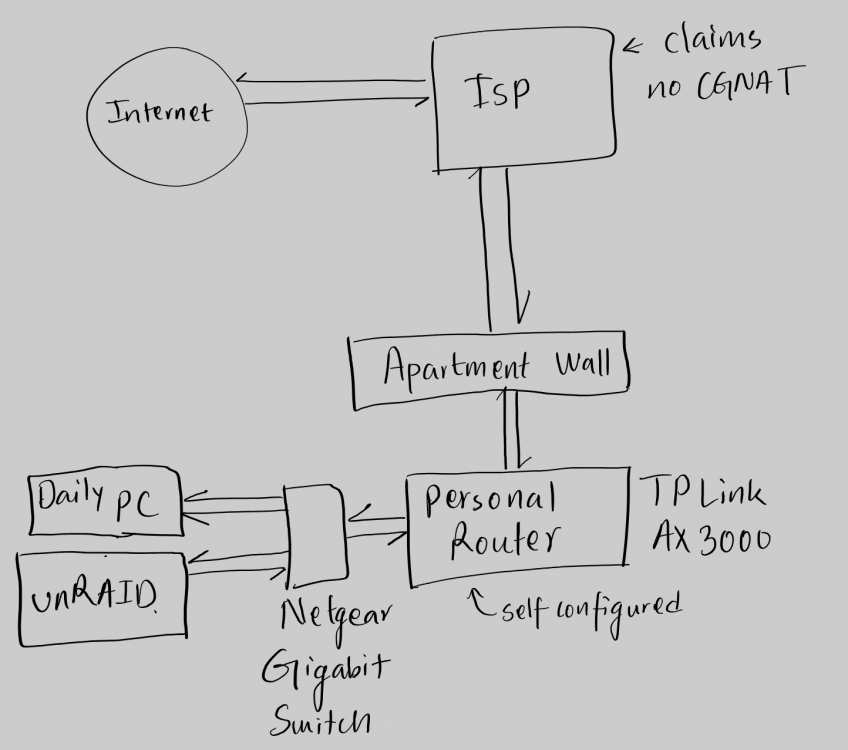
Hi! thank you for responding! I am running Unraid 6.10rc4. I have the diagnostics attached. mango-diagnostics-20220411-1604.zip Here's a sketch of the network setup. No VPN running on router and had only one Wireguard tunnel on unraid active. That again was not in "VPN Tunneled access mode" but in "Remote Access to LAN" mode as specified by the Wireguard Guide. I reset that and now have no tunnels i.e. wireguard not configured and all tunnels deleted. I am not double NAT'd. I only have one router (not a modem/router combo) and one gigabit 5 port switch. It does! it matches the IP address reported by unraid. What do now? TIA
-
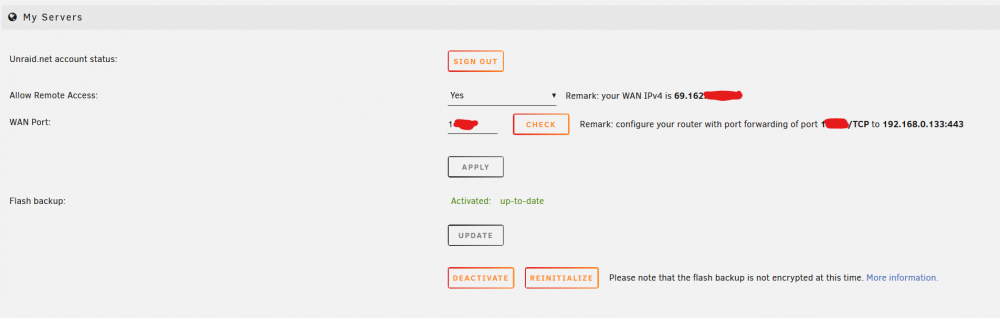
Hello I am very new to unRaid and very new to networking concepts. TLDR: At this point I would like to be able to simply access my server dashboard using my phone's cellular connection. I have an unRaid setup with files loaded and shares created at home. I can access everything flawlessly from home but I need to travel outside the US for over a month and would like to access my server and files when I am away. I have another desktop that is my daily driver which I would also like to use through unRaid by using wake-on-lan feature but I don't want to get ahead of myself. Here is what I have done so far. a. Setup unraid and followed SpaceInvader's guide for duckdns IP tracking b. Setup wireguard, single peer, and installed android app for wireguard using this guide ( ) c. setup port forwarding on my router to allow unraid.net remote server access as instructed d. setup google's dns servers instead of what was default in router What is not working? a. remote access from unraid.net myServers section is not working b. wireguard on android does not work when trying to access internet through VPN c. Wireguard has a 'remark' shown below: Remark: The Local endpoint resolves to 10.1.***.***. In most cases, this should be your public WAN IPv4 instead: 69.162.***.*** The 10.1.***.*** is what is shown by duckdns and when I ping myservername.duckdns.org the IP address comes up as 10.1.***.***. I have no idea what this IP address starting in 69.162 is from and it also shows like below: Any and all help will be appreciated!!