





Fencer
Members
-
Joined
-
Last visited
Everything posted by Fencer
-
That's the plan. When I was building this I was unfortunately on an older compatibility list and the one I got was the only particular model of the Marvells still showing compatible at that time. Missed the blurb at the top of the page so my bad. I've gotten a bit better at navigating the forum and the guides since then. Rebuild should be done by the time I get home and it'll be time to add the cache drive and hope the thing doesn't cough up furballs until I can get a compatible replacement one.
-
Let's see, updates and info: Turns out Disk 5 is in fact on the Marvell controller and going over my drive notes from before, it and one other drive had reallocated sector counts. There was some kind of event that happened when they were in my old server and 3 of the 7 drives popped up with errors at the same moment. (reallocated sector counts in varying amounts and one had another one. The 3rd drive with the multiple error values didn't get reused but the two with the reallocated sector errors I did reuse after running a surface scan and multiple extended spart checks on and kept an eye on. The reallocated sector count for Drive 5 has held steady at 48 for over 6 months and remains so and the other has held steady at 72 for the same amount of time. Per instructions in the Storage Management manual, I stopped the array, unmounted Disk 5, restarted the array, let it see the missing disk and then stopped it, re-added disk 5 and it's now going through a rebuild. So far no errors at about 10% rebuild so hopefully it will rebuild successfully and be good for the moment. It's going to take a month or two to scrape together a few nickels and buy another controller card and new drives to eventually replace disks 5 and 6. Am I on the right track here? One thing I had read about that controller was that it would possibly need to be reflashed to use but it came right up and didn't have raid enabled. I believe you are correct in the controller being the reason it dropped off. I need to learn more about this stuff going forward...
-
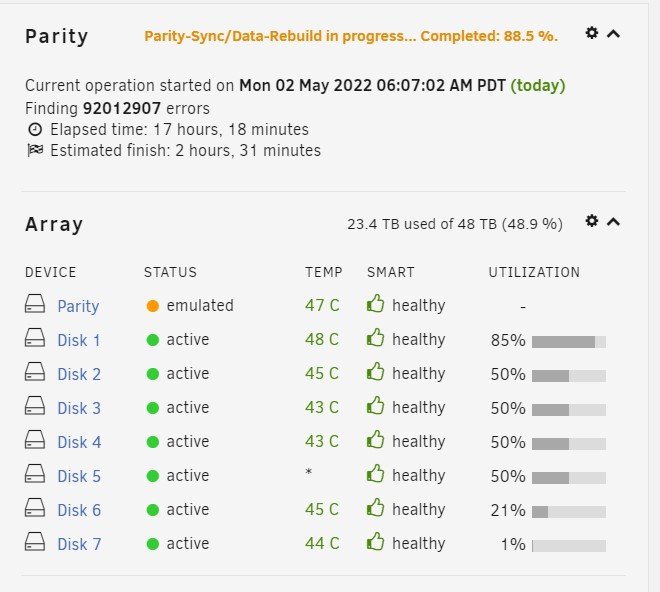
It didn't come back up and all 91 million errors came up off the drive. I'll open it up shortly and see which disk it is and what controller it's connected to. I thought 6-7 were connected to the other controller but I'll double check that and the cables. Attached is the diags after the power cycle: powertower-diagnostics-20220503-1715.zip
-
OK, Parity run still has a few hours to go but this is the zip with the diags that I just ran. If there's a particular one I should be posting or a different format please let me know powertower-diagnostics-20220503-0006.zip
-
Whew... Finally got all my files copied over to my array and added the parity disk to it this morning. I checked it after about 13 hours and it showed 92 million (!) errors and the temperature reading for disk 5 has mysteriously disappeared (see attached pic). The number of errors hasn't increased in several hours and it seems to be chugging along but this is highly concerning. Disks 6 and 7 are attached to one of the (formerly) approved Marvell controllers and I would have thought if something was going to error out that it would be one of those. No SMART issues are reported on any of the disks as of the time I started the parity build. Thoughts on this? Should I rerun the parity, restart the system? Kind of lost here at the moment.
-
So 24-36 hours, sounds like about what I expected, cool. Then all that's left is to add in the cache drive and I should be set for now. Looking good!
-
Ah, dumb user errors... Managed to accidentally move about 4TB of data off an external drive instead of copy off of it so now I'm stuck waiting for it to copy back. Yay me!! Tomorrow's the day to set up the cache and parity drives. I'm guessing it'll take a day or two to do the parity on a 48TB array? My normal use is to add about 5-50 gigs of new data a week so my plan is to add new files to the Unraid server during daily use and once a week or two to back those folders up to the two main externals I have for them using Teracopy in Windows as I can set it to only copy new files and add the checksum verification to start with. I know there's a Linux-based tool (forgot the name at the moment) that will accomplish the same and when I have time I'll find and fiddle with that when I have time. I only plan to have the externals hooked up when I'm backing up new stuff, other than that they'll sit in a drawer. My shares are set up to where all the changes will be on 2 of them so that doesn't seem too cumbersome to deal with. Looking forward to having this thing fully functioning so I can give it a good test run before I purchase a license and learning how to set up a smooth media server for all the video, audio and comic book goodness sitting on it!
-
Thank you very much for your insights! I'm off to bed and will be reading up a bit more on Krusader's usage for moving files to different disks when I get up. This stuff will still take another 7-8 hours to finish copying, lol. I'll know better for next time. Looking forward to getting this monster box out from under my desk and into it's proper place soon...
-
My guess is what you mentioned about Krusader pre-allocating the folders before copying the data over. I kind of suspected that when I went into the folder in Windows and all the folders were already there. I followed the Spaceinvader One tutorial on Krusader and it had me delete the original path and add paths 1_unraid_shares and 2_unraid_unassigned. I'll have to go dig a bit read up on how to move folders to disks rather than shares in it.
-
Averaging 160-185MB/s is definitely faster than I had expected, so that's a plus and with a fan blowing on my external, temps are all a nice 37-42 degrees C. Disks 2-3 stopped right at 3TB apiece and it's currently writing to disk 4. Seems like the only ornery one that didn't follow the allocation method is the first (bigger) disk. At it's current pace, it should hit 3TB on disk 4, then 5 and part of 6 in the next 10 hours.
-
That sounds like a plan. I was looking for tools or directions on how to move folders to different disks but all the posts I found were from years ago and I don't know if they work on 6.9. I'm definitely open to moving them disk to disk. If you could point me in a direction I'll be happy to check it out. The first 5TB of folders all went to the first drive and I expected that. I then added the movie folder about 10 genres at a time. The movies folder is broken down like: /movies/movie genre/movie series (if it has one)/movie title/files. The TV Shows folder was added afterwards about 15 series at a time and has a similar structure /TV Shows/series name/season/episode with a few of them probably going another folder in for something or another. I'm seeing that the second half of the movies folder transfers have some files on disk 2 but it doesn't look like it started splitting them until it hit 90%. Then when I added to the TV Shows share a number of them went on disk 1 as well, bringing it up to 11.2TB used and 760 megs free. It seems to have completely ignored the high water allocation altogether, as I thought it would hit about 6TB on drive 1 and start filling the other drives before coming back to drive 1. Only thing I can think of is that having a setting in the split level setting other than auto overrode the allocation method?
-
Next update, fun fun!! Turns out that Fit thumb drive stopped being read altogether and the replacement they sent is humming along nicely in the system now. Krusader is doing an awesome job of quickly moving my files from my external drives to the array (screwed up on the split level thing though, asked for assistance in the appropriate forum thread.) Once they're all transferred and I have my first drive not at 90+% full I'll be adding in the parity and cache drives. So far it's looking good and I'm liking it better than my previous Freenas setup. I'll drop a line in here later as to progress. Hopefully I'll get to parity, etc. by Sunday!
-
Hi, got my system up and it's looking promising. I did seem to make one pretty good blunder though. For my first few shares (comics and movies, both that go several folders deep) I had set the Allocation Method to High Water and the split level to Automatically split only the first 5 directories. Problem I have is that the way I did it, my 12TB disk filled up and now has 760 megs of free space left while 3 of the 6TB drives haven't even been touched. I'm guessing that it's because the split level overrode that 50% threshold thing that High Water is supposed to do? My system has 2x 12TB drives and 7 6TB ones and the array has 1x 12TB disk and 7 6TB ones. I'm using Krusader to add the 30-odd terabytes of data from my mounted usb drives and speed is better than expected. Once I have the files moved to the array, I'll be adding parity with the 2nd 12TB disk and adding in the 1TB nvme drive in the system as my cache drive. I reset the allocation method on those two folders to "automatically split only the top level directories" and am looking to delete 4 folders in the movie share (about 3.5TB) and then reupload them with the new split level and excluding the first drive. Would this achieve what I'm looking for? I really don't like the idea of running a disk at over 90% right from the start. If I'm reading things correctly, I need to get these files spread out over another disk or 3 before adding the parity drive. Thoughts on whether I'm on the right track or way off?
-
Huh, just my luck. It'll make a nice music drive for my Prius anyway, lol. UPDATE: Amazon has agreed to refund me for the 3 6TB Maxdigitaldata drives that have SMART errors (Rebranded Seagate Constellation drives) so I'm looking at purchasing 2 10Tb drives instead of 3 6tb ones. I can get 2 of the Seagate Exos x14 10Tb ones for about the same price. Thoughts on this? It'll only give me 4TB more space now but it'll allow me to add 10Tb drives going forward as I build this out over the next year or two. Side note, the reseller's label covers the breather hole on every one of these drives. I wonder if that had anything to do with the drive failures. I finally created a pool with the working 4 drives to play around with and get a feel for Unraid while I get the bad drive and possibly unusable controller situation figured out. It's fun and should be interesting to figure out how I want to arrange these levels and things.
-
yeah, I've heard that several people have used them. Is yours the usb 3.1 Plus version?
-
Oh, JonathanM: I got it from this page: https://wiki.unraid.net/Hardware_Compatibility#PCI_SATA_Controllers I had mistakenly assumed that as they became incompatible they'd be removed from the list. I missed the part in there about it not being updated much since V6 came out.
-
Ugh, wonderful. Nothing like clicking on what turns out to be an old link without realizing it... All I need is a 2-port card to stick my last 2 drives on. Only picked up the Supermicro becauseI found a refurb for $16. Looks like I'll be building an array with my existing good drives and adding to it when I get the others replaced and a decent expansion card. Live and learn... @Michael: Those temps are from a few hours into a preclear so they were pretty active for a while when I took that screenshot. They're still holding steady at 45-46 55% through the zeroing part. Higher than I'd like them but from what I've read pretty normal for those particular drives. Interesting that both of the cooler-running drives, the Exos ones both show reallocation errors. Turning into more of a project than I'd hoped but I'll keep plugging...
-
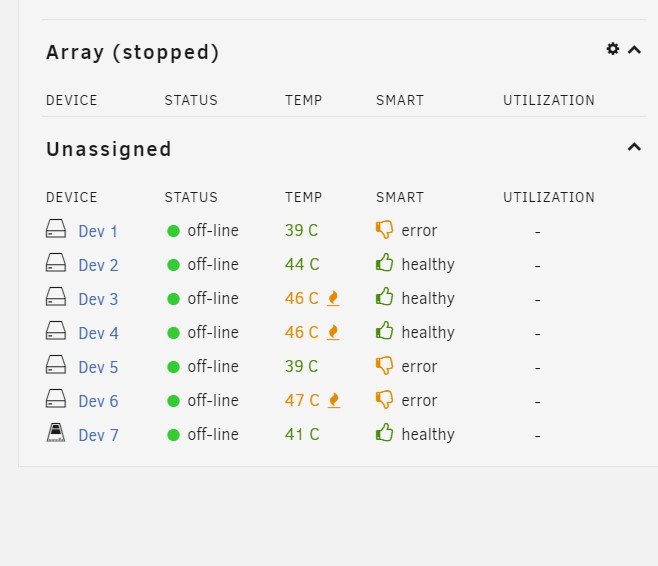
Well, it's been... Interesting so far with a ways to go. The good: -finally got it booting, that took some doing. -The SK Hynix Gold P31 I got for $99 seems to be doing well and reviewed well for sustained writes, etc. per this review: https://www.techpowerup.com/review/sk-hynix-gold-p31-1-tb/17.html I think I'll pick up another for my main laptop. - I definitely like the interface and hardware info displayed. I'm guessing I'll be liking it more when the preclearing is done and I've created an array to play with The not-so-good: -The 32 gig Samsung Fit I thought was a recommended drive was incompatible so I ended up going with a 16gig Sandisk Cruzer -The Gigabyte mobo I thought had 9 usable sata ports only had 6, the other 3 are sata express and looked to be a pain to work with. I picked up a SuperMicro AOC-SASLP-MV8 8-Channel/300MB/s SAS/SATA RAID Adapter Card that the site said was compatible so I'll either move all the drives to that or go half and half or something. Thoughts on that would be appreciated. -And the big one: 3 of my 6 month old drives are showing SMART errors (reallocated sector counts) and the temps even with excellent airflow right across them have 4 at 45-47C and the other two at 39C steady. They're rebranded Seagate Constellation drives (2 are Exos drives) and as I understand it the Constellation ones run a bit hot. So if these drives all pass the preclear with the pre- and post- checks should they be good to go or should I be hitting up my vendor for some warranty replacements? I'm a little wary of seeing some thumbs-downs starting out (see pic)
-
Will do! I'll read up on Unraid tomorrow and start prepping the build. Maybe even a few pics along the way. Thanks for the assistance!
-
Thank you for that Michael! I'm planning on zeroing out the drives to double-check them for errors due to the fact that in my existing, definitely not-optimized Truenas box within a month of building a pool I've consistently gotten a mysterious data corruption error that said my pool was degraded. Did extended smart checks on each disk that came up clean but more recently I've gotten 3 airflow temperature warnings (2 of those were not well-ventilated, since corrected) and querying the smart status showed one of my disks had 4 errors at once a few months ago that haven't repeated. I think the disks are good but I'd feel better with a fresh read and replacing the one drive with the previous errors if need be before proceeding. They're still under warranty so if one is bad I can always get started with 6 drives and add it later. I'll go dig for an Unraid setup tutorial and educate myself a bit before proceeding. Haven't had the time to read up on it all yet and it's pretty different from what I'm used to. My usual thing has been to create one share that covers the whole pool, setting it as a drive letter and creating folders in there for my various stuff, movies, tv shows, other data stuff, etc. The SK hynix gold nvme arrived and will go in the system. If I'm unhappy with it I'll shell out the bucks when I can and replace it with something better suited. I have a laptop that would love some bigger nvme love, lol. Once I've copied a season or two of the few series my family can't seem to live without to my media pc, I'll build this box and get started. I'm a little concerned about the Realtek LAN chip in this motherboard as I've read that some folks are having issues with it. Hopefully the drivers will be there and it'll work well enough. If not I'll pick up an Intel 10Gb card as at some point I know I'll end up making the move to 10Gb ethernet but that's pie in the sky for me at the moment. Moving from SoCal to Vegas in a few months and I can't justify the cost yet to my lovely lady...
-
thanks all, quick update: All my stuff with the exception of the mounting hardware for the Coolermaster 212 have arrived so I'll use the existing water cooler until that comes in, looks like a few weeks with the backorder. I have my current existing NAS completely backed up to external usb drives that I'll be loading the new one off of. As I understand it, zeroing out all the drives in the unit is best practice and I'm guessing that that will take a week or so with 7 6TB drives, does that sound about right? I have 32TB of data to transfer in once that's done. I've read that there's several different methods to accomplish this, including not enabling the cache drive until the data is transferred, not setting up a parity drive until the data's transferred, and loading the drives individually from my desktop system to take advantage of the faster internal transfer speeds, moving them to my Unraid box and setting up the parity drive to look for them. It's a bit confusing. Can someone point me to a tutorial on setting up and accomplishing this? I know that transferring data to my existing zfs array took a little over a week to accomplish and I'm hoping that similar times can be done here (excepting the time zeroing out the disks of course.)
-
Hmm... For the AIO, my initial thought was to mount it at the rear exhaust the way it is in my current box. I believe I still have a Coolermaster 212 Evo air cooler that I'll need to find mounting hardware to use (snapped a threaded mount being stupid building a computer for my mom) assuming it fits in the Antec 101. Don't think it will be a problem. If I'm reading the reviews of the SK hynix Gold P31 correctly, it should be a good drive to use for the cache. Link following: https://www.anandtech.com/show/16012/the-sk-hynix-gold-p31-ssd-review/5 Just checked my stash and I actually have 1x16Gig stick of DDR4 ram and 2x4Gig sticks. Would the single 16 gig stick be better or should I use the 2 4 gig ones for half the ram but dual-channel memory? Normally I'd say the doubled ram in single-channel but I'm up for suggestions. Probably end up playing around with both ways to see how it goes. I guess the only other question remaining will be the Realtek GbE network chip on the motherboard. I've been reading that I might be better off getting a dedicated Intel card in the near future. Hopefully there's drivers for my particular board's flavor. Assuming I pull the trigger on the SK hynix SSD and taking into account the suggestions here, my final build will be something like this: Antec P101 Silent case Gigabyte GA-Z170-HD3 motherboard i7 6700 cpu (cooling to be determined) 1x16Gig ddr4 memory 1 1TB SK hynix Gold P31 nvme cache drive w/heatsink 7x 6TB MaxDigitalData hard drives That should be good to build a decent Unraid box I think with enough room to add another 6TB down the line. Thank you for your inputs. Any thoughts on the current build plan are welcome!
-
Thank you very much Michael Meiszi! Good stuff to be considering. Received my motherboard last night, Antec P101 case should be here this weekend. I ordered a SAMSUNG MUF-32AB/AM FIT Plus 32GB Flash Drive to use as my boot drive, so now I'm down to my last few decisions: Cache drive choices: 1TB SK hynix Gold P31 nvme drive for $110 bucks or 1TB Sandisk SSD Plus Sata drive for $80 I'm leaning towards spending the extra $30 for the nvme one as it'll keep my last sata port free to add another drive down the road. CPU choice: New, unused i7 6700 or a 4 year old-ish i7 7700T from a retired desktop from work. The much lower wattage and heat from the 7700T has me thinking it could be a viable option with this board and I could pick up a decent air cooler for it for $20. Otherwise, I'll likely reuse my Corsair h110 (?) water cooler from the existing build that has several years of mileage on it if I go with the 6700. Only thought with the water cooling is there's 3x120mm intake fans blowing right over my hard drives and the single 120mm exhaust fan on the back so I'm wondering if heat buildup from the 7-8 drives that'll be in there will be an issue if I have the radiator sandwiched in there in a push-pull setup. They run 44-46C in my current, less ideally ventilated case. Thoughts?
-
Apologies if this has previously been answered. I've been using Truenas 12 on my NAS for the last few months and am looking to see if Unraid would be a better solution. This is for my home storage and mostly used for media storage to access from my computers there. I would like to set it up as a home server (Plex or similar) so a massive amount of initial uploading and then mostly ability to access the files from 2-3 computers at a time. For some reason I've been getting unexplainable pool degredation warnings and frequent copy errors. Hard drives, cables and memory both check good and my assumption is that it's an issue with my current hardware. Been looking to upgrade them for a bit anyway. Recently noticed that hard drive temps are jumping up into the mid-high 40C range during transfers. Thoughts on whether Unraid will be a better solution for my storage would be appreciated. Current setup: OS: Truenas 12, disks set up in zfs1 array for 32 gigs of storage i7 4790K cpu MSI G87-G45 gaming mobo 7x MaxDigitalData 6TB hard drives Samsung 850 pro 250Gb Sata SSD (OS) 24 gigs non-ecc memory (8x2, 4x2) Netgear Nighthawk AX-8 router I'm replacing the 4790K with a new i7 6700 cpu and a GIGABYTE GA-Z170-HD3 motherboard that should arrive this week. Also replacing my case with an Antec P101 case for proper drive bays and better cooling. I may exand it in the future but currently I'm satisfied with the size of the array. Given the above, would Unraid be a good solution or should I stick with Truenas? Any comments or suggestions would be appreciated. If I understand Unraid correctly, the size/speed of the cache drive is crucial to speed of large uploads and am willing to pick up a larger ssd or replace it with an NVME one.
