





4o4-n0t-found
Members
-
Joined
-
Last visited
Everything posted by 4o4-n0t-found
-
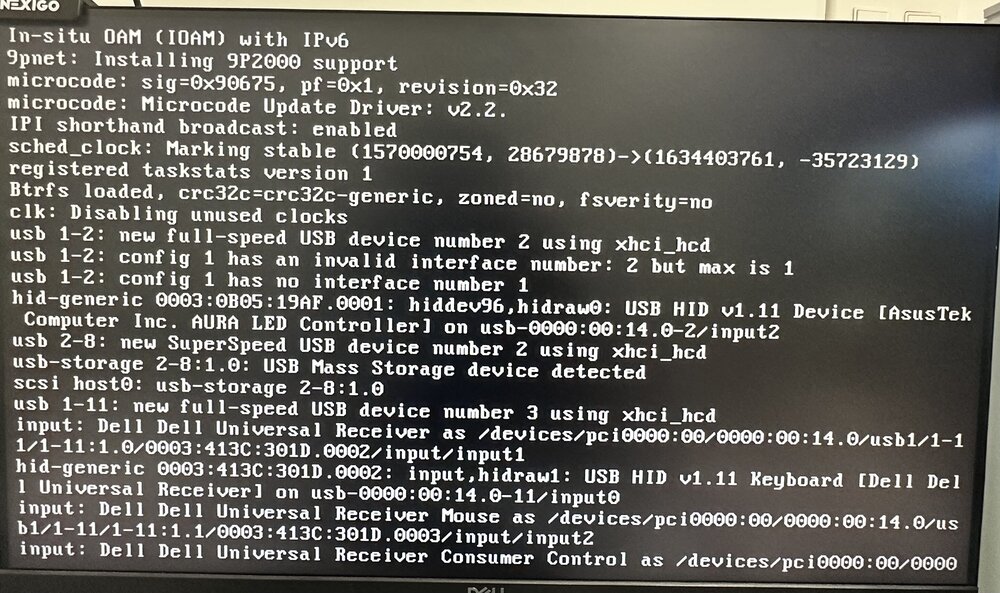
The issue is, I have a video passthrough, because the VM wasn’t set to auto start it hanged there until I started the VM. Everything else works fine. When I saw it halt here, I thought my entire unRaid OS was offline.
-
Silly on my part, still able to access webui and content. I have a passthrough for a VM but the vm doesn't auto start, so it'll hang here until i start the VM.
-
I went away for a couple weeks and came back to my unraid not booting. It gets stuck on boot at an INPUT, showing my USB receiver which is my keyboard / mouse. I reinstalled UNRAID on my USB and it boots, prompting me to reeconfigure. When i restore my entire CONFIG folder, i get back to the same error. Is there other extra things i can strip from the config as to not lose my drive setup etc. edit: I renamed the plugins folder. And still stuck. attached screenshot
-
you’ll need to click on macOS installer 2 or 3 times while it loops through the install then you will see Big Sur.
-
Using terminal in vscode and running into the same issue.Was just wondering if this is a unraid / macinabox limitation or it's an over vnc issue. I tried using the browser to access the OS, screen sharing, as well as vnc viewer but same issue. few apps such as hyper.js and google chrome are not rendering. could this also be a limitation because I'm using an igpu as I don't have a dedicated graphics card. when I launch chrome, it only shows the scroll bar, the maximize, close, minimize buttons. TIA.

