



Skip to content
View in the app

A better way to browse. Learn more.

Unraid

A full-screen app on your home screen with push notifications, badges and more.

To install this app on iOS and iPadOS
  1. Tap the Share icon in Safari
  2. Scroll the menu and tap Add to Home Screen.
  3. Tap Add in the top-right corner.
To install this app on Android
  1. Tap the 3-dot menu (⋮) in the top-right corner of the browser.
  2. Tap Add to Home screen or Install app.
  3. Confirm by tapping Install.

nsal1

Members
  • Joined

  • Last visited

  1. Wow! That was fast! It's showing correctly now as 4GiB. Thanks for taking care of that so quickly.
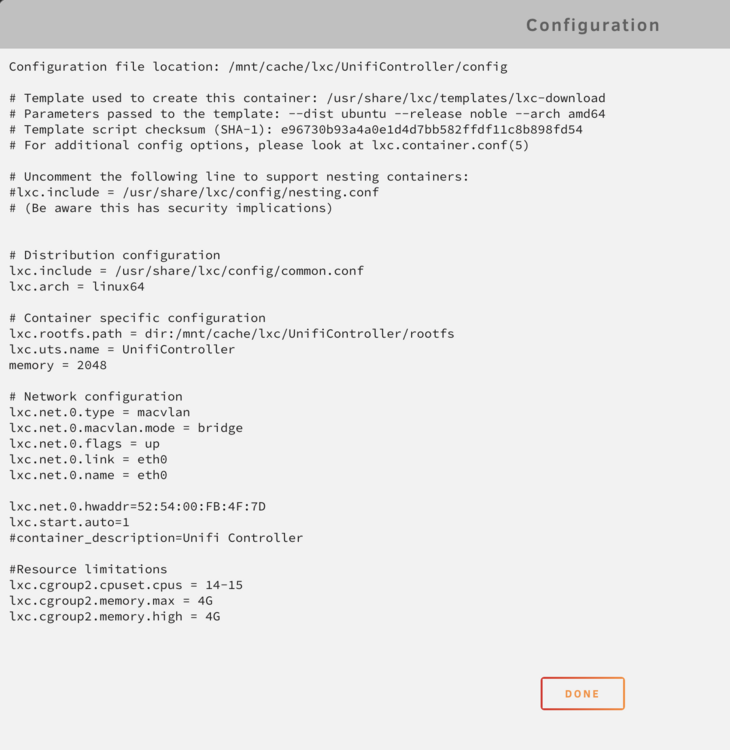
  2. Hi, I'm having an issue getting the LXC to respect memory limits set in the config file. See the file below: But when running the container, it only seems to respect the CPU limits and not the memory limit: Please let me know if I'm doing something wrong. I would really appreciate any help.
  3. Not sure how this happened but I am replying to follow this in case anyone else has an idea.
  4. I ended up using the Docker image as well and now it's finally working. I would have preferred to just use a share but at least it's working now.
  5. Just chiming in to say I am having a very similar issue and I am hoping someone chimes in with a solution.

Account

Navigation

Search

Search

Configure browser push notifications

Chrome (Android)
  1. Tap the lock icon next to the address bar.
  2. Tap Permissions → Notifications.
  3. Adjust your preference.
Chrome (Desktop)
  1. Click the padlock icon in the address bar.
  2. Select Site settings.
  3. Find Notifications and adjust your preference.

