





DrSiva2022
Members
-
Joined
-
Last visited
-
Almost after close to an year or so , with the help of chatgpt , i was able to upgrade from 27 to 33 .. Thanks for your guide , i was able to follow it to the core .. updated each version . Chatgpt helped me check the DB after every update and also asked me to check the logins , admin page etc. The update ran pretty neatly. I was able to do this because i purchased a 16TB hdd recently and was about to add it to the pool , then thought instead of external hdd , i will use this hdd to backup. Backup did take lot of time . Chatgpt was fed with your post.. it created all the needed commands to backup all important things , verify it as well. We didnt backup preview cache , as it was huge and took so much time because of small size files. Now all that is good , IT also me helped me clear few admin errors like HTHS , localization error and redirect errors. Thanks for the guide you provided. If anyone is interested , i can ask chatgpt to create the list of commands and how i did .
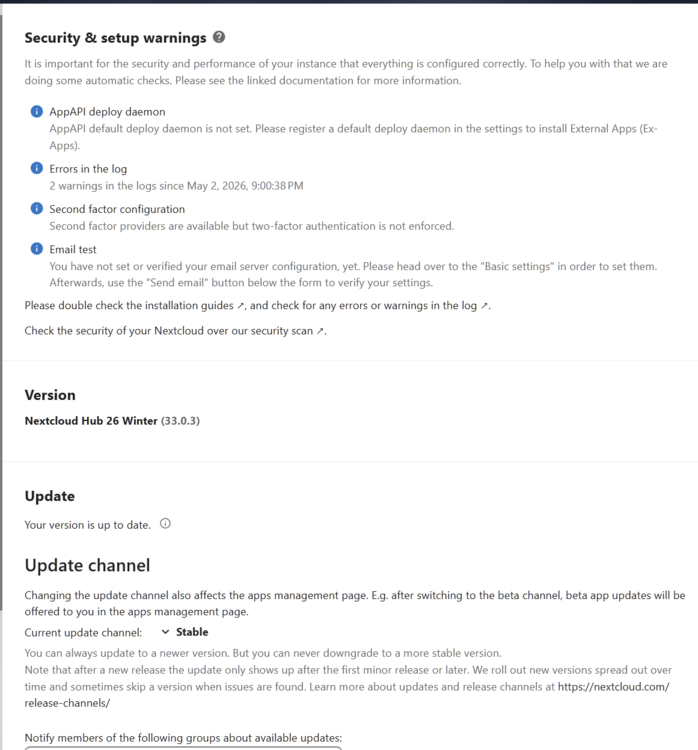
-
updated today and lost my projects.. it happened last time as well. Either the update broke something , or i have confiugured something wrong. It now lands on setup page. last time i was able to backup DB before its was too late , this time its lost. How do i prevcent such lose in future ?
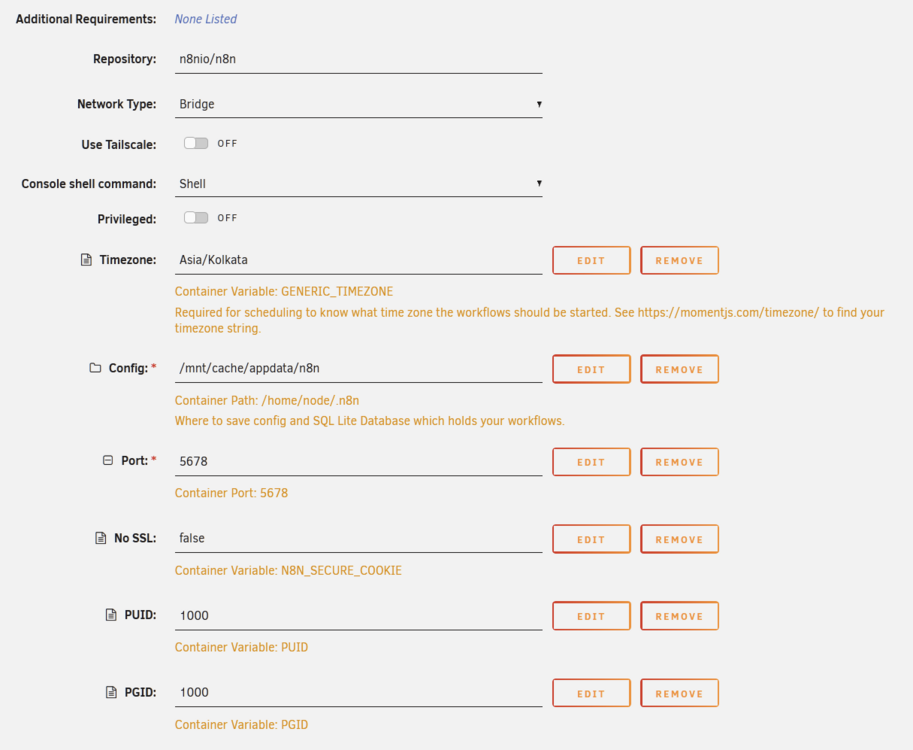
-
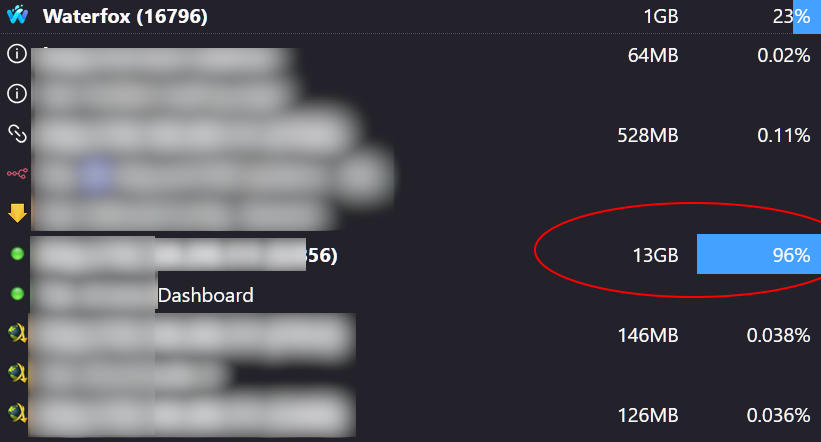
This is annoying.. its same on waterfox also , a fork of firefox. It literally takes up X GB based on X number of hours the browser is on. It also makes entire browser slow. I had to close it via waterfox task manager to clear the memory.
-
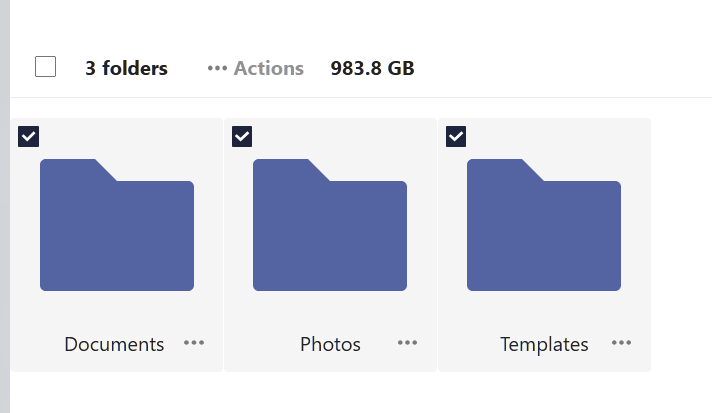
First of all , let me thank you for posting such a detailed reply. I did search with my release tag and not much results came , hence posted the question. Also last time when i updated NC, it hung , resulted in some PHP error or some sort and i was very new to unraid at that time. Luckily i was able to see the data and was able to backup it (that time the size was pretty small). Also thats when i fixed the NC tag to specific release to prevent any auto-updates Now that its grown this much , and i am almost 2 years behind the latest release , I want to be sure and get all details before starting the upgrade. Yes this is the sole backup of my personal and family pictures and videos , which i have compiled from various other small sources. I will first do a backup and stop my phone syncs first and then proceed with your suggestion. As for cloudbackup , i just want to follow or have some redundancy to my data and felt cloud backup might fit into the 3-2-1 backup. After exploring , found none to be cost efficient. As of now , i do run a parity disk on my unraid. thats one safety net atleast. Will use this opportunity to do a full backup of NC data on to my portable HDD. Will try to connect the usb hdd to unraid server directly and let it backup ? Is it possible ? If you're really concerned, then create a second instance of NC and database, with the lastest version, referencing a new data folder. Once that is up and running, you can move your data over from old folder to new folder and tell NC to re-scan the files. You won't have any data from your calendar, deck, messenger, etc as that's in the old database, but if your only concerned about your files, then you could start there. After that's done, you can drop your old NC and Dataase from docker and appdata. As of now , i have only simply uploaded pictures from old bacups into respective folder. What is happening now is i have made my phones to sync with NC and upload camera folder alone to update once i get to home wifi , same goes tomy family members under each logins. With hires images ,they run out of space pretty fast. other than that i havent used NC a lot , except for face identification extension and duplicate finder. So if the NC 30 , parallel install is possible , i can do that , or will try. once again , thanks for your wonderful reply , gives better confidence to move forward. Also i might have wrongly got the numbers . when i select all the folders it shows only 983GB
-
Never mind , installed it under linux , everything worked fine.
-
I am afraid to do anything .. Also i need loads of time to move the data with most of them being pictures IS it possible i can move them to different place on my hdd ?
-
I tried to run zorinOS , but except for one time where it booted and started to install and even installed , but upon reboot , it got stuck and was rebooting repeatedly. Other times it simply refuses to go past "try zorinOS" page. Here is my XML <?xml version='1.0' encoding='UTF-8'?> <domain type='kvm'> <name>Zorin</name> <uuid>fec27e57-037b-d1fe-d78a-2dcatg90c57b</uuid> <metadata> <vmtemplate xmlns="unraid" name="Ubuntu" icon="libreelec.png" os="ubuntu" webui="" storage="default"/> </metadata> <memory unit='KiB'>4194304</memory> <currentMemory unit='KiB'>4194304</currentMemory> <memoryBacking> <nosharepages/> </memoryBacking> <vcpu placement='static'>4</vcpu> <cputune> <vcpupin vcpu='0' cpuset='2'/> <vcpupin vcpu='1' cpuset='8'/> <vcpupin vcpu='2' cpuset='4'/> <vcpupin vcpu='3' cpuset='10'/> </cputune> <os> <type arch='x86_64' machine='pc-q35-8.2'>hvm</type> <loader readonly='yes' type='pflash'>/usr/share/qemu/ovmf-x64/OVMF_CODE-pure-efi-tpm.fd</loader> <nvram>/etc/libvirt/qemu/nvram/fec27e57-037b-d1fe-d78a-2dcatg90c57b_VARS-pure-efi-tpm.fd</nvram> </os> <features> <acpi/> <apic/> </features> <cpu mode='host-passthrough' check='none' migratable='on'> <topology sockets='1' dies='1' clusters='1' cores='2' threads='2'/> <cache mode='passthrough'/> <feature policy='require' name='topoext'/> </cpu> <clock offset='utc'> <timer name='hpet' present='no'/> <timer name='hypervclock' present='no'/> <timer name='pit' tickpolicy='delay'/> <timer name='rtc' tickpolicy='catchup'/> </clock> <on_poweroff>destroy</on_poweroff> <on_reboot>restart</on_reboot> <on_crash>restart</on_crash> <devices> <emulator>/usr/local/sbin/qemu</emulator> <disk type='file' device='disk'> <driver name='qemu' type='raw' cache='writeback' discard='unmap'/> <source file='/mnt/user/domains/Zorin/vdisk1.img'/> <target dev='hdc' bus='virtio'/> <serial>vdisk1</serial> <boot order='1'/> <address type='pci' domain='0x0000' bus='0x03' slot='0x00' function='0x0'/> </disk> <disk type='file' device='cdrom'> <driver name='qemu' type='raw'/> <source file='/mnt/user/isos/Zorin-OS-17.3-Core-64-bit-r2.iso'/> <target dev='hda' bus='sata'/> <readonly/> <boot order='2'/> <address type='drive' controller='0' bus='0' target='0' unit='0'/> </disk> <controller type='usb' index='0' model='ich9-ehci1'> <address type='pci' domain='0x0000' bus='0x00' slot='0x07' function='0x7'/> </controller> <controller type='usb' index='0' model='ich9-uhci1'> <master startport='0'/> <address type='pci' domain='0x0000' bus='0x00' slot='0x07' function='0x0' multifunction='on'/> </controller> <controller type='usb' index='0' model='ich9-uhci2'> <master startport='2'/> <address type='pci' domain='0x0000' bus='0x00' slot='0x07' function='0x1' multifunction='on'/> </controller> <controller type='usb' index='0' model='ich9-uhci3'> <master startport='4'/> <address type='pci' domain='0x0000' bus='0x00' slot='0x07' function='0x2'/> </controller> <controller type='pci' index='0' model='pcie-root'/> <controller type='pci' index='1' model='pcie-root-port'> <model name='pcie-root-port'/> <target chassis='1' port='0x8'/> <address type='pci' domain='0x0000' bus='0x00' slot='0x01' function='0x0' multifunction='on'/> </controller> <controller type='pci' index='2' model='pcie-root-port'> <model name='pcie-root-port'/> <target chassis='2' port='0x9'/> <address type='pci' domain='0x0000' bus='0x00' slot='0x01' function='0x1'/> </controller> <controller type='pci' index='3' model='pcie-root-port'> <model name='pcie-root-port'/> <target chassis='3' port='0xa'/> <address type='pci' domain='0x0000' bus='0x00' slot='0x01' function='0x2'/> </controller> <controller type='pci' index='4' model='pcie-root-port'> <model name='pcie-root-port'/> <target chassis='4' port='0xb'/> <address type='pci' domain='0x0000' bus='0x00' slot='0x01' function='0x3'/> </controller> <controller type='virtio-serial' index='0'> <address type='pci' domain='0x0000' bus='0x02' slot='0x00' function='0x0'/> </controller> <controller type='sata' index='0'> <address type='pci' domain='0x0000' bus='0x00' slot='0x1f' function='0x2'/> </controller> <interface type='bridge'> <mac address='52:54:00:b3:80:21'/> <source bridge='br0'/> <model type='virtio-net'/> <address type='pci' domain='0x0000' bus='0x01' slot='0x00' function='0x0'/> </interface> <serial type='pty'> <target type='isa-serial' port='0'> <model name='isa-serial'/> </target> </serial> <console type='pty'> <target type='serial' port='0'/> </console> <channel type='unix'> <target type='virtio' name='org.qemu.guest_agent.0'/> <address type='virtio-serial' controller='0' bus='0' port='1'/> </channel> <input type='tablet' bus='usb'> <address type='usb' bus='0' port='1'/> </input> <input type='mouse' bus='ps2'/> <input type='keyboard' bus='ps2'/> <tpm model='tpm-tis'> <backend type='emulator' version='2.0' persistent_state='yes'/> </tpm> <graphics type='vnc' port='-1' autoport='yes' websocket='-1' listen='0.0.0.0' sharePolicy='ignore'> <listen type='address' address='0.0.0.0'/> </graphics> <audio id='1' type='none'/> <video> <model type='cirrus' vram='16384' heads='1' primary='yes'/> <address type='pci' domain='0x0000' bus='0x00' slot='0x1e' function='0x0'/> </video> <watchdog model='itco' action='reset'/> <memballoon model='virtio'> <address type='pci' domain='0x0000' bus='0x00' slot='0x05' function='0x0'/> </memballoon> </devices> </domain>
-
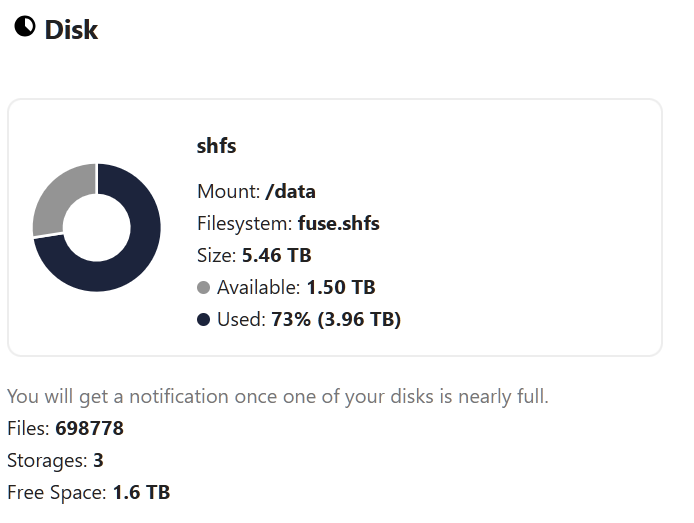
@Kilrah @Mrtj18 Thanks for your advices .. Backing up almost 5.5TB will take me years , since most are photos and will take so much time.. If it was simply movie files , trasnfer to ext hdd will be fast. So i have two options , in both options i have to backup my data .. one option is hop through multiple version and hope i see the light at the end of tunnel , second is erase the path and pray you draw the same path for the DB to work properly.. :( I always wanted to have a backup to cloud.. was looking into those cold storages or pay onen time ones .. is it possible i can lin to nextcloud and upload them there ? Also after doing all these , is the new version of NC has resolved this tedious way of upgrading ?
-
, is it simply possible to uninstall nextcloud and reinstall and load backup config(if thats even possible) so that these upgrades wont mess with my data and if i uninstall and reinstalll a new version , it will simply able to bring the old "data" and config to current state ? If not , does simply renaming the folder will help ?
-
data for container alone ? or you are saying the 2TB of my data ? I dont have any resource to even copy them elsewhere. app data and db are ok.. they might be small , data here refers to which one ?
-
@cosmicrelish , Almost in the same boat... I am on 27.0.2. Last time i updated to 27.0.2 from a lower version , it totally went sideways and had to reinstall , reupload everything. I have now set the version fixed to prevent any auto-updates. Now my backups at almost 2TB. I have all folders neatly created , i dont want to mess things up. The system is working just fine , but at the same time , i dont want to be behind the main version too far. someone please help me figure out the best way to upgrade to latest version , without breaking things. I really wish updating nextcloud was refined , rather than becoming too tiresome and problematic.
-
I am also on the same boat . What precaution should one take before doing this ? Also i have had some head ache when i updated nextcloud last time. So dont want to spoil the current setup.
-
No need , just do this
-
Pls someone help...
-
ok i moved all .err and ib_xyz files to a folder and restarted mariadb. Now its not logging that much error . but logs like this Brought to you by linuxserver.io ─────────────────────────────────────── To support LSIO projects visit: https://www.linuxserver.io/donate/ ─────────────────────────────────────── GID/UID ─────────────────────────────────────── User UID: 99 User GID: 100 ─────────────────────────────────────── [custom-init] No custom files found, skipping... UMASK corrected from 022 to 0640 ... 230810 15:19:07 mysqld_safe Logging to '/config/databases/1ea560a3a27c.err'. 230810 15:19:07 mysqld_safe Starting mariadbd daemon with databases from /config/databases [ls.io-init] done. when you go into 1ea...... .err file . this is what is inside 230810 15:19:07 mysqld_safe Starting mariadbd daemon with databases from /config/databases 2023-08-10 15:19:07 0 [Note] Starting MariaDB 10.6.13-MariaDB-log source revision a24f2bb50ba4a!!!!!!!!d584937f36 as process 363 2023-08-10 15:19:07 0 [Note] InnoDB: Compressed tables use zlib 1.2.13 2023-08-10 15:19:07 0 [Note] InnoDB: Number of pools: 1 2023-08-10 15:19:07 0 [Note] InnoDB: Using crc32 + pclmulqdq instructions 2023-08-10 15:19:07 0 [Note] mariadbd: O_TMPFILE is not supported on /var/tmp (disabling future attempts) 2023-08-10 15:19:07 0 [Note] InnoDB: Using Linux native AIO 2023-08-10 15:19:07 0 [Note] InnoDB: Initializing buffer pool, total size = 268435456, chunk size = 134217728 2023-08-10 15:19:07 0 [Note] InnoDB: Completed initialization of buffer pool 2023-08-10 15:19:07 0 [Note] InnoDB: 128 rollback segments are active. 2023-08-10 15:19:07 0 [Note] InnoDB: Creating shared tablespace for temporary tables 2023-08-10 15:19:07 0 [Note] InnoDB: Setting file './ibtmp1' size to 12 MB. Physically writing the file full; Please wait ... 2023-08-10 15:19:07 0 [Note] InnoDB: File './ibtmp1' size is now 12 MB. 2023-08-10 15:19:07 0 [Note] InnoDB: 10.6.13 started; log sequence number 33112; transaction id 4 2023-08-10 15:19:07 0 [Note] Plugin 'FEEDBACK' is disabled. 2023-08-10 15:19:07 0 [Note] InnoDB: Loading buffer pool(s) from /config/databases/ib_buffer_pool 2023-08-10 15:19:07 0 [Note] InnoDB: Buffer pool(s) load completed at 230810 15:19:07 2023-08-10 15:19:07 1 [Warning] Failed to load slave replication state from table mysql.gtid_slave_pos: 1932: Table 'mysql.gtid_slave_pos' doesn't exist in engine 2023-08-10 15:19:07 0 [Note] Server socket created on IP: '0.0.0.0'. 2023-08-10 15:19:07 0 [Note] Server socket created on IP: '::'. 2023-08-10 15:19:07 0 [ERROR] Incorrect definition of table mysql.event: expected column 'definer' at position 3 to have type varchar(, found type char(141). 2023-08-10 15:19:07 0 [ERROR] mariadbd: Event Scheduler: An error occurred when initializing system tables. Disabling the Event Scheduler. 2023-08-10 15:19:07 2 [Warning] Failed to load slave replication state from table mysql.gtid_slave_pos: 1932: Table 'mysql.gtid_slave_pos' doesn't exist in engine 2023-08-10 15:19:07 0 [Note] /usr/bin/mariadbd: ready for connections. Version: '10.6.13-MariaDB-log' socket: '/run/mysqld/mysqld.sock' port: 3306 MariaDB Server 2023-08-10 15:19:08 4 [Warning] Aborted connection 4 to db: 'unconnected' user: 'unauthenticated' host: 'localhost' (This connection closed normally without authentication) 2023-08-10 15:19:08 5 [Warning] Access denied for user 'root'@'localhost' (using password: YES)



