





Nostromo
Members
-
Joined
-
Last visited
-
This is becoming very interesting... Situation is the same, but now my disk5 is at 93% full, and the disk6 only 19%. Some data has been written there, but not much. In addition to that, for a strange reason once I abort the rclone sync script from User Scripts it seems to remain active getting more information (inbound speed remains at maximum and disk keep getting data), so can't pause the problem that way. And if I use unBalance for moving information manually, key folders have some errors in permissions and it seems that nothing is really moved. Here is the error report: There are some permission issues with the folders/files you want to transfer 63861 file(s)/folder(s) with an owner other than 'nobody' 63858 file(s)/folder(s) with a group other than 'users' 0 folder(s) with a permission other than 'drwxrwxrwx' 0 files(s) with a permission other than '-rw-rw-rw-' or '-r--r--r--' Worried? Noooo. Just a bit.
-
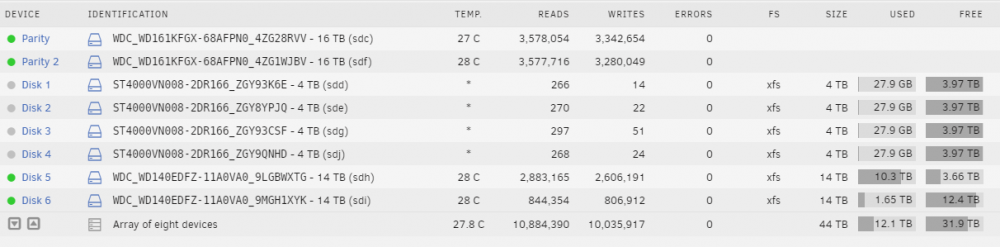
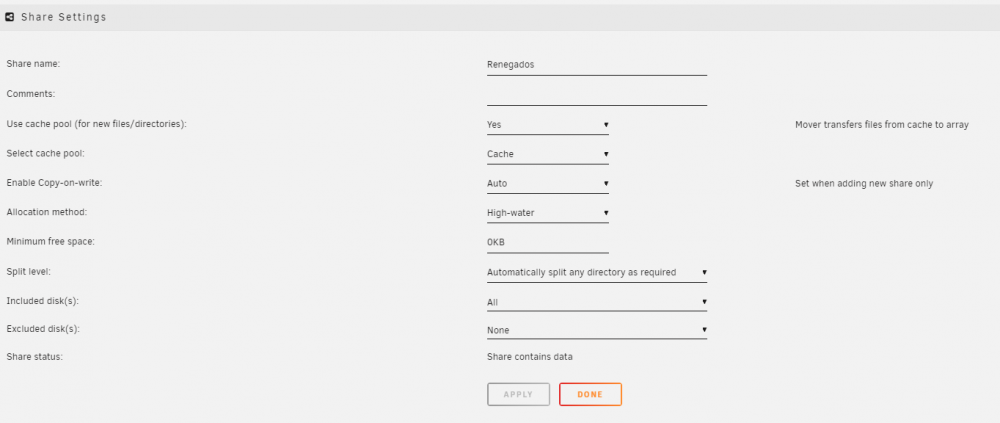
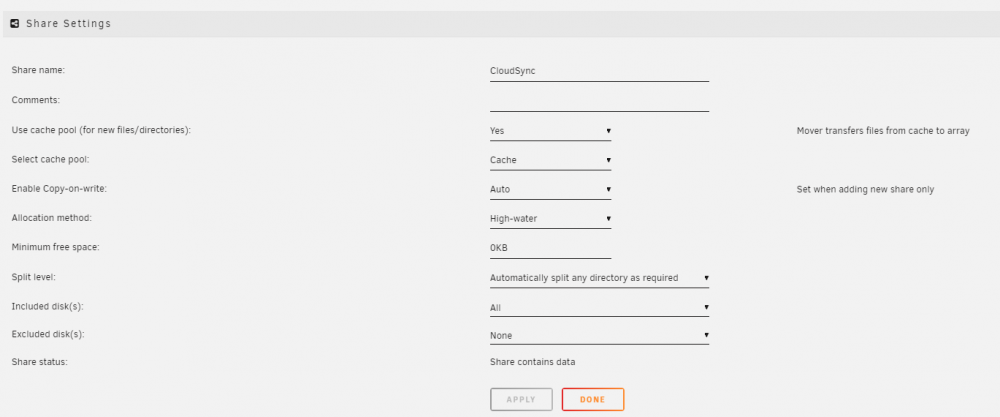
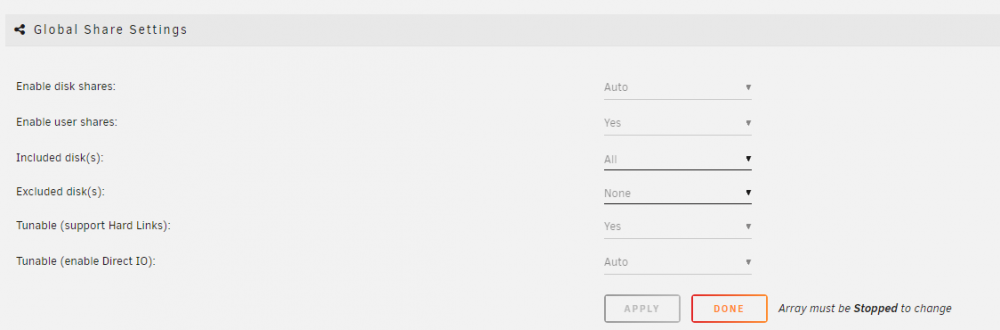
Hi all! I think I understand well the high water allocation method, and I would say that something is not working right on my Unraid setup (version 6.9.2). As have been checking many other threads about it, I will cover the configuration options I saw there. Anyway, I modified nothing from the standard installation. Firstly, my disks. My array has two 14TB drives and four 4TB ones (and two 16TB partidy drives). As I am starting with my server, all data is still being stored in the 14TB ones. As 4TB disks wont be used for a time, I spinned them down. Regarding the shares, I have created only two. One is small, 183GB, and the other is a big one that I am currently filling with rclone sync and right now takes 11.6TB (all has sense looking at the drives). I have been waiting some days monitoring the disk allocation and according to picture above, I would say that the high water mark is not working at all. High water mark should be marked by the half of the biggest drive, which is 7TB. Therefore disk 5 should be left at around 7TB and sync moved to disk 6. This is happening sporadically, as you can see some data has been copied, but anyway most of it is allocated in disk 5. Here what I have checked in my configuration: - Both shares have high-water allocation method, automatically split any directory and all included disks / none excluded (pics below) - In global share settings, also all disks included / none excluded (pic below) - Rclone sync command used has been started and stopped after reaching the high water mark. Same with the server - Files I am downloading are big but just talking in the worst case like 100GB. Therefore the system should not have problems for taking the next file to the other drive. - One issue I don't know if can be relevant. Last time I aborted rclone sync (using user scripts) server continued receiving data. I had to reboot the server for closing the connection. So not sure if the fact that the data is received using user scripts + rclone can be behind the problem. In conclussion, I have no idea why the disk 5 keeps receiving almost all the information coming from the rclone sync command. From my understanding, due to the high water mark, data should be stored few TB ago in disk 6. I have checked all the related configuration and seems to be ok. The only issues that I can imagine: - Can be related with the folder structure of the data. Many folders with many files inside. But in my opinion that should make even easier to split data according to high water mark. - Can be related with the usage of user scripts + rclone, which has even less sense for me. Am I missing something? I know that I can move data by myself using for example unBalance plugin, but you know, would like to understand what is going on here Thanks in advance!
-
Oh ok good, that simplifies a lot the procedure. Many thanks to both for the fast replies
-
Thank you very much! Then I guess that I should add some SMART test to the schedule for completing the parity check.
-
Hi guys, New Unraid user here, coming from TrueNAS. I wanted to get more from my server so moved on recently. After basic setup I am trying to focus on the proper schedule maintenance but still a bit lost. Going to the point, I am trying to understand what Unraid is checking when I receive the "array health report". I know how to schedule but despite checking forum and documentations could not find what is happening. Could you help me? Extending my question, I would like to prepare a good maintenance schedule. As the scrub test is not existing in xfs and it is not clear for me if it is worth to do regular extended SMART test, understanding array health check / report can help me to decide. Thanks in advance!


